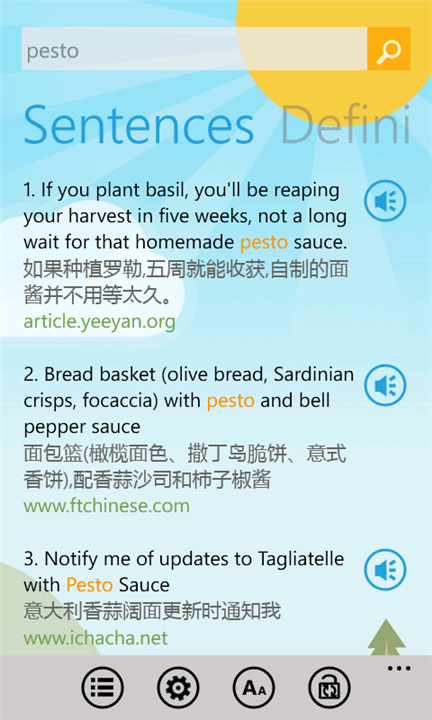
Microsoft has added Bing Dictionary to the Windows Phone Marketplace. This app supports both local and online dictionary look up. It is targeted toward a Chinese speaking audience, but the UI can also be switched to English.
Some of the features include:
• Local/Online dictionary: Local dictionary contains 100,000 most-frequently-used English and Chinese words. Online dictionary provides more words, sentences and voice. • Smart Index: Creative Smart Index matches incomplete words and their inflections. Quick-definition is also provided for convenience. Try to input ”better”?
• Click-to-Lookup: Don’t like keyboard on phone? Try two clicks to start a new search: first click a word in definitions or sentences, then click the search button. • Search Suggestion: uncertain of spelling? Online dictionary provides search candidates of similar spelling or pronunciation to your input. • Machine Translate: online dictionary mode supports machine translation. Input a long sentence to try the latest Microsoft translation engine between Chinese and English. • Themes and Fonts: UI themes, Chinese or English user interface, and different font sizes for comfortable reading experience. • Search history: save your history for recent queries, easily review and traffic-saving.
While the app has only been out for a little over a week, it already boasts a 4.5 star rating. Bing Dictionary can be downloaded from the Windows Phone Marketplace for free right now.
Mint Mobile is now allowing you to get whichever plan you like for either three, six, or 12 months for just $15/mo. If you go for the six-month unlimited service, for instance, you'll now have to pay just $90 upfront instead of $210.
Charlene S. is a former tech news writer at PhoneArena. Her content contribution focused on deep software coverage. She was active between 2011 and 2012, producing a ton of news stories on various topics, as well as going hands-on with the Galaxy Note 2.
COMMENTS (4)
COMMENTS (4)
All comments need to comply with our
Community Guidelines
PhoneArena Community Rules
A discussion is a place, where people can voice their opinion, no matter if it
is positive, neutral or negative. However, when posting, one must stay true to the topic, and not just share some
random thoughts, which are not directly related to the matter.
Things that are NOT allowed:
Off-topic talk - you must stick to the subject of discussion
Offensive, hate speech - if you want to say something, say it politely
Spam/Advertisements - these posts are deleted
Multiple accounts - one person can have only one account
Impersonations and offensive nicknames - these accounts get banned
To help keep our community safe and free from spam, we apply temporary limits to newly created accounts:
New accounts created within the last 24 hours may experience restrictions on how frequently they can
post or comment.
These limits are in place as a precaution and will automatically lift.
Moderation is done by humans. We try to be as objective as possible and moderate with zero bias. If you think a
post should be moderated - please, report it.
Have a question about the rules or why you have been moderated/limited/banned? Please,
contact us.





Things that are NOT allowed:
To help keep our community safe and free from spam, we apply temporary limits to newly created accounts: