It only took 17 years, but WhatsApp may finally back up your chats on its own servers. A new backup system is available to beta testers on Android and iOS right now. So users may soon be free of the former system, which made them use either Google Drive or iCloud storage to back up WhatsApp chats.
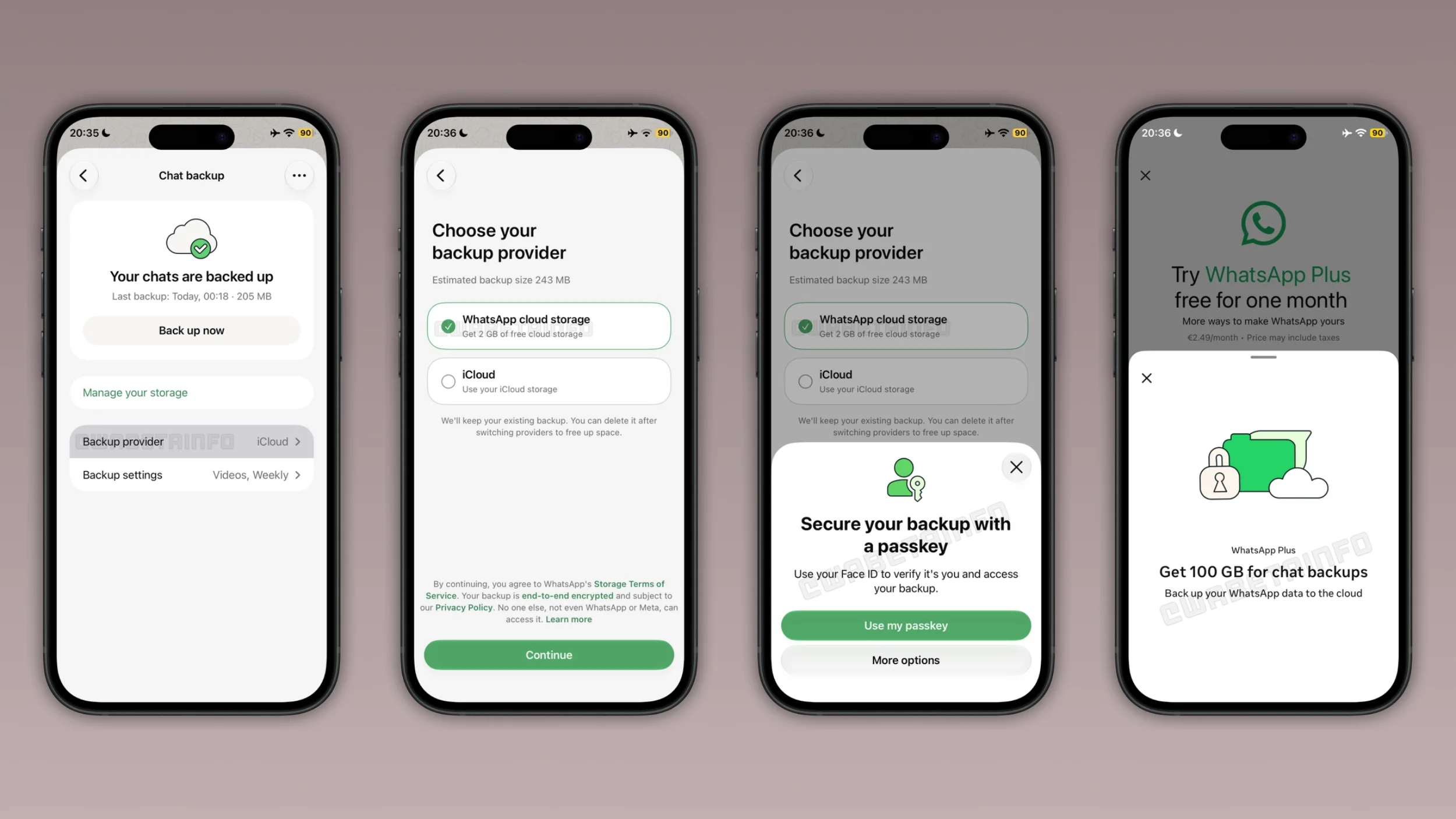
2GB of free WhatsApp cloud storage
The upcoming WhatsApp interface. | Image by WABetainfo
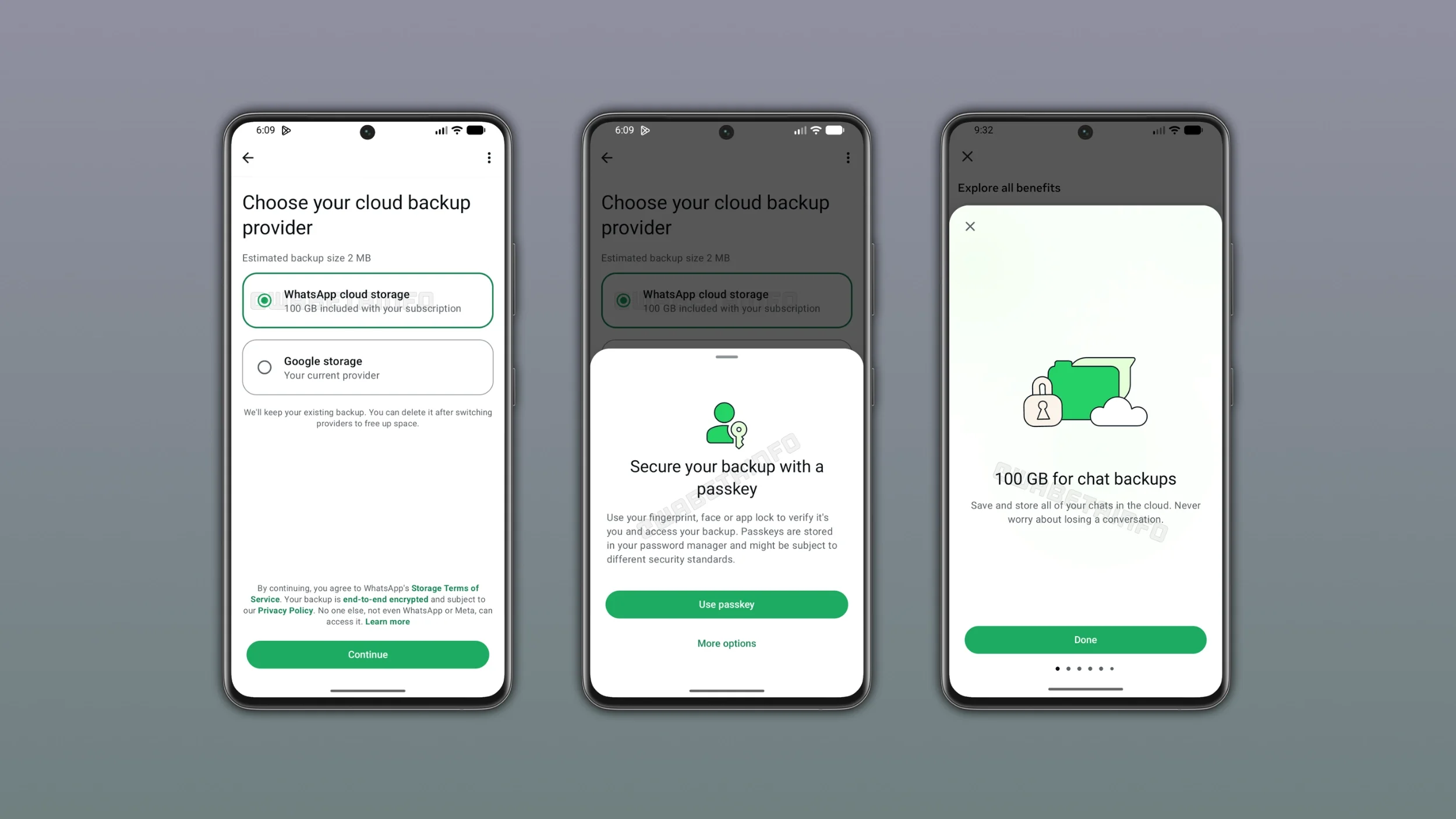
At the time of writing, WhatsApp’s beta program is full, but testers have shared screenshots of the new backup interface on iOS and Android.
The app now has a “WhatsApp cloud storage” option when you select the cloud provider. By default, it gives users 2GB of free storage. For those who need extra storage, the WhatsApp Plus subscription comes with 100GB of cloud storage and costs $2.99/month.
Extra storage with WhatsApp Plus monthly subscription. | Image by WABetainfo
After selecting that option, you just encrypt your backup with a passkey, and that’s it. WhatsApp will autosave the chat history based on chosen settings. Naturally, when restoring these backups, you will be able to recover your chats without logging into a Google or iCloud account.
Poll
1 Votes
How do you want WhatsApp to handle chat history?
WhatsApp is built different
Messenger, Discord, Instagram, Telegram, and other major chat platforms sync and store user chats on their servers, so you never have to worry about losing your chat history or media. And while WhatsApp can now store chat history, it still doesn’t sync it like those apps do. I’ll explain.
WhatsApp was originally built to use the phone’s local storage, and iCloud was added years later as an add-on. Soon after, Meta (then called Facebook) acquired WhatsApp and added a Google Drive option. This backup system has two big problems:
Recommended For You
The fact that it's called a "backup." Other mainstream apps don’t have chat backups or recovery because your chats are synced live on all connected devices at all times.
Juggling the backup data back and forth between local and cloud storage makes this process extremely finicky. That’s why chat history just seems to vanish for people every so often.
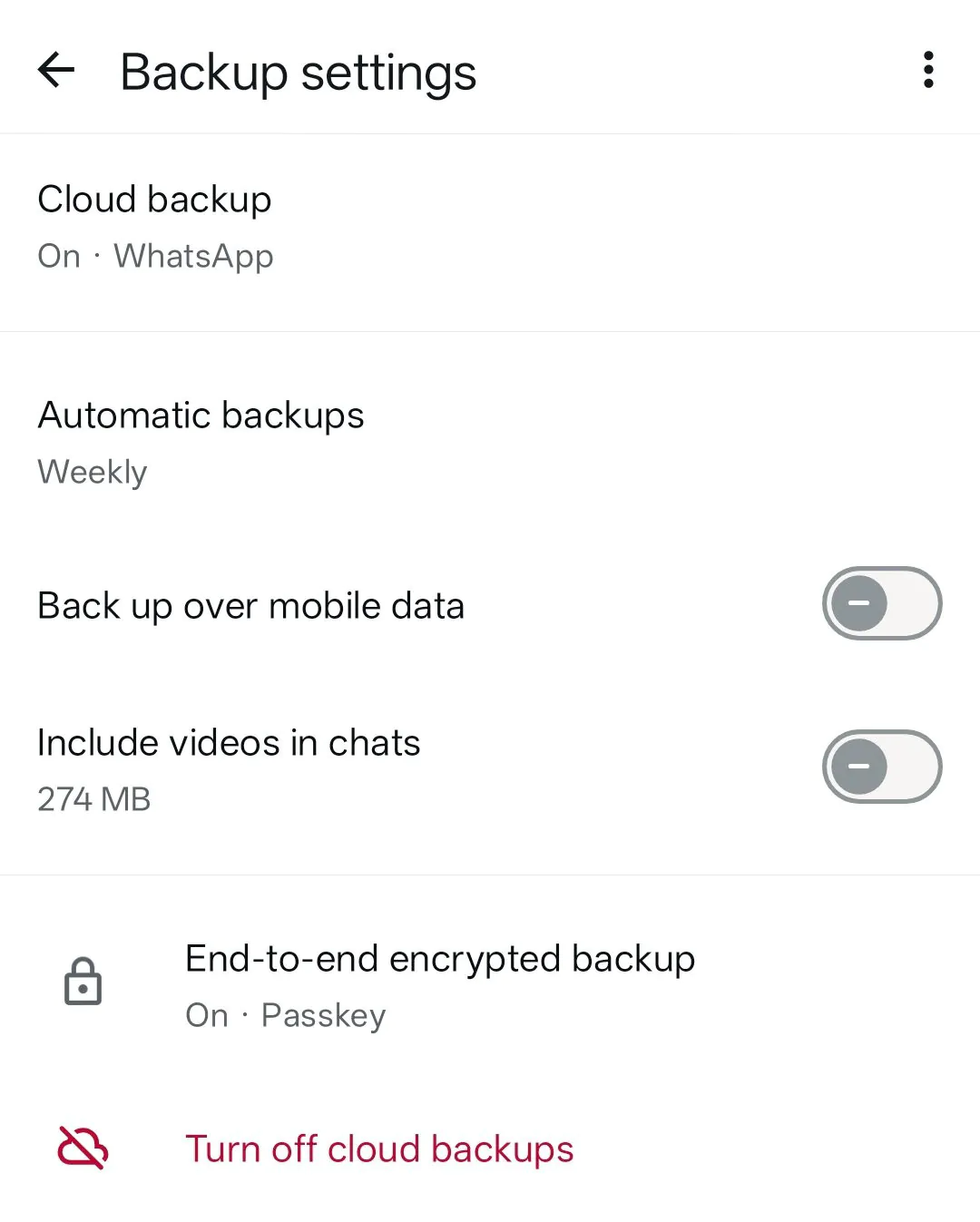
Now let’s go back to the syncing issue. You may have noticed that this new WhatsApp cloud feature still relies on routinely scheduled backups, just like it did with Drive or iCloud, so the underlying system is not live synced. WhatsApp still doesn’t work like those other messaging apps.
WhatsApp cloud backup settings. | Image by AndroidAuthority
I’ve been using WhatsApp my whole life because that’s what everyone else uses, and I’ve lost several chat backups over the years. WhatsApp has 3 billion active users worldwide, so you can extrapolate the scale of the problem from there.
If WhatsApp had a local backup option, I would’ve been spared the trouble. While there is a way to dig into the phone's file system and copy the files manually, it may not work on all phones, and it requires technical finesse. The app should have an easy option to back up all the chats locally. Other WhatsApp users agree.
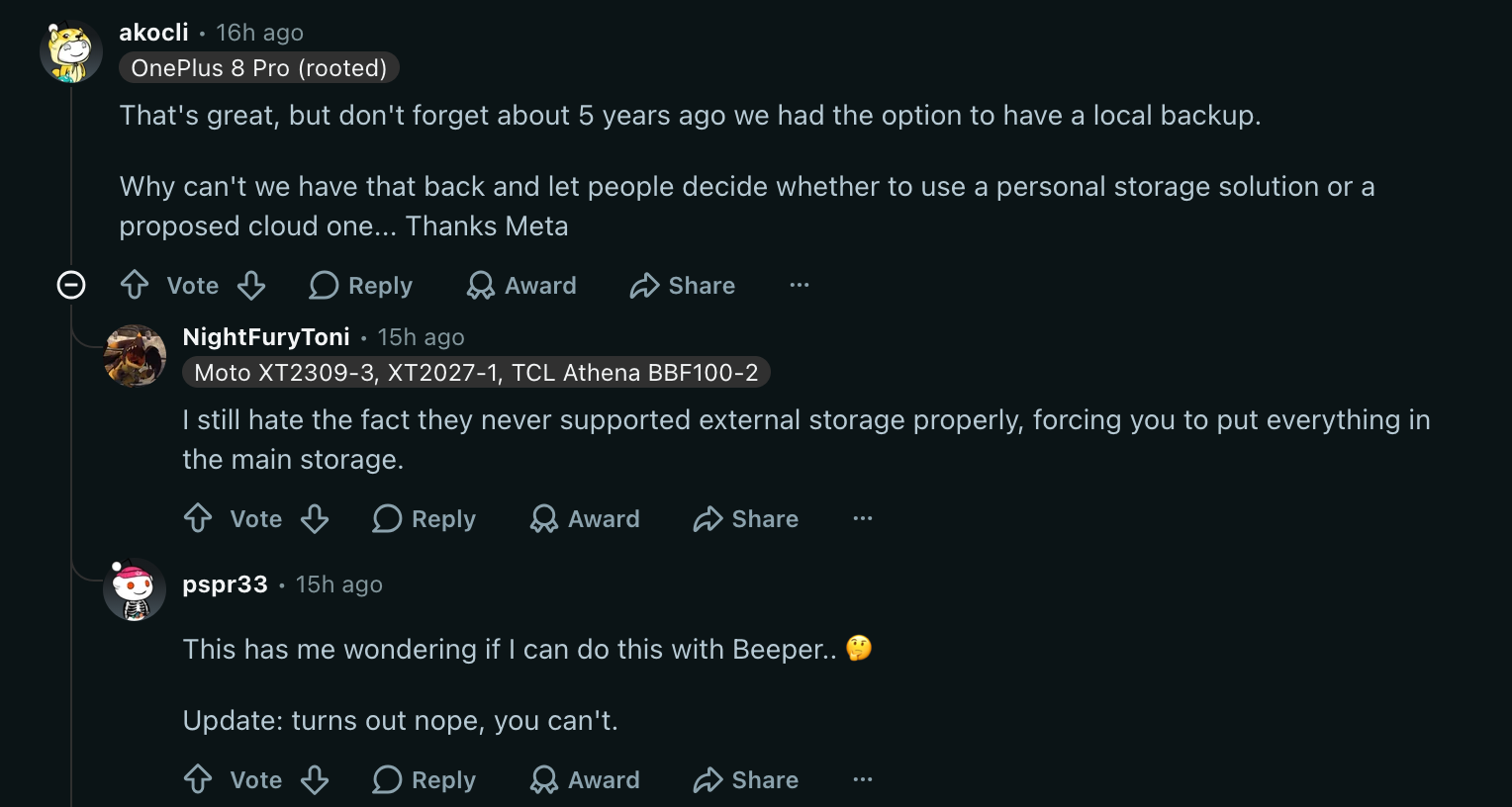
WhatsApp users discussing local backups. | Image by Reddit
Backing up and restoring WhatsApp chats between iOS and Android has been a logistical nightmare for users. And it seems to remain so with this upcoming update.
Even if you were to select the “WhatsApp cloud storage” option on Android, you may not be able to restore those chats on iOS, or vice versa. For now, you will have to use the QR-based system, which requires both phones to be next to each other, so it can transfer the backups over local Wi-Fi.
Meta is rolling out this updated backup system only to select devices. So whether you have the latest iPhone Duo or last year's Galaxy A56, you can't get this update unless Meta sends it to your phone specifically (assuming it's already enrolled in the beta program). Based on WhatsApp’s usual release history, it could be a few weeks before we start seeing these features in the wild.
Faisal Rasool has been writing about mobile tech for the past ten years. His favorite cousin used to be a mobile technician and, as a kid, Faisal learned how to repair and tweak phones in his workshop. Faisal's first phone was the Samsung Galaxy Europa (released 2010). More Android smartphones followed it, including the Samsung Galaxy S4, the Galaxy S6, Huawei P8, and currently the Galaxy A56.
He's a life-long Android guy because he loves other open-source platforms. He's been covering such platforms for websites like How-To Geek, Android Headlines, Android Police, SlashGear, and now PhoneArena.
Faisal has a bachelor's in English literature and he likes to write stories and paint in his free time.
A discussion is a place, where people can voice their opinion, no matter if it
is positive, neutral or negative. However, when posting, one must stay true to the topic, and not just share some
random thoughts, which are not directly related to the matter.
Things that are NOT allowed:
Off-topic talk - you must stick to the subject of discussion
Offensive, hate speech - if you want to say something, say it politely
Spam/Advertisements - these posts are deleted
Multiple accounts - one person can have only one account
Impersonations and offensive nicknames - these accounts get banned
To help keep our community safe and free from spam, we apply temporary limits to newly created accounts:
New accounts created within the last 24 hours may experience restrictions on how frequently they can
post or comment.
These limits are in place as a precaution and will automatically lift.
Moderation is done by humans. We try to be as objective as possible and moderate with zero bias. If you think a
post should be moderated - please, report it.
Have a question about the rules or why you have been moderated/limited/banned? Please,
contact us.









Things that are NOT allowed:
To help keep our community safe and free from spam, we apply temporary limits to newly created accounts: