
The latest SmartThings update adds some nifty features and a One UI-inspired redesign
Samsung has a refreshed SmartThings app with some nice new features.
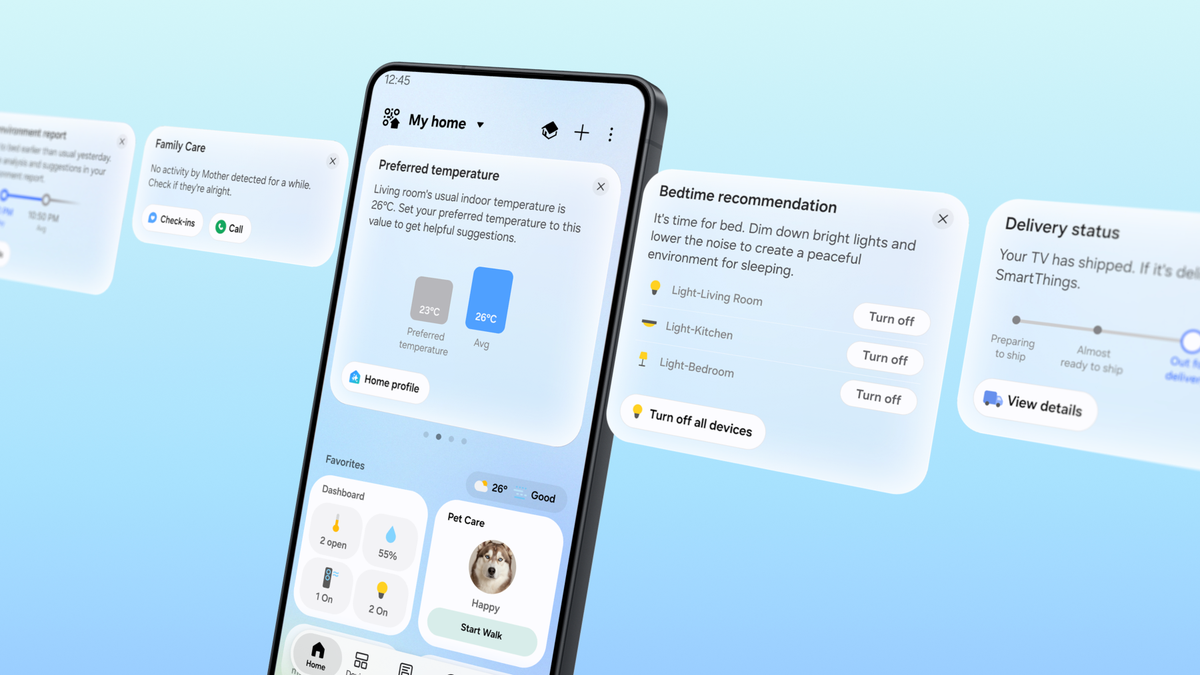
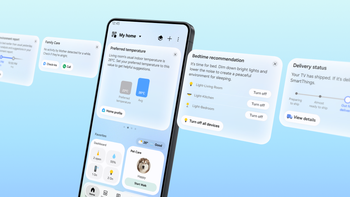
The new SmartThings app. | Image by Samsung
Samsung has been hard at work with a refresh for the SmartThings app, which is at the core of its smart home platform. Shortly after launching its new design, the company has today announced some new features that would make it even easier to use.
The highlight new feature is called SmartThings Now, which appears as cards at the top of the refreshed Home tab in the SmartThings app. These cards display important information and actionable items based on the user’s current situation, like its location and the usage history and patterns.
For example, the card could recommend you to change the order of the cards on the Home tab when seasons change and you don’t need your AC that much anymore. In another example, if an older family member who’s using the Family Care feature doesn’t show device activity for an extended period, SmartThings Now will recommend you to check in or call them.
In a more obvious example, SmartThings Now will suggest you to turn on lights and air purifiers when you get near your home. However, once you take this action, you’ll get a recommendation to create a new routine. The idea is to make the experience more natural and use the context from the user’s actions and choices to help them discover and use new features.
All this comes alongside an update to the Home tab, which now offers a more streamlined view with a more space-efficient service cards design, and a new Floating Bar that improves one-handed use on larger phones. This is in line with the overall One UI design.
Probably the nicest purely practical update is that SmartThings now supports local controls. This allows users to control devices connected to the same Wi-Fi network even when there’s no internet connectivity. This also improves response times by about 30% compared to cloud-based control.
The switch between local and cloud-based remote control is done automatically by SmartThings, and it’s based on whether the mobile device is at home or away. There’s also a new Offline Device Diagnostics tool, which makes updating new network information across registered devices faster and easier.
Finally, the update also adds support for Matter 1.6. This is the latest version of the protocol, which comes with enhanced security between devices. There’s also support for four new device categories:
Samsung has already launched the new SmartThings interface for both its Android and iOS apps.
The new Home tab experience and SmartThings Now are also available on devices like Samsung Smart TVs, Family Hub refrigerators, Windows devices, and Samsung appliances with 7-inch or 9-inch displays with SmartThings support.
I’ve been using several Samsung appliances, but I never liked using the SmartThings app all that much because it often felt clunky. This update definitely made the whole interface cleaner and easier to get around. My favorite part is that the information I’m looking for most often is now surfaced on top of the starting screen, so I don’t need to browse around for it.
Samsung is rethinking the SmartThings app Home tab
The highlight new feature is called SmartThings Now, which appears as cards at the top of the refreshed Home tab in the SmartThings app. These cards display important information and actionable items based on the user’s current situation, like its location and the usage history and patterns.
For example, the card could recommend you to change the order of the cards on the Home tab when seasons change and you don’t need your AC that much anymore. In another example, if an older family member who’s using the Family Care feature doesn’t show device activity for an extended period, SmartThings Now will recommend you to check in or call them.
This update marks another step in SmartThings’ ongoing efforts to move beyond a home experience where users search for and launch features.
Jaeyeon Jung, Executive Vice President and Head of the SmartThings Team, AI Platform Center, Samsung Electronics, October 2026
How many smart home devices do you use?
1 Votes
SmartThings now has enhanced local controls support
The SmartThings app got a nice refresh. | Video by Samsung
Probably the nicest purely practical update is that SmartThings now supports local controls. This allows users to control devices connected to the same Wi-Fi network even when there’s no internet connectivity. This also improves response times by about 30% compared to cloud-based control.
Finally, the update also adds support for Matter 1.6. This is the latest version of the protocol, which comes with enhanced security between devices. There’s also support for four new device categories:
- Energy Meters for real-time power monitoring
- Closures for specialized door and gate types
- Irrigation devices such as sprinkler systems
- Soil Sensors for measuring ground conditions.
The updated SmartThings app is already available
Samsung has already launched the new SmartThings interface for both its Android and iOS apps.
A truly nice refresh
I’ve been using several Samsung appliances, but I never liked using the SmartThings app all that much because it often felt clunky. This update definitely made the whole interface cleaner and easier to get around. My favorite part is that the information I’m looking for most often is now surfaced on top of the starting screen, so I don’t need to browse around for it.


Popular stories



Latest News

Things that are NOT allowed:
To help keep our community safe and free from spam, we apply temporary limits to newly created accounts: