
Editorials · Reviewer Insight
Samsung ruined One UI 9 for me with this absurd change
I love One UI 9, except for this absurd Samsung design change.

This article may contain personal views and opinion from the author.
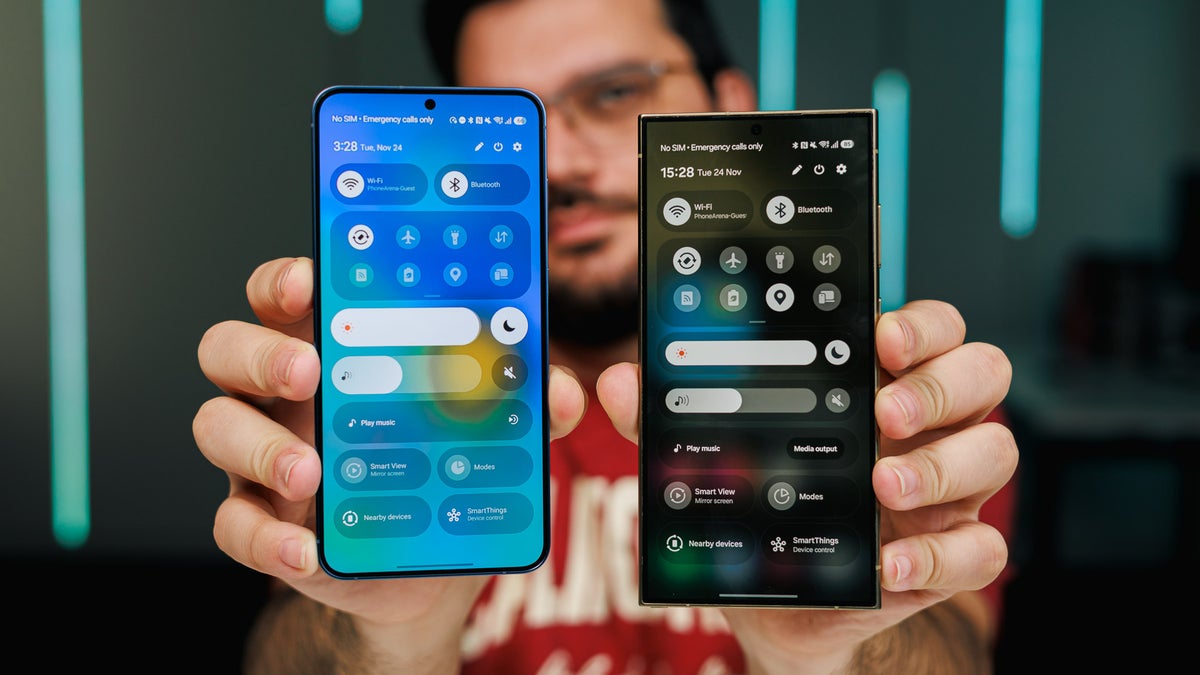
Was it that hard to offer users a choice in this particular case? | Image by PhoneArena
I have to admit that among all Android skins that aren't the vanilla Pixel flavor, Samsung's One UI is my favorite one.
The reasons for that are quite simple: One UI is smooth, polished, and most importantly, easily the most customizable Android interface that you can truly make yours. At the same time, One UI is also probably the last major Android interface that still maintains a certain unique style and is not yet another copy of iOS, like the majority of Android skins these days.
Gone are the days of laggy TouchWiz that was featured on every Samsung phone once upon a time, and One UI really is something else these days. If I could, I'd opt to have One UI on any Android phone that I might ever use. Just imagine Oppo or Vivo hardware combined with Samsung's customizable interface—proper flagship bliss.
That said, no matter how much I like One UI, it's not software that's immune to criticism. In fact, one of the major changes that the One UI 9 update brought to every Galaxy phone is a massive step in the wrong direction, both aesthetically and usability-wise.
Samsung, what are these enormous volume and brightness sliders?
While One UI 9 expanded the customizability of the quick settings panel (which is more than a welcome addition to it nonetheless!), one of the major changes is those fat, meaty sliders that Samsung introduced instead of the much sleeker and more appealing ones used previously.
And I have to be honest—I don't like these one bit!
They take up too much space, don't necessarily improve the user experience, and honestly feel like I've enabled some elder mode on my phone. The new sliders are easily twice as thick, which honestly makes them look absurd to me!
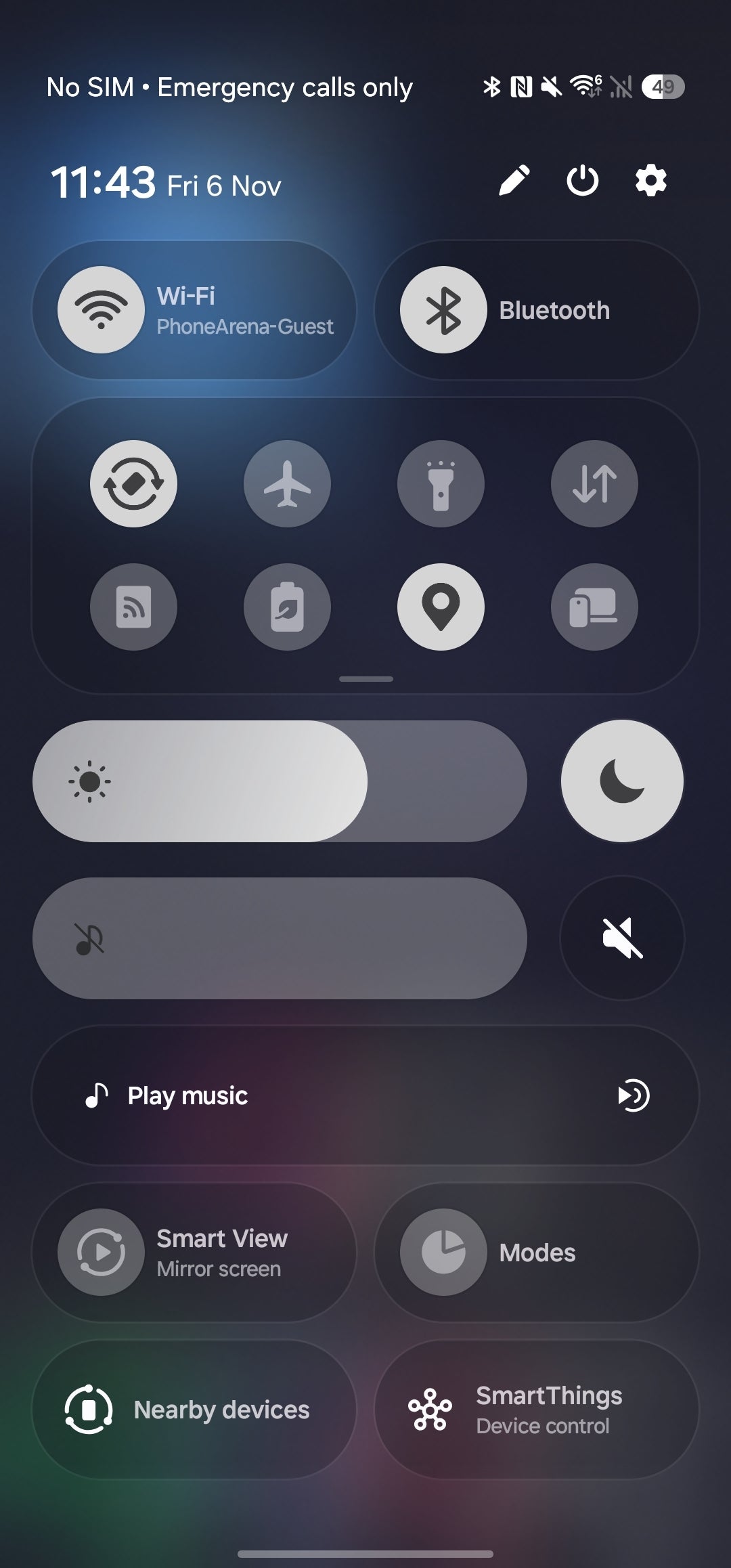
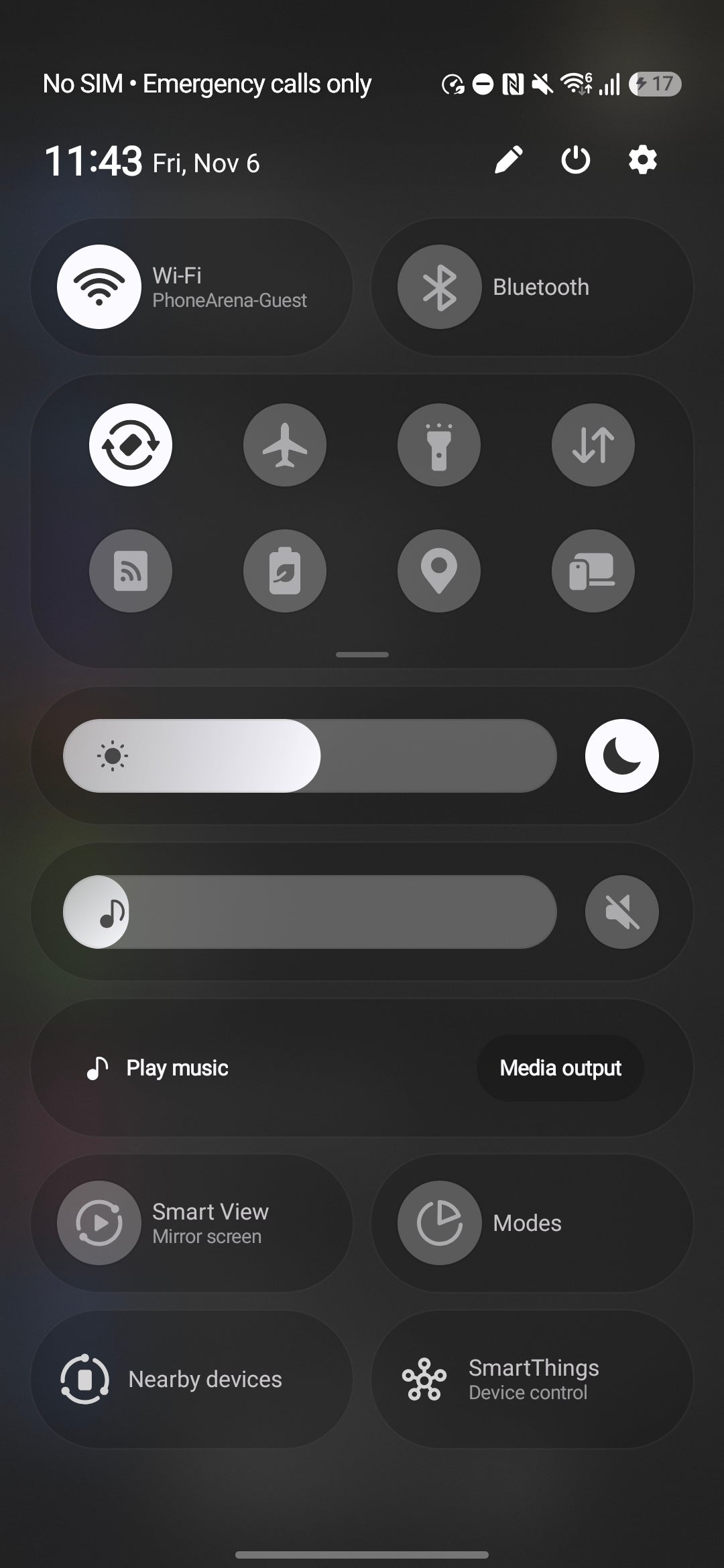
One UI 9 vs One UI 8.5 slider thickness. | Images by PhoneArena
I know what you're thinking. "If One UI is so customizable, then surely Samsung has baked in an option in one of its Good Lock modules to reduce the size and choose your preferred thickness?"
Well, sadly, you can't do that.
You can flip their orientation from horizontal to vertical, though. You can also put a background picture of a cute anime girl or make them lime green if you're into that, but changing the slider thickness is a major no-no, it seems.
Other than that, the sliders are stuck in their new thickness. I've searched through all the relevant Good Lock modules and scoured all the respective subreddits, but the reality is that Samsung wouldn't allow you to change those sliders.
Samsung doesn't seem to understand why we love One UI so much
See, this is the kind of minor change that always irritates me so much. I know it's a minor pet peeve, and it's just a cosmetic change that most people might not even have noticed, but I'm vexed beyond belief.
Samsung was welcome to introduce thicker volume and brightness sliders in One UI 9, but in all honesty, power users should have also been given the option to revert that change from within a respective Good Lock module. In its current implementation, this change feels forced and unwelcome on any of my Samsung devices.
And this shows a general misunderstanding of why powerusers and customization geeks prefer One UI over any other Android interface. Samsung achieved a personalization heaven for those people, yet a simple change like this one shows it doesn't really understand the real value of its interface and why it has attracted a specific breed of a user.
I will surely adapt to the new looks of my control center, but the point here is that I objectively shouldn't have to. Or better said, I shouldn't have been forced to do that. We should have been given the option to freely change the thickness of these two essential sliders and customize them to our heart's content.
I do hope Samsung addresses that in a future software update, hopefully One UI 9.5 in early 2027.
If you're as annoyed as me, make some noise and make those feelings heard.

Popular stories





Latest News


Things that are NOT allowed:
To help keep our community safe and free from spam, we apply temporary limits to newly created accounts: