Google testing iPhone feature to add to Pixel smartphones
Google might soon expand on a current Pixel capability matching the iOS version of it.
Pixel handsets could get feature already on iPhone | Image by PhoneArena
Pixel handsets could soon get a Photo Shuffle feature that is similar to the iOS Photo Shuffle feature for iPhone users. This allows you to create an album consisting of images of your favorite people and pets that become the wallpaper on your phone. The album can shuffle to a new image, changing the wallpaper, every hour, every day, at sunrise and again at sunset, or with a tap.
Android 17 QPR1 beta 5 reveals code indicating a Photo Shuffle feature is coming to Pixel handsets
Android Authority recently discovered some clues in the latest Android 17 QPR1 beta 5 release that Google is indeed testing this for Pixel handsets. Users will be able to use an album that has already been compiled or create a new one. Currently, Pixel owners who have wanted such a feature have had to let their fingers do the walking to the Google Play Store and install a battery-draining third-party app.
Pixel users can currently have their wallpaper automatically changed daily
Pixel users can currently arrange to have their wallpaper automatically changed. However, the photos that are being used and the amount of time between shuffles cannot be controlled by the device owner. To use the current version of the wallpaper photo shuffle, from your Pixel go to Settings > Wallpaper & style > More wallpapers and tap on a Collection.
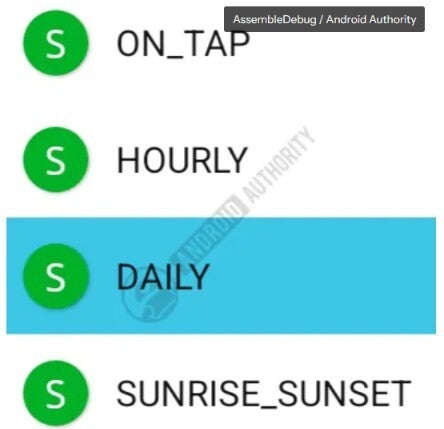
Pixel users will be able to determine how often the wallpaper changes on their phone. | Image by Android Authority
After deciding on the Collection images you want to use, you'll press that strange-looking icon in the top right corner. A pop-up box with the heading "Wallpaper will change automatically every day" will appear with a box to check if you want future wallpapers to be downloaded only when you're running on a Wi-Fi connection.
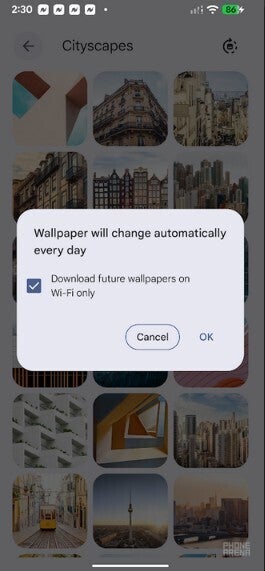
Pixel users can currently have the wallpaper changed daily using a Collection of images. | Image by PhoneArena
Apple iPhone users can set up the wallpaper shuffle on their phones by going to Settings > Wallpaper > Add New Wallpaper and click the photo shuffle button at the top of the screen. That takes you to a page where you can choose from Pets, Nature, Cities, or a particular Album you've created. You can select to have the images shuffled On Tap, On Lock, Hourly, or Daily.
While I typically favor the Android UI over iOS, I will say that the implementation of this feature by Apple is simple and well done. If Google is going to copy Apple, as seems to be the case here, let's hope that it keeps the same simple setup for Pixel users.
The wallpaper I use on my Pixel and my iPhone
I can't say that I've ever used this feature on any phone I've owned, including my current Pixel 6 Pro and iPhone 15 Pro Max. I can say that I might give this a shot on my Pixel where I favor the use of Cityscapes as my wallpaper.
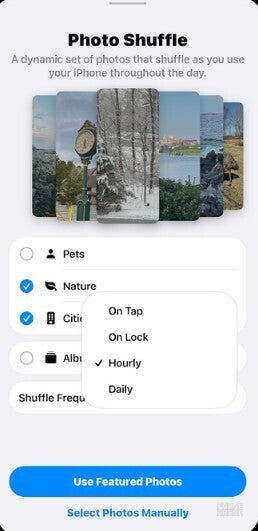
Photo Shuffle for iOS is extremely easy to set up.| Image by PhoneArena
On my iPhone, the wallpaper I use is the one with the clownfish swimming because of nostalgic reasons. Released with iOS 16 in 2022, this is the same wallpaper that was on the iPhone when the late Steve Jobs unveiled the device to a mesmerized crowd on January 9, 2007. Apple also used it on some early iPhone ads, but ironically, it never released the wallpaper for the handset until fifteen years later.
Choosing your phone's wallpaper is a task that is more personal than you might think
Even though wallpaper is not the most important part of a phone, one could argue that it is the most personal, especially if you use images that you've snapped yourself. Even if you limit yourself to the stock photos supplied by the company that manufactured your phone, the wallpaper you use is still a personal choice and to some degree, it does reveal a little of your personality.
If I recall correctly, the actual wallpaper on the first iPhone was an image of the Earth from space. The image, known as "Blue Marble," was a composite made up from months of satellie data collected by NASA.


Popular stories



Latest News




![Another batch of Galaxy S26 series users in the US are getting a nice surprise today [UPDATED]](https://m-cdn.phonearena.com/images/article/183643-wide-two_350/Another-batch-of-Galaxy-S26-series-users-in-the-US-are-getting-a-nice-surprise-today-UPDATED.webp)
Things that are NOT allowed:
To help keep our community safe and free from spam, we apply temporary limits to newly created accounts: