Early glimpses of Android 13 are now starting to appear even more, despite it being too early for any concrete information to show up. However, leaks are detailing what we could expect from what seems to be a quality-of-life update rather than a complete revamped look (as was the Android 12) of the operating system. Now, XDA-Developers reports about a new leak that shows four new styles for dynamic themes for Android 13, as well as gives us a look at the notifications permissions.
Android 13 dynamic themes: four new styles leaked
One of the most advertised and quite cool features that Android 12 brought was dynamic themes: a feature that adjusts colors in the OS based on your wallpaper and the colors in it. Now, with this new leak, we get to see some new styles from Android 13's palette.
The feature for dynamic themes is codenamed "monet", and with Android 13, we see that the wallpaper-based theming of the user interface gets even more dynamic. Here, we can see the four styles we are talking about:
These four new styles are codenamed TONAL_SPOT, VIBRANT, EXPRESSIVE, and SPRITZ. Of course, these four styles will again use your wallpaper in order to generate colors for the UI.
Here's a breakdown of what these four styles are expected to represent:
TONAL_SPOT: The default Material You dynamic theme
VIBRANT: Quite self-explanatory, this one offers more colorful secondary and background colors
EXPRESSIVE: This adds even some colors that are not present in the background alongside the extracted colors
SPIRITZ: This one delivers a more muted look
Currently, Android 12 on Pixel phones has four dynamic theme styles, and all of them are generated by changing the seed color or main hue. The new additions that might make it to Android 13 will offer even more customization and of course, colorfulness, to your device.
Recommended For You
Android 13 notifications permission box
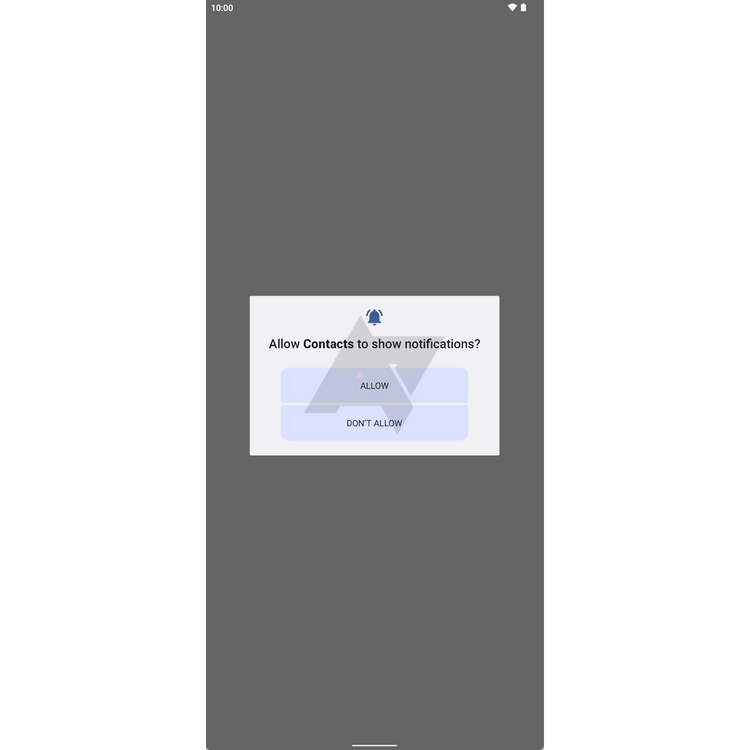
On top of the new four styles for dynamic theming in Android 13, we get to see also how the box for notifications permission might look like in the new OS. Some of you may know, but notifications are going to become an opt-in thing with Android 13, and won't be on by default for everything, clogging your notifications shade.
Thanks to this quality-of-life update, you will be able to choose whether you want the app to send you a notification or not, just like you give permissions to apps to use your camera, location, etc. The screenshot below shows us how this dialogue could look like in Android 13, having two options: Allow and Don't.
Check out some other Android 13 rumored or leaked features you might have missed
Recently, we reported on a few other leaks giving us glimpses about Android 13.
First off, Android 13 will reportedly make QR scanning a more seamless and unified experience. As you may know, so far different phone makers have had their own way of implementing QR scanning, and of course, there is Google Lens, but with Android 13, Google is looking to include a QR scanner directly from your lock screen.
Additionally, you may also get a shortcut for the QR scanner in your notification shade. This will for sure make scanning for QR codes even more quick and easy on Android devices.
Another quite useful feature that's most likely going to come to Android 13 is a change in how the audio output window looks. This menu is the one that allows you to choose which headset or speakers you want to play your music through and its volume, and it will be getting a fresh coat of color for a more consistent look.
Six-month unlimited plan is now 57% off
$90
$210
$120 off (57%)
Mint Mobile is now allowing you to get whichever plan you like for either three, six, or 12 months for just $15/mo. If you go for the six-month unlimited service, for instance, you'll now have to pay just $90 upfront instead of $210.
Iskra Petrova is a news writer at PhoneArena, where she covers mobile tech news and maintains the site’s device hubs with the latest leaked specs, rumors, and official details for upcoming phones. She joined PhoneArena in 2020 after three years in technical support for Microsoft Exchange, giving her practical experience with software infrastructure and troubleshooting. Iskra holds a Master’s Degree in Literature, which helps her translate complex tech details into clear, reader-friendly coverage. She is a daily Apple ecosystem user, while also closely following Sony Xperia’s camera-focused phones and Samsung’s Galaxy Z Flip series.
A discussion is a place, where people can voice their opinion, no matter if it
is positive, neutral or negative. However, when posting, one must stay true to the topic, and not just share some
random thoughts, which are not directly related to the matter.
Things that are NOT allowed:
Off-topic talk - you must stick to the subject of discussion
Offensive, hate speech - if you want to say something, say it politely
Spam/Advertisements - these posts are deleted
Multiple accounts - one person can have only one account
Impersonations and offensive nicknames - these accounts get banned
To help keep our community safe and free from spam, we apply temporary limits to newly created accounts:
New accounts created within the last 24 hours may experience restrictions on how frequently they can
post or comment.
These limits are in place as a precaution and will automatically lift.
Moderation is done by humans. We try to be as objective as possible and moderate with zero bias. If you think a
post should be moderated - please, report it.
Have a question about the rules or why you have been moderated/limited/banned? Please,
contact us.








Things that are NOT allowed:
To help keep our community safe and free from spam, we apply temporary limits to newly created accounts: