SwiftKey beta makes cut, copy & paste a breeze with the new Clipboard feature

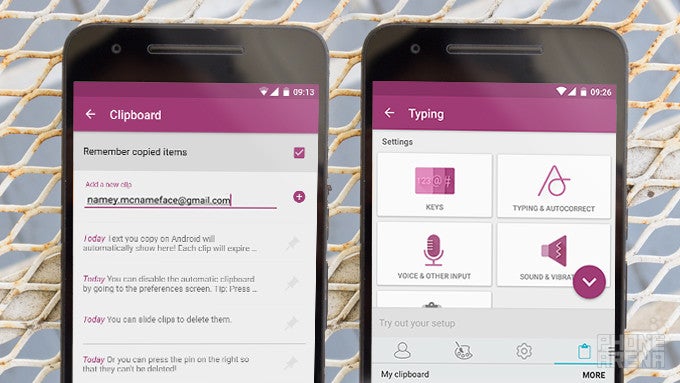
Microsoft yesterday updated the SwiftKey beta app for Android, adding a very useful and highly demanded from the community feature – a clipboard panel. The new feature is conveniently tucked a swipe away from the keyboard – in the options hub – and offers some much welcomed additions.
Clipboard keeps tabs on whatever text you've copied or cut within the last hour and presents it in list form. Important entries can be pinned and saved for later and you can add your own custom snippets such as emails, numbers and addresses. Whenever you want to paste something, you can just swipe from the left on predictions row to get to the new Clipboard hub where you can simply tap on an entry to paste it.
If you want to try out the new feature, you can download the standalone SwiftKey beta app on the Play Store.
via: MSPoweruser
Clipboard keeps tabs on whatever text you've copied or cut within the last hour and presents it in list form. Important entries can be pinned and saved for later and you can add your own custom snippets such as emails, numbers and addresses. Whenever you want to paste something, you can just swipe from the left on predictions row to get to the new Clipboard hub where you can simply tap on an entry to paste it.
via: MSPoweruser

Popular stories





Latest News






Things that are NOT allowed:
To help keep our community safe and free from spam, we apply temporary limits to newly created accounts: