Nokia Lumia 930 Review
Introduction
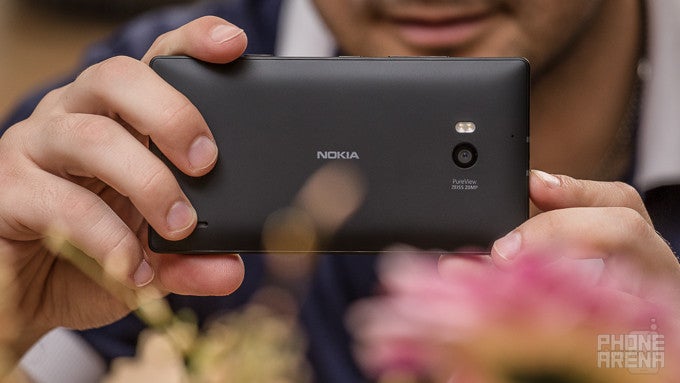
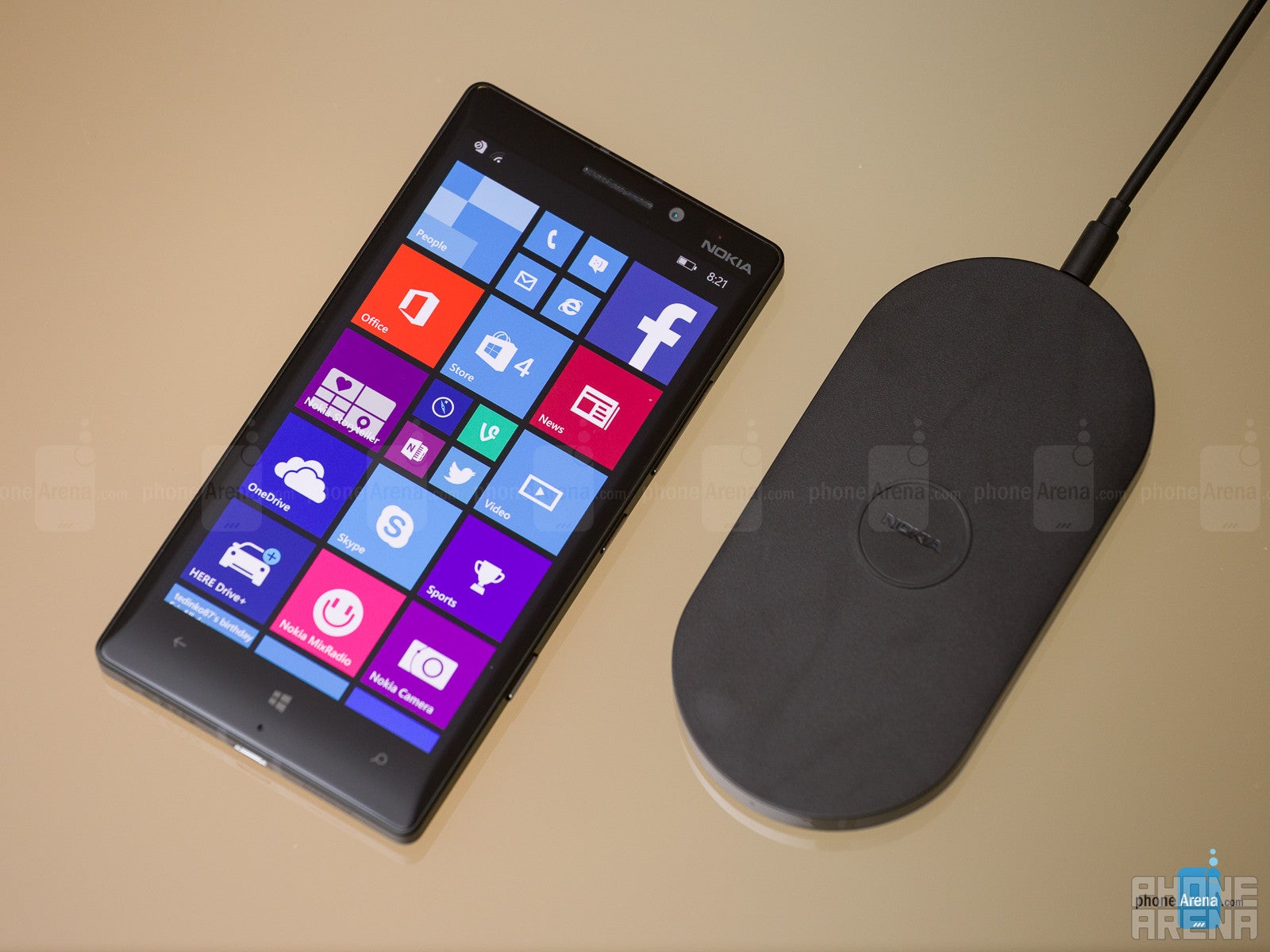
The Lumia 930 is the international version of Verizon's exclusive Lumia Icon flagship, and is arguably the swan song of the Nokia that were, as it has been conceived before Microsoft gobbled up its entire smartphone business. Nevertheless, it is Windows Phone's attempt to hold the flagship fort against Android juggernauts like the Galaxy S5 or the Xperia Z2. At first brush it has everything needed to take them head-on, like a large 1080p display, quad-core Snapdragon processor, 2 GB of RAM, 32 GB of internal memory, a 20 MP main camera, and exclusive Dolby surround audio recording. How about when we dive into the details? Let's see...
- In-ear stereo headphones
- Nokia AC-60 wall charger
- Nokia Charging and Data Cable CA-190CD
- Warranty and information leaflets
Design
With its chunky, but comfortable to grasp chassis, the Lumia 930 is one solid piece of unibody craftsmanship.
Compared to the Lumia 1020 and its giant 41 MP camera hump on the back, Nokia Lumia 930 is definitely smaller. However, at 5.39 x 2.80 x 0.39 inches (137 x 71 x 9.8 mm) and weighing 5.89 oz (167 g), it is still bulky and heavy for a 5-incher. The heavy unibody chassis feel very solid, though, and this feeling is further reinforced by the aluminum rim surrounding the sides, which gives the colorful polycarbonate pillow-shaped shells of the Lumia 930 a more premium look. We also liked how the tapered cover glass slopes towards the sides to merge with the metal rim for one uninterrupted look and feel. Nokia bragged that it takes hundreds of robotic movements to achieve the curved glass edges, and we have to say that the results of all that scrubbing are very pleasant to hold or simply look at.

5.39 x 2.8 x 0.39 inches
137 x 71 x 9.8 mm
5.89 oz (167 g)

5.59 x 2.85 x 0.32 inches
142 x 72.5 x 8.1 mm
5.11 oz (145 g)

5.78 x 2.89 x 0.32 inches
146.8 x 73.3 x 8.2 mm
5.75 oz (163 g)

5.13 x 2.81 x 0.41 inches
130.4 x 71.4 x 10.4 mm
5.57 oz (158 g)

5.39 x 2.8 x 0.39 inches
137 x 71 x 9.8 mm
5.89 oz (167 g)

5.59 x 2.85 x 0.32 inches
142 x 72.5 x 8.1 mm
5.11 oz (145 g)

5.78 x 2.89 x 0.32 inches
146.8 x 73.3 x 8.2 mm
5.75 oz (163 g)

5.13 x 2.81 x 0.41 inches
130.4 x 71.4 x 10.4 mm
5.57 oz (158 g)
Compare these and other phones using our Size Comparison tool.
Display
True to its traditions, Nokia supplied a display with excellent outdoor visibility, and then threw in manual color mode adjustments for a good measure.
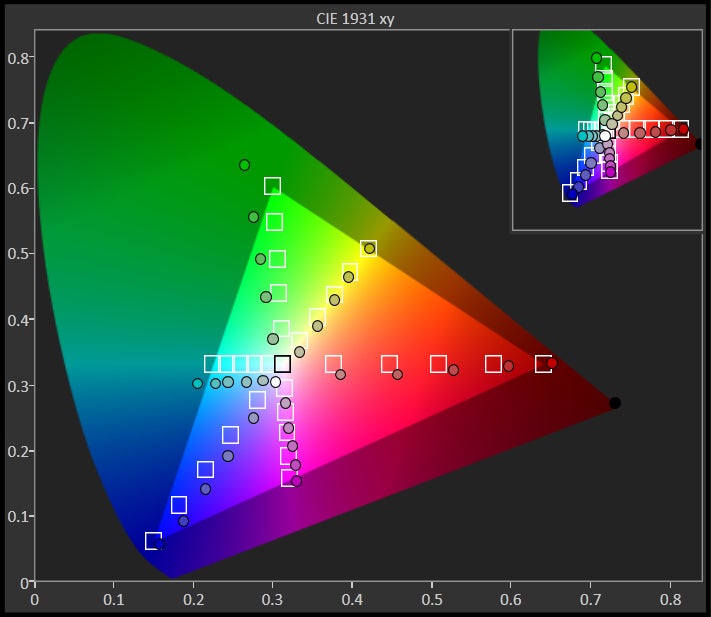
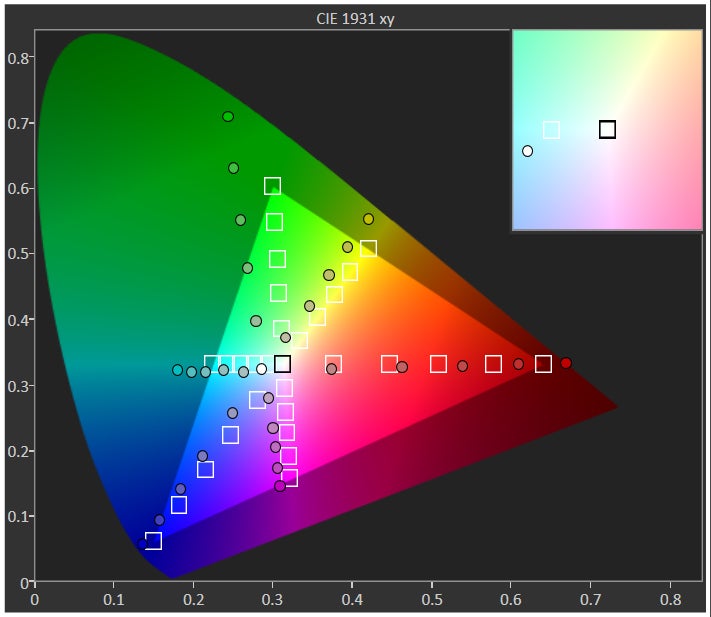
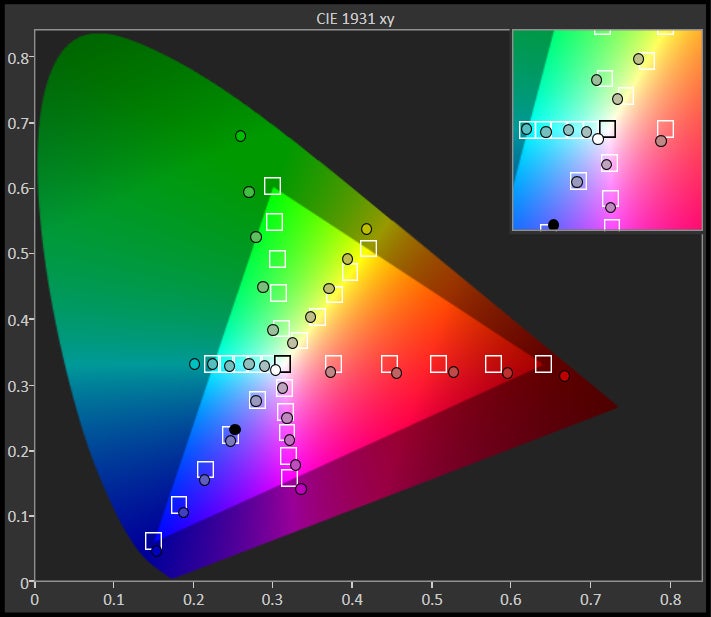
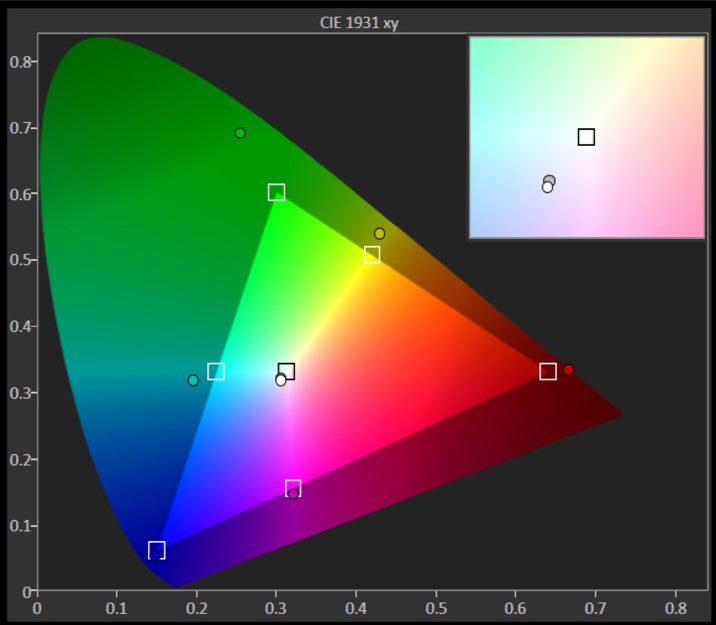
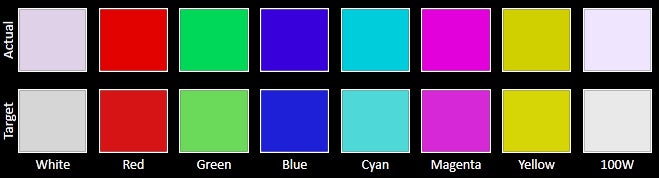
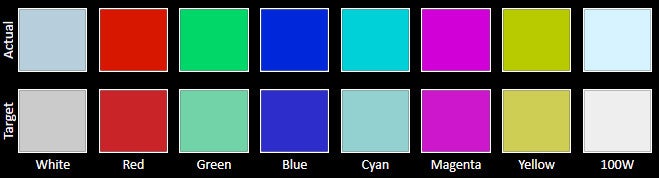
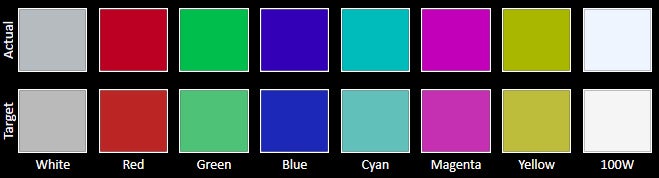
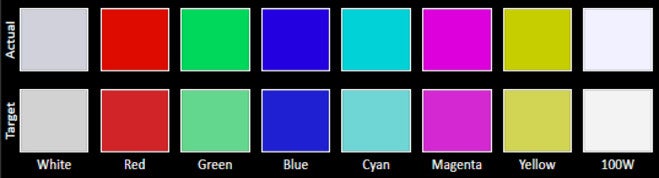
Lumia 930 sports a 5” 1080x1920 pixels AMOLED display with the respectable 441ppi pixel density. You have several display modes to choose from, like cool, vivid and advanced, with the latter letting you play around with color temperature and saturation sliders, until you've reached the desired results. Color saturation can be adjusted from “natural”, all the way to the gaudy “vivid” level. Color temperature goes from warm through neutral to cold, while you can also emphasize separate colors with another slider – from green to purple. In the default mode, we measured the color temperature to be 6724K, which is very close to the reference 6500K white point, but still, white has a slight purpleish tint. As usual with AMOLED display, colors are oversaturated colors but to a lesser extent than, say, in the Galaxy S5's default mode.
Covered by sculpted Gorilla Glass 3, the Nokia Lumia 930 screen should withstand more than a few bumps and scratches, and, as usual, it also features a supersensitive touch layer, meaning that you can operate it with your gloves on.




Interface and functionality
Windows Phone 8.1 is now a mature and functionally rich mobile OS, to which Nokia adds a laundry list of exclusive apps like HERE Maps and MixRadio.
There is lots of other, smaller improvements like the neat Quiet Hours feature. It is a do-not-disturb option in essence, that can automatically activate in certain hours. It also works with the calendar, and when you’re in a meeting, it’d automatically put your phone into silent mode. Another neat option is “Find My Phone” that will help you locate a phone when you lose it, or wipe your private data off it.
Processor and memory
With its 2.2 GHz Snapdragon and 2 GB of RAM, Lumia 930 is one of the most powerful Windows Phones to date.
You won't feel underpowered for a second with the quad-core Snadpragon 800 8974-AA processor that is clocked at 2.2 GHz in the Lumia 930. This processor is a level below the 801 in current Android flagships, but the main difference is in the image processing speed, while Nokia uses a proprietary processor for its PureView cameras anyway, so no biggie. The light and springy Windows Phone OS is not an issue for this processor, as are all other apps in the Windows Store, including 3D games. In addition, the Lumia 930 comes with the hearty 2 GB of RAM, which means you can line up many apps in the background without running out, and app loading is faster overall. Nokia supplied the handset with the flagship-worthy 32 GB of storage out of the box, so you won't be feeling out of breath for space, even though the phone doesn't come with a microSD slot for expansion.
Internet and connectivity
Just like iOS, Windows Phone doesn't let third party browsers spoil a veritable monopoly. The mobile Internet Explorer 11 browser has been updated in WP 8.1 to be faster and with tons of new features, though. Internet Explorer’s new options include an incognito mode that does not store browser history, reading mode that leaves only the text of a webpage in a nicely formatted document, and support for unlimited tabs. You also get the option to go back and forward in pages by just swiping left and right like on some other mobile browsers we know, which is neat. Another option that is particularly nice is pinning webpages to the start screen. The pages then appear as live tiles showing you the page in its latest, most up-to-date state, serving as a living and breathing bookmark. The browsing experience itself is very smooth, and you can scroll around and zoom in and out of pages without lag.
Camera
Lumia 930 brings PureView in a rather compact package with good results and video with stellar sound.
The 20 MP PureView rear camera comes with Zeiss six-element lens, optical image stabilization, and a dual-LED flash. The 1.12 µm pixels are spread on a 1/2.5'' sensor size, which is slightly smaller than the 1/2.3” one in the Xperia Z2, which has identical resolution. Also, Sony's phone has a wider f/2.0 aperture, compared to f/2.4 in the Lumia 930.
The PureView pixel-binning technology lets you shoot in lower resolution with higher quality, as it merges the info from several adjacent pixels into one with arguably better photographic virtues. You also get the so-called lossless zoom, which crops the frame to zoom up to 1.8x into part of the picture while preserving quality (but losing the pixel-binning advantage). It's not the Galaxy K zoom's 10x optical closeup, but is certainly better than all-digital zoom. The minimum focus range for the camera's macro shots is pegged by Nokia to be about four inches (10 cm).
Nokia Camera has got a very convenient interface, rich in manual controls that don’t get in the way when you don’t need them. There are handy sliders for features like white balance, ISO (100-4000), shutter speed (up to 4 seconds) and so on. In addition, you get Nokia's mode and effects set like Panorama lens, Nokia Refocus, Bing vision, Cinemagraph lens, and Nokia Glam Me.
Nokia Lumia 930 Sample images
The Lumia 930 can't shoot 4K video, as most of the Android flagships now do. It does 1080p footage only with 30fps, but it has an ace up its sleeve – the sound quality, thanks to the record four HAAC microphones spread around its body. You have a few options – a normal stereo, surround sound (Dolby Digital Plus 5.1), or directional stereo, which emphasizes the sound from the objects in front of you, rather than what's being told behind the scenes. Interestingly enough, when the surround sound option is on, the 930 records a stereo stream as well, so you can pick and choose afterwards, when previewing or editing the video. The quality of the soundtrack is one of the best among phones and Nokia's HAAC mics have proved they are capable of recording in noisy environments, like a concert.
Sample Videos
Multimedia
The video player runs everything thrown at it, while Nokia's MixRadio will take care of your musical ear for free.
With a large and vivid 5” display, the Lumia 930 has got the core asset for enjoying media on the go. It is also pretty conducive to pictures and video editing, and the Microsoft-Nokia duo are supplying free apps with rich functionality for both of those undertakings.
The stock video player chews through all major video codecs with ease, including DivX/Xvid/MKV files at up to 1080p resolution, which is certainly commendable, as it was not something Windows Phones used to do. The video player now also sports subtitle and captions support.
Call quality
Excellent earpiece and voice quality, thanks to four strategically placed HAAC microphones.
As you can expect from a phone that has not two or three, but four high-amplitude microphones, the folks we called reported stellar quality, with clean and well-defined voice timbre, generous strength, and suppressed ambient noises. The earpiece of the Lumia 930 is also great, as it is loud enough, and doesn't distort the voices coming in, even at the highest volume levels.
Battery
Conclusion
We found the Nokia Lumia 930 to be an excellent Windows Phone device. Perhaps the biggest virtue of the 930 is that it finally packs Nokia's PureView camera goodness into a fairly compact and manageable format, coming with solid premium build but without bulk protruding on the back. The 930 can capture great images with some drawbacks, videos with rich sound, and has stellar voice quality. It also comes with a fine AMOLED display that has decent image quality, and great outdoor visibility.
Windows Phone 8.1 is now a functionally rich mobile OS, too, that makes day-to-day operations with the phone much easier than with previous WP editions. When we add the preloaded HERE maps navigation that gives you offline voice-guidance for free, and the MixRadio streaming, we certainly can't complain about the out-of-the-box software that comes with the Lumia 930. The ecosystem still lacks in terms of app count, though, so if you are coming from an Android handset, or an iPhone, some applications you know and love might not be here yet.
The fly in the ointment with the otherwise well-rounded Lumia 930 is its pricing scheme. Nokia priced it at $600 – a tad less than what Android flagships cost - but, considering Microsoft's mobile platform market share, its poster boy might have a steep sales climb ahead. For this kind of dough you can get the Galaxy S5, Xperia Z2 or HTC One (M8), and each of them has comparable or surpassing hardware features, save for HTC's flagship, whose camera is inferior to the rest. When we add the popularity contest that Android and its apps have won over Windows Phone, one might have to wait for the Lumia 930 price to fall more in line with its potential market, which, if the Lumia line's history is any indication, should happen rather quickly.
Software version: 8.10.12397.895



Popular stories



Latest News



Things that are NOT allowed:
To help keep our community safe and free from spam, we apply temporary limits to newly created accounts: