Disappearing messages: something that could protect your privacy in a 007-like way... yeah, but it had some issues on WhatsApp, including the ability to save a media file that was set to disappear to your phone. Pretty much making the feature less useful for privacy and more useful for fun with your friends. However, Meta is now rolling out an update that aims at improving WhatsApp privacy, reports MySmartPrice, and you won't be able to automatically save media files set to disappear.
WhatsApp rolls out update to Disappearing Media features
WABetaInfo reports that some new improvements in the privacy department for WhatsApp are now rolling out to iOS and Android users. Before this update, you could auto-save media in your phone's camera roll, but now, this will be restricted for disappearing chats, making them more secure and private.
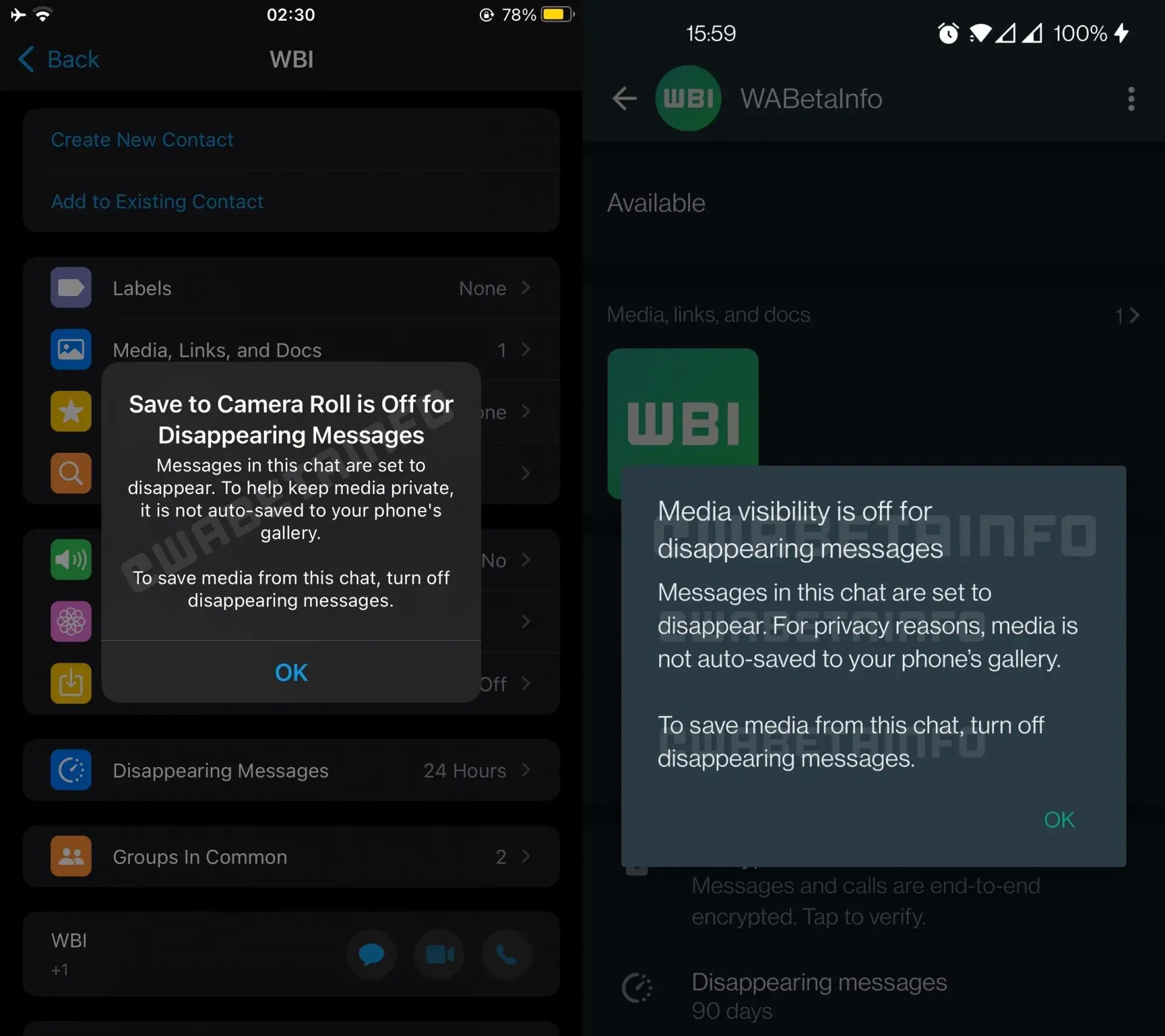
As you can see on the screenshot below, with this new update, WhatsApp will automatically turn off the "Media Visibility" option for disappearing chats on Android. On IOS, the feature "Save to Camera Roll" will be turned off. This way, you won't be able to automatically save any images, videos, or GIFs to your phone's gallery during disappearing chat.
These auto-options are turned off by default. However, you can still save the media in disappearing chat if you go to settings and toggle the features on, as well as, you can manually download the media file.
Recommended For You
According to WABetaInfo, this feature has now been rolled out to beta users and will be coming to the general public within 24 hours.
One of the features that WhatsApp is currently working on is a bigger file size for file sharing on the chat app. Before this update, WhatsApp had a limit of 100MB for files you wanted to send or receive on the chat service. With this new change, this limit will be raised significantly to 2GB. Keep in mind, though, that this feature has rolled out to a small number of beta testers, currently located in Argentina, and is not yet available for everyone.
We reported recently on the fact that the long-awaited and very useful multi-device support is now finally coming to both Android and iOS (it will first be released on iOS by the end of this month, and Android users should get it sometime in April).
Why is this WhatsApp feature so important? Well, for those of you who don't know, currently you can use WhatsApp on your PC or Mac to chat, but you need your iPhone or Android phone to be online at all times so that the chat will work. That is because WhatsApp is storing your identity key for the end-to-end encryption on your phone.
However, the multi-device support feature changes that. With it, you will be able to have your WhatsApp account on up to four additional devices, which you can use at all times without having your phone online as each of them will have its own identity key.
Another useful feature that WhatsApp introduced recently is the ability to react to messages sent on the chat app with emoji. This feature was spotted again in a beta version of the popular messaging app.
Once it becomes official, you will have six reactions to messages sent to you on WhatsApp: Like, Love, Laugh, Surprised, Sad, and Thanks.
Iskra Petrova is a news writer at PhoneArena, where she covers mobile tech news and maintains the site’s device hubs with the latest leaked specs, rumors, and official details for upcoming phones. She joined PhoneArena in 2020 after three years in technical support for Microsoft Exchange, giving her practical experience with software infrastructure and troubleshooting. Iskra holds a Master’s Degree in Literature, which helps her translate complex tech details into clear, reader-friendly coverage. She is a daily Apple ecosystem user, while also closely following Sony Xperia’s camera-focused phones and Samsung’s Galaxy Z Flip series.
A discussion is a place, where people can voice their opinion, no matter if it
is positive, neutral or negative. However, when posting, one must stay true to the topic, and not just share some
random thoughts, which are not directly related to the matter.
Things that are NOT allowed:
Off-topic talk - you must stick to the subject of discussion
Offensive, hate speech - if you want to say something, say it politely
Spam/Advertisements - these posts are deleted
Multiple accounts - one person can have only one account
Impersonations and offensive nicknames - these accounts get banned
To help keep our community safe and free from spam, we apply temporary limits to newly created accounts:
New accounts created within the last 24 hours may experience restrictions on how frequently they can
post or comment.
These limits are in place as a precaution and will automatically lift.
Moderation is done by humans. We try to be as objective as possible and moderate with zero bias. If you think a
post should be moderated - please, report it.
Have a question about the rules or why you have been moderated/limited/banned? Please,
contact us.













![Another batch of Galaxy S26 series users in the US are getting a nice surprise today [UPDATED]](https://m-cdn.phonearena.com/images/article/183643-wide-two_350/Another-batch-of-Galaxy-S26-series-users-in-the-US-are-getting-a-nice-surprise-today-UPDATED.webp)
Things that are NOT allowed:
To help keep our community safe and free from spam, we apply temporary limits to newly created accounts: