iOS 9 Review: here's all you should be excited about

It's all so familiar
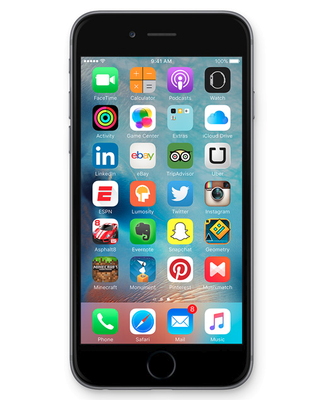
Is this a big deal? No, we wouldn't say so. As we implied already, the difference between the two typefaces is barely noticeable. Opinions as to which one of the two looks better are mixed among us here at the office – some do find San Francisco a tad clearer, some favor the look of the good ol' Helvetica. Other's can't see a difference in legibility at all. But in any case, text in iOS 9 is still easy to read even at small sizes, and those who need to, still have the freedom to boost its size from the iOS settings menu.
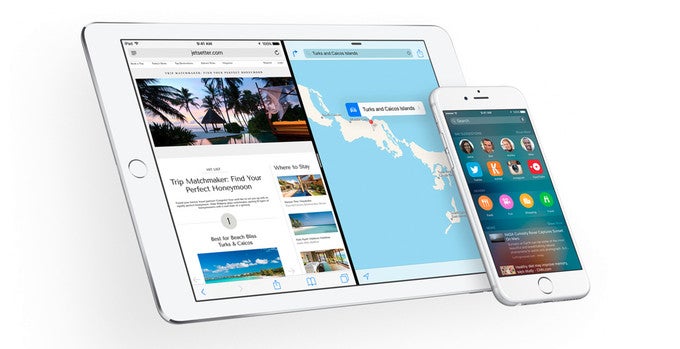
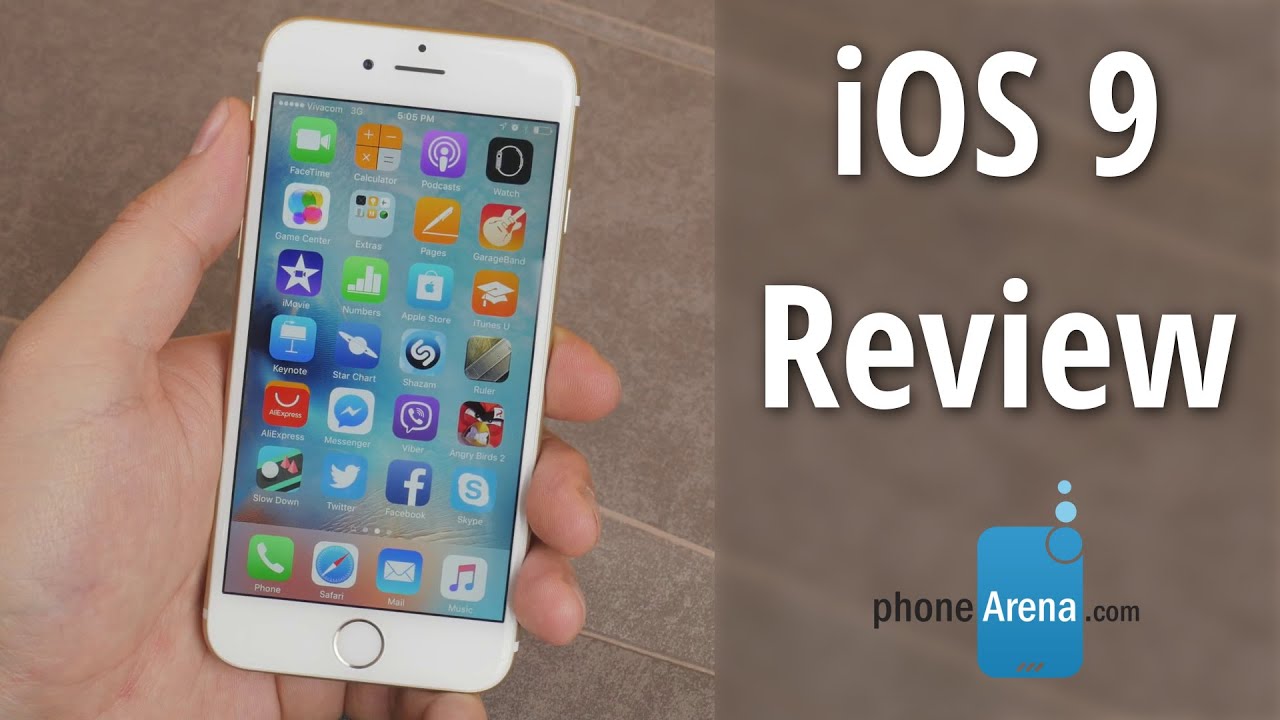
While iOS 9 does not add much in terms of customization options, it does bring along a cache of new still wallpapers, designed specifically for the screens of iOS devices. Furthermore, the range of dynamic wallpapers has been expanded, and you may take a peek at the additions right here. And if that's not enough, users are given the freedom to turn a Live Photo into a dynamic wallpaper. Alas, we don't see the new dynamic wallpapers on our iPhone 6, which leads us to believe that they're a feature reserved for iPhone 6s and 6s Plus users only. We didn't get any support for Live Photos either. Anyway, here's a quick look at iOS 9. Looks a lot like iOS 8, doesn't it?
Spotlight Search and suggestions have gained a level
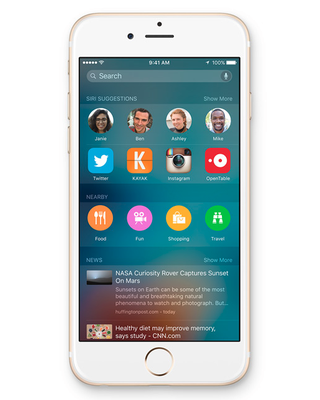
Speaking of Search, it now has the capability of digging through your third-party apps. For instance, if you're looking for a great cooking recipe for pizza, relevant results will be displayed from within cooking apps you have installed on your device. Better yet, the search result shown is deep-linked to the recipe; tapping it won't simply launch the respective app, it will take you straight to the recipe's page. And if you wish to go back to your search results, there's a back button in the upper left corner. The thing about searching through third-party apps, however, is that it won't be available in any app. A developer will have to allow their app's content to be indexed first before it would start appearing in search results.
What's also new is the Search window positioned to the left of your left-most home screen. On one hand, it feels redundant having it alongside Spotlight search as they both do mostly the same thing. On the other hand, the new Search window also has the ability to display recommendations for things like nearby restaurants and coffee shops. It will also pull news headlines from the web on topics that interest you. All in all, it is neat having these new recommendations built into iOS, although we do have to mention that they're only available in 15 major markets.
Siri is now smarter, aware of content and location
Speaking of Siri, the "Hey, Siri" command can now launch the virtual assistant even when your iPhone is in stand-by. But there's a catch – only the iPhone 6s, the iPhone 6s Plus, and the iPad Pro can constantly listen for the voice trigger. On older models, "Hey, Siri" works in stand-by only if the device is plugged into a charger.
But, as Apple puts it, the best assistant is a proactive assistant. It should be able to anticipate your needs and act accordingly. And so, with iOS 9, you'll get to enjoy this kind of assistance from Siri and the operating system. If you launch the same app every morning – the one with your exercise routine or the one you stream music from, for instance – a shortcut for that app will pop up in your lock screen's corner. Another example of iOS' proactive abilities is that OpenTable invitations you get via email can automatically be added to your Calendar. And if you're getting a call from a number that isn't in your contacts, iOS will check your email in search of that number and a name that might be associated with it.
News – a place to catch up on the latest headlines
All in all, News is shaping up as a neat app. Once in your personalized feed, you're presented with headlines in a chronological order, along with a summary and an illustrative image for most of them. When you open an article, it is laid out an easy-to-read manner, with images to go along with most stories. You can bookmark articles, add them to your notes or reading list, or share them with your buddies.
However, News isn't quite perfect yet. We ran across formatting issues on a couple of occasions, and with one particular media, there were huge blank areas where videos were supposed to be present. Although these imperfections could have been caused by the way the publishers' content was formatted, we can't be sure. In any case, these seem to be glitches resolvable by a simple patch.
At this time, News is only available in the United States, the United Kingdom, and Australia, and English is the only supported language. Oh, and the app contains iAds, albeit on rare occasions.
Notes, now with doodles
A long-time iOS user would be well familiar with the stock Notes app in iOS 9. But it has been treated to a nice upgrade, so we thought we'd dedicate a section to it as well. What we really like about it is that we can now easily add checklists and finger-drawn sketches to any given note. The added formatting button is also welcome. And no less importantly, we can now turn content from other apps into a note. This works for web pages, messages, photos, locations on Apple Maps, and pretty much anything that you can interact with via the iOS share sheet.
Apple Maps adds transit routes in major cities
There's a lot to like about iOS, but there are also areas where the platform is still catching up to its competitors. Adding public transit routes to Apple Maps is an example of the latter. It is a welcome addition, of course, and a well executed one. Buses, trains, subways, and ferries are all supported. Routes are color-coded and clearly labeled. Directions are laid out step by step, with time estimates for the portions of the route. Station entrances and exits are shown on the map once you zoom in close enough. But there's a lot of ground that Apple Maps has yet to cover, as transit is only available in select major cities at this point.
Transit aside, Apple Maps has had its searching capabilities expanded. You can now easily find places by type around you as they can be grouped right from within your search results. Once you find a place you're interested in, it will show whether or not Apple Pay is available at the venue.
Messaging and keyboard
Quite a few things about the stock iOS keyboard have changed. The one you're likely to notice first is that the keys are now dynamic – they switch between upper- and lowercase depending on what letter you're about to input. This makes typing more intuitive and convenient, especially when you're entering passwords.
A handy improvement is the addition of a trackpad functionality – holding down two fingers on the keyboard lets you move the cursor and mark text as if you were using a Mac's trackpad. However, this feature will land on iPads only. Yes, it did appear in early betas of iOS for the iPhone, but it has since been removed due to usability issues. And that's a bummer; an option to have it switched on or off would have been nice.
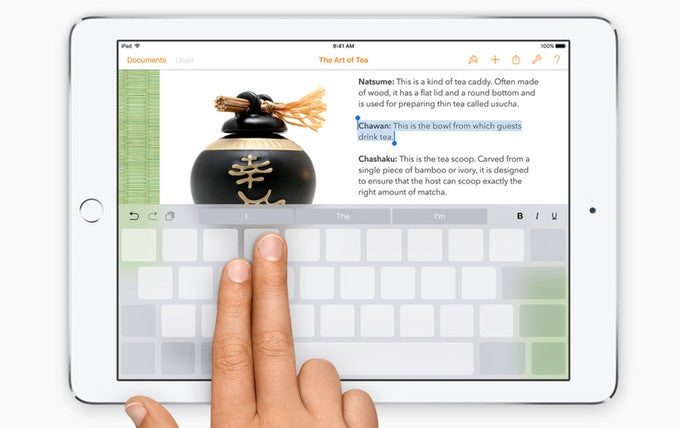
The iOS 9 keyboard features trackpad functionality, quick formatting shortcuts (on iPad only)
Multitask like a boss (if you have an iPad)
Speaking of multitasking, iOS 9 brings a redesigned recent apps list, and we're not entirely happy with the change. Yes, the new design is pretty, but it only shows you a portion of the app snapshots due to its stacked layout, you don't get the big app icons as you used to, you can't access your recent and favorite contacts as before, and flipping through apps isn't as fluid as it was in iOS 8. That's not too big of a deal, of course, but it is a change we'll have to adapt to.
Speaking of multitasking, iOS 9 has gained support for picture-in-picture functionality. Let's say that you're enjoying a video and a new notification pops up. If you tap the notification, you'll be taken to the app that sent it, but your video will keep on running in a small, movable, resizeable window. Again, the PiP feature will come to the iPad Air 2 only.
Performance and benchmarks
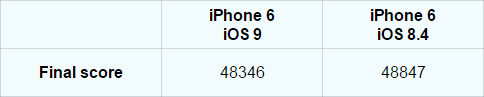
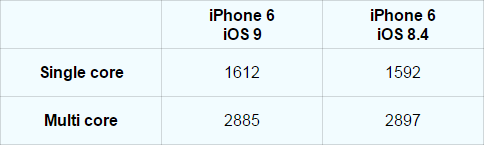
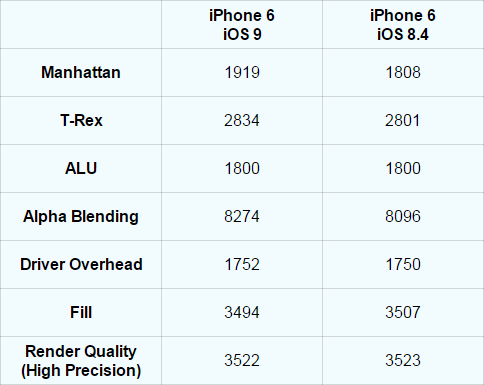
These were many of the key functional improvements coming with iOS 9, but does the platform's new version boost performance as well? To answer this question, we ran a handful of benchmarks on two iPhone 6 units, one running iOS 8.4 and another updated to iOS 9 Gold Master. The results from our testing session were mixed, with some tests suggesting that performance has dropped, others indicating a boost, and then there were the benchmarks that returned identical scores. Apple does note that iOS 9 improves performance and overall efficiency, but the boost could be impossible to measure with the benchmark apps we used. Anyway, here are the score averages that we got after 3 runs on two iPhone 6 units.
AnTuTu Benchmark v5.2.0
(Higher is better)
Geekbench v3.3.4
(Higher is better)
GFXBench Open GL v3.0.38
(Higher is better)
Battery life
For the most part, how long your iPhone lasts between charges depends on how you use it and how you have it configured. And in our particular case, we don't see much of an improvement, although in theory, iOS 9 is supposed to be more efficient, using less power than before for certain tasks.
Speaking of battery life, there's a dedicated Battery screen in iOS 9's settings menu. It is where you may see which are the apps sucking the most battery life. It is also where the new Low Power Mode can be activated from, if you feel like you need to. Yes, there's a power-saving mode in iOS 9, and it works by reducing the screen's brightness, limiting background app activity, and managing connectivity. But you don't have to activate it manually each time your battery goes low. Once you're at the 20% mark, iOS will ask you if you want to have it enabled.
Storage space optimization and app trimming
Storage space is one of those things that are never enough. That's why we're happy to know that iOS 9 reduces the space occupied by apps you have installed through a method called app thinning. Basically, when installing an app, only the resources your particular device requires will be requested. At least that's the theory. We compared several popular apps side by side, both third-party apps and ones by Apple, and we didn't see any difference in the amount of space they occupied. It looks like the benefit of app thinning in iOS 9 will come at a later time, once apps are made to support it.
UPDATE: After the official iOS 9 build landed on our iPhone 6, several hundred megabytes of storage space were freed up.
We can start wrapping things up by saying what iOS 9 isn't. The new software isn't revolutionary, that's for sure, as most of the features it brings have been available on other platforms for a while, in one form or another. It isn't flawless as there are things about it we don't quite like, such as the redundant search options, the redesigned list of recent apps, and the not-quite-perfect News application. It is also a tad disappointing that we can't yet feel the promised optimization in storage space use by installed apps. On the other hand, Apple has proven itself to be quick when it comes to polishing the rough edges of its software, and we're sure that the true potential of iOS 9 will shine in the very near future.
Furthermore, most of the new features added with iOS have been executed really well. We're happy with the multitasking experience, the implementation of transit routes in Apple Maps is more than welcome, the expanded search functionality has great potential, and the new tricks that Siri has learned should come in handy. With all this in mind, we'd say that iOS 9 is a release to look forward to. That said, get your iPhones and iPads ready for the incoming update.
Conclusion
We can start wrapping things up by saying what iOS 9 isn't. The new software isn't revolutionary, that's for sure, as most of the features it brings have been available on other platforms for a while, in one form or another. It isn't flawless as there are things about it we don't quite like, such as the redundant search options, the redesigned list of recent apps, and the not-quite-perfect News application. It is also a tad disappointing that we can't yet feel the promised optimization in storage space use by installed apps. On the other hand, Apple has proven itself to be quick when it comes to polishing the rough edges of its software, and we're sure that the true potential of iOS 9 will shine in the very near future.
iOS 9 screenshots


Popular stories



Latest News




![Another batch of Galaxy S26 series users in the US are getting a nice surprise today [UPDATED]](https://m-cdn.phonearena.com/images/article/183643-wide-two_350/Another-batch-of-Galaxy-S26-series-users-in-the-US-are-getting-a-nice-surprise-today-UPDATED.webp)
Things that are NOT allowed:
To help keep our community safe and free from spam, we apply temporary limits to newly created accounts: