Every product we review or recommend is thoroughly tested by our in-house experts in real-world conditions, following our
review methodology
and
ethics statement
to ensure honest, independent, and data-driven results.
Sharing the T-Mobile shelf with the LG myTouch is the myTouch Q model, where the “Q” simply means it has a physical QWERTY keyboard for entering text – not the character “Q” from Star Trek TNG.
The overall feeling of the myTouch Q is pleasing, as it fits well in the hand with rounded corners and has a soft-touch coating on the back to provide a good grip, though it is a bit thick at 0.51” and feels a bit heavy at 5.64oz, but this to be expected because of the keyboard.
The overall feeling of the T-Mobile myTouch Q is pleasing, as it fits well in the hand
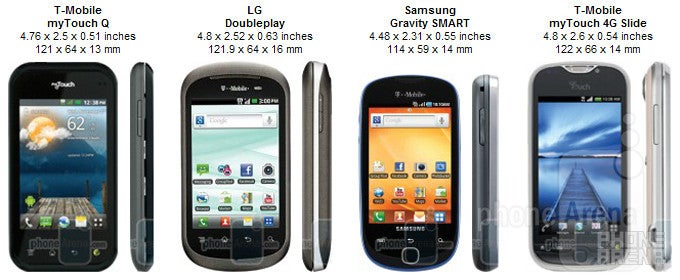
You can compare the T-Mobile myTouch Q with many other phones using our Size Visualization Tool.
The display on the T-Mobile myTouch Q is a bit on the small side, only measuring in at 3.5” and with a resolution of 320x480. Since it is a regular TFT LCD, and not AMOLED like the larger 3.8” screen found on the myTouch, colors don’t really “pop” out at you, but images still look OK and text is clear, though outside visibility in the sun is lacking.
Under the display are touch-sensitive buttons for accessing the menu option, home, and back. There is also a dedicated Genius Button to open its included app, which uses voice recognition for completing tasks, such as calling people, sending messages and emails, searching for local businesses, etc. On the top of the phone you’ll find the power/lock key, microUSB port, and 3.5mm headset jack.
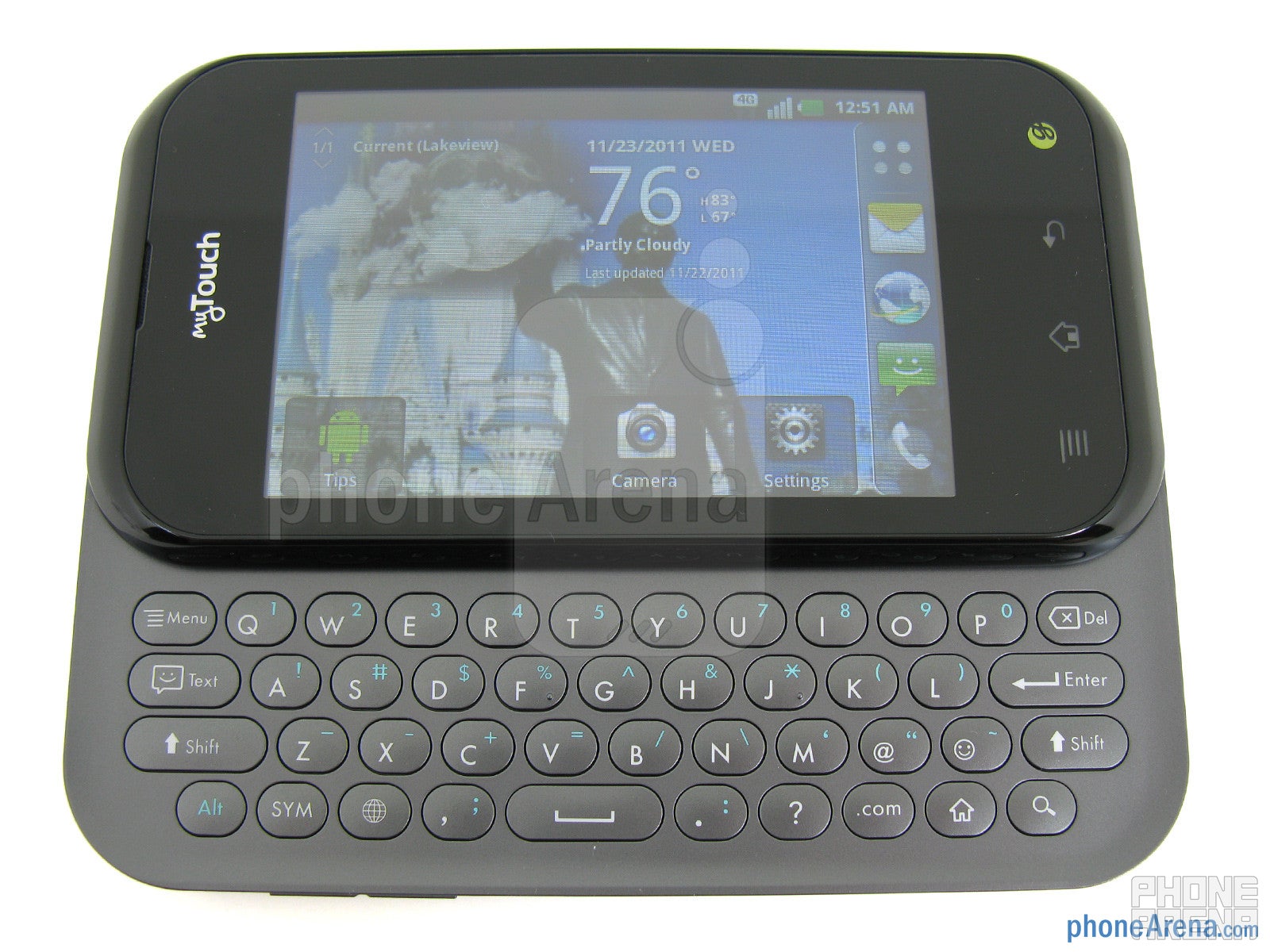
Sliding open the QWERTY keyboard is relatively simple, due to it being spring-loaded, and can be done with one hand. You are treated with a simple 4-row design, which means the top row is populated by both letters (in white) and numbers (in blue). The oval keys provide a nice “click” response when pressed. Unfortunately, there’s not much space between them, and they are relatively flat, which means typing mistakes can happen with long messages.
The QWERTY keyboard is spring-loaded
Interface:
This is a short review of the T-Mobile myTouch Q. It shares many software features of the QWERTY-less T-Mobile myTouch, which has a more in-depth review here.
Recommended For You
Included on the T-Mobile myTouch Q is the LG Optimus user interface, which is running above Android 2.3.4 Gingerbread. There are a total of 7 homescreens that you can customize with a nice selection of widgets, including specific ones from T-Mobile called MobileLife that will show a calendar with appointments or even a shopping list.
Included on the T-Mobile myTouch Q is the LG Optimus user interface
Response is good for the most part, as there is a 1GHz MSM8255 chipset by Qualcomm on-board, which features the Adreno 205 GPU. You also get 512 MB of RAM and 900MB of application storage space, which is good amount for a mid-level smartphone.
Internet:
Using the included WebKit based browser works well with most web sites, but ones that rely heavily on Flash content feel sluggish and unresponsive when trying to navigate through them. We don’t believe this to be a fault of the browser, but has more to do with the lower-end hardware that is used on the T-Mobile myTouch Q, as higher-end Android smartphones can run Flash sties with little to no lag.
The WebKit based browser works well
One feature that we’re glad to see on the device is the inclusion of 4G, which allowed the PhoneArena.com site to fully load in 30 seconds. When using the SpeedTest.net app, we were able to achieve download speeds up to 8 Mbps, though we did see this drop to around 5 Mbps during peak times, and uploads were generally between 1-2 Mbps. Wi-Fi 802.11b/g/n is also on board, as is Bluetooth 3.0 that can save up to 100 parings.
Camera:
Located on the back of the T-Mobile myTouch Q we find an average 5-megapixel camera with auto-focus and single LED flash. When looking at the pictures that we took outside on a sunny day, we noticed that colors were more accurate than from the myTouch. Because of this, images are more pleasing to the eye, but there still is some loss in detail in bright areas. Pictures captured inside tend to show a lot of grain with even lower detail. The on-board LED flash does an OK job of illuminating a dark environment, but unfortunately the auto-focus doesn’t work well with it and causes flash pictures to look a bit blurry.
Outdoor samples taken with the T-Mobile myTouch Q
Indoor samples
Videos can be recorded at 1280x720p resolution, but the quality is below par. Details are missing, and videos look shaky even when holding the phone still with both hands. Even though videos are recorded at 30 frames-per-second, we did notice some trail-effects while cars moved across the screen.
T-Mobile myTouch Q Sample Video:
Performance:
Call quality was good, as there wasn’t any background noise and voices sounded clear and natural on both ends. Reception was also good in our area, as we had 3-4 bars showing and we didn’t drop any data connections or calls. The included 1520mAh battery was able to provide us up to 6 hours of talk time, or about 8 hours of mixed usage, so heavy users may want to charge the device while at work.
Conclusion:
Both the T-Mobile myTouch Q and myTouch are for the budget oriented smartphone user, as they are under $80 with contract. Since the software and most of the internal hardware is practically identical between them, it comes down to wanting a physical QWERTY keyboard with a smaller TFT display on the myTouch Q, or a larger AMOLED display and thinner body on the myTouch. We’ll let you make that decision.
Sam Earley, is a former reviews and news writer at PhoneArena. His incredibly productive run included numerous reviews and comparison articles of breakthrough products, such as the Motorola DROID X, Verizon Pre 2, HTC Thunderbolt and many others.
Recommended For You
COMMENTS (4)
COMMENTS (4)
All comments need to comply with our
Community Guidelines
PhoneArena Community Rules
A discussion is a place, where people can voice their opinion, no matter if it
is positive, neutral or negative. However, when posting, one must stay true to the topic, and not just share some
random thoughts, which are not directly related to the matter.
Things that are NOT allowed:
Off-topic talk - you must stick to the subject of discussion
Offensive, hate speech - if you want to say something, say it politely
Spam/Advertisements - these posts are deleted
Multiple accounts - one person can have only one account
Impersonations and offensive nicknames - these accounts get banned
To help keep our community safe and free from spam, we apply temporary limits to newly created accounts:
New accounts created within the last 24 hours may experience restrictions on how frequently they can
post or comment.
These limits are in place as a precaution and will automatically lift.
Moderation is done by humans. We try to be as objective as possible and moderate with zero bias. If you think a
post should be moderated - please, report it.
Have a question about the rules or why you have been moderated/limited/banned? Please,
contact us.









Things that are NOT allowed:
To help keep our community safe and free from spam, we apply temporary limits to newly created accounts: