PhoneArena is looking for new authors! To view all available positions, click here.
  • Home
  • News
  • Here's how to run Android apps on your Windows/Mac desktop/laptop computer

Here's how to run Android apps on your Windows/Mac desktop/laptop computer

Posted: , by Victor H.

Share:

Discuss 24
Here's how to run Android apps on your Windows/Mac desktop/laptop computer
Android is the most prolific and fastest growing platform on the market right now, and it’s been so for the last couple of years. With that growth came more than 700,000 applications on Google Play, a figure that is on par with what Apple has in its App Store.

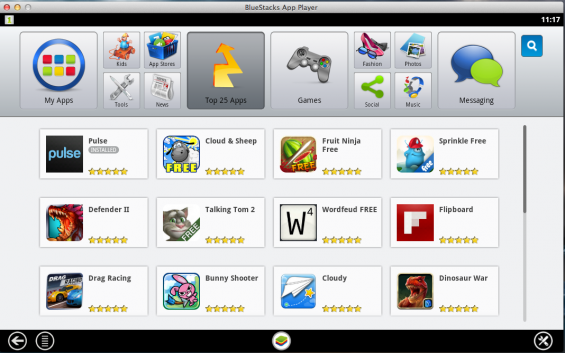
With such a wealth of apps, you might be secretly wishing to have some of them available not just on your phone or tablet, but also on your Windows or Mac notebook/desktop computer. And now there is an easy way to do just that with an called BlueStacks.

The application is still in beta, but it does pretty well in its core functionality - allowing you to run Google Play and install apps from it on your computer.

There is both a Windows and Mac version of Bluestacks, and everything should be working just fine and easily. Give it a shot - it’s right below.


via Coolsmartphones

Here's how to run Android apps on your Windows/Mac desktop/laptop computer

Share:

Discuss24

24 Comments

  • Options
    Close


Want to comment? Please login or register.

1. pfroo40 posted on 28 Dec 2012, 08:28 10

This would be pretty awesome on a Windows 8 x86 tablet. Even better if it worked on RT.

3. windroid posted on 28 Dec 2012, 08:38 1

Indeed!
Trying to decide for a tablet, either Android or Windows RT or (full) Windows 8, if android apps run fairly well in Win8 I'll start to consider that a better option.

12. bluexperia posted on 28 Dec 2012, 11:17

i`ve tried it before and well, it seems promising but it eat as much ram capacity as you has(mine is 4gb 32-bit). but you should try it..

19. Veigald posted on 28 Dec 2012, 18:23 1 1

Bought a Surface for my wife for Christmas, and really have to say Win 8 looks light years ahead of Android and her old iPad in terms of interface. Just ridiculous how outdated her iPad looks in comparison. Now it just needs more apps.... but they will come fast, I would think.

4. Muhannad posted on 28 Dec 2012, 09:12 2

Damn, if only my laptop had a touchscreen.

5. techspace posted on 28 Dec 2012, 09:12 1

I have been using this for a long time now, it looks good in some cases but the games with more graphics don't work very well for now, but its still in beta so it should change when the final version comes out.....this should be a huge selling point for ms and I think the final version will be quite expensive

6. yowanvista posted on 28 Dec 2012, 09:36 2

Bluestacks still uses the Gingerbread base/API with a modded version of an obsolete Dalvik VM, Apps don't run that smoothly as in a native installation.

22. gmacattacks posted on 29 Dec 2012, 00:20

May I use your profile photo for an album cover?

25. yowanvista posted on 31 Dec 2012, 16:54

Of course, here's a bigger version which I made in PS
http://i.imgur.com/4954l.jpg

7. zaryab_hussain77 posted on 28 Dec 2012, 09:51 1 3

now I m Gonna stick to my laptop :)

8. SIGPRO posted on 28 Dec 2012, 10:24 2

Bluestacks....come on this is really old news, this exist for a long time now!

18. motty posted on 28 Dec 2012, 16:23

So true I wondered why P.A telling us about this software

9. zaryab_hussain77 posted on 28 Dec 2012, 10:30 1

how to add app data.. like asphalt 7 and other games

10. gazmatic posted on 28 Dec 2012, 10:35

i've been using this for quite some time...

when i'm lazy i whatsapp my friends from my laptop...

it is much easier

i highly recommend this program.... its free!

11. TBomb posted on 28 Dec 2012, 10:58 1

do all the apps work on this?

13. rcranium posted on 28 Dec 2012, 12:36

Cool. I was only able to use Pulse and ES explorer. Tried running Phoenix HD but no joy. Ooopsie! That's an ios game.

14. Raziel14 posted on 28 Dec 2012, 13:39

It is great! Tnx

15. XPERIA-KNIGHT posted on 28 Dec 2012, 14:38

cool works pretty good

16. CSM201 posted on 28 Dec 2012, 15:10

Just download this for my Windows PC and the corresponding Cloud app from my GalaxyS3 to sync the apps i already have downloaded. Works good for transcending the apps to the laptop/desktop. Easy to use controls. Data for the apps u have downloaded does not sync so don't expect to start any games where u left off on your phone/tablet. Problem I had was it downloaded a few apps i didn't have on my phone and continued to show on my desktop that it had just downloaded again and again and again. Being that it's in BETA I can see the potential though

17. motty posted on 28 Dec 2012, 16:21

Is this new? Hmmm,

20. Pings posted on 28 Dec 2012, 21:33

lol I got Launcher Pro to work on it. Going to check out some others.

21. OpTiMuS_BlAcK posted on 28 Dec 2012, 22:24

I lol'd at my Benchmark scores in Bluestacks, They're all over 9000!

23. ogy_dogy posted on 29 Dec 2012, 06:08

Id be happier with an emulator that runs windows apps on android.

24. Pings posted on 29 Dec 2012, 17:27

Yes and no. They got the right idea. SMS and app syncing is cool. If you could respond to emal/sms would be better. Better app support and at least Android 4.0 is must.

Want to comment? Please login or register.

Hot Phones

  • Samsung Galaxy S4Samsung Galaxy S4
  • Apple iPhone 5Apple iPhone 5
  • Samsung GALAXY Note IISamsung GALAXY Note II
  • HTC OneHTC One
  • Sony Xperia ZSony Xperia Z
  • Google Nexus 4Google Nexus 4
  • LG Optimus GLG Optimus G
  • Nokia Lumia 920Nokia Lumia 920