LG G3 vs Samsung Galaxy S5
Introduction
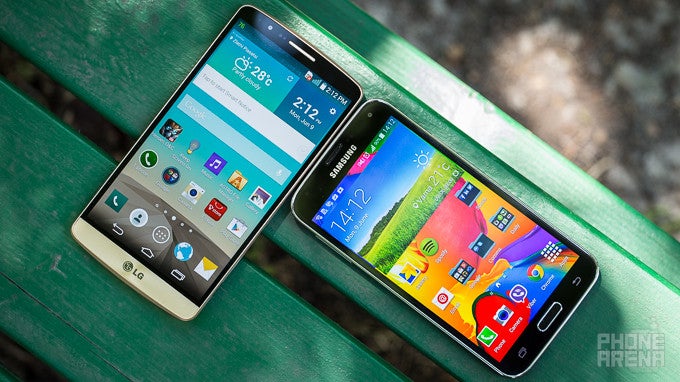
Inside and outside, the LG G3 is nothing short of a truly impressive, and quite intriguing, device. In fact, it's the first device to claim that it's both global and has an extremely detailed, 1440 x 2560 (QHD) resolution display. And that's not even half of it – the hardware configuration of the phone is just monstrous.
But so is the one on the Galaxy S5. The latest Samsung juggernaut has reaped major success with both consumers and critics alike, and that's not surprising in the least. So while the S5 display's pixel count falls short of that on the G3, the phone certainly has a ton to offer, including (but not limited to) an outstanding, 16-megapixel camera, a dust- and water-resistant body, and a vast array of software features.
UPDATE (Jun 25, 2014): This comparison was originally based on our experience with the Korean version of the LG G3. After testing the International (European) version of the phone, we've updated the story with our new findings, affecting the display, camera and battery performance.
Design
Attractive design? The LG G3 has it. But the more pedestrian-looking Galaxy S5 is utilitarians' pick of choice.
To say that LG and Samsung each have their own way of doing things when it comes to design would be a medium-sized understatement.
Both devices are made out of plastic, but both companies have given it their best shot, and the body of neither of the two handsets can be considered cheap. For its part, LG is using high-quality polycarbonate for its rear (with traces of metal within), completed with a matte finish that reminds a whole lot of brushed metal and battles greasy fingerprints. In the same vein, Samsung's Galaxy S5 also sports a plastic chassis, but the back comes with a dotted pattern that looks and feels a bit like leather, and is also excellent at repelling smudges. In this stand-off between faux metal and faux leather, the G3 has a hand over the more pedestrian-looking S5.
Looking at the G3, both the power button and volume rocker are noticeably more pronounced than before, and their design and shape have also been changed. Both provide a more profound tactile feedback, with the latter even sporting a new, mesh-textured pattern on top. Travel has also been improved, but the power key is making the better showing in this regard. But neither of the two keys proves as good as what the GS5 has on board - a more conventional, power-and-volume-keys-on-the-sides setup. Indeed, both of these are placed conveniently, and provide great, clicky feedback and travel.

5.76 x 2.94 x 0.35 inches
146.3 x 74.6 x 8.9 mm
5.26 oz (149 g)

5.59 x 2.85 x 0.32 inches
142 x 72.5 x 8.1 mm
5.11 oz (145 g)

5.76 x 2.94 x 0.35 inches
146.3 x 74.6 x 8.9 mm
5.26 oz (149 g)

5.59 x 2.85 x 0.32 inches
142 x 72.5 x 8.1 mm
5.11 oz (145 g)
See the full LG G3 vs Samsung Galaxy S5 size comparison or compare them to other phones using our Size Comparison tool.
Display
Superior detail, and more accurate colors -- the G3 scores the win here.
One of the very unique points of the LG G3 is its extremely sharp, 1440 x 2560 (QHD) pixel resolution display. This 5.5-inch panel offers the industry-leading 538 pixels per inch, and, according to LG, true-to-life image.
The Samsung Galaxy S5 is outclassed in this regard as it features a standard resolution of 1080 x 1920 pixels (FHD), which works out to 'just' 432 pixels per inch. Frankly, however, you're unlikely to perceive this inferiority in detail, especially when looking at the two displays from a normal viewing distance.
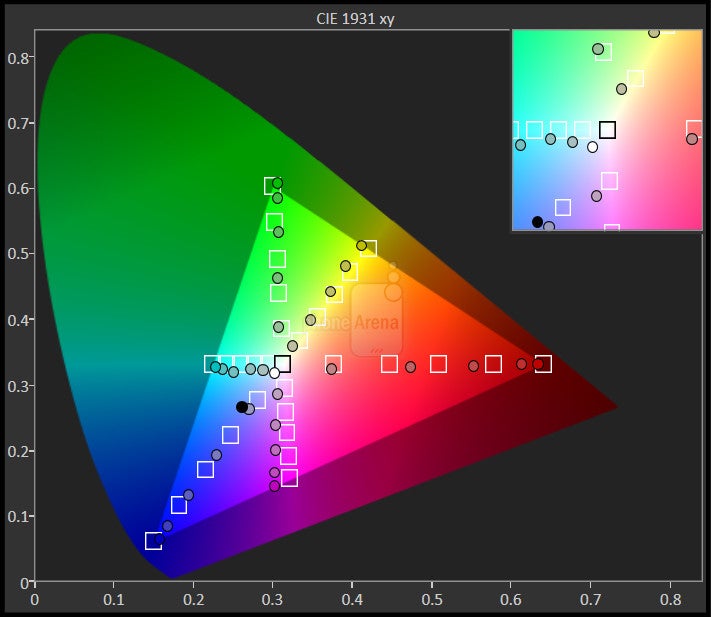
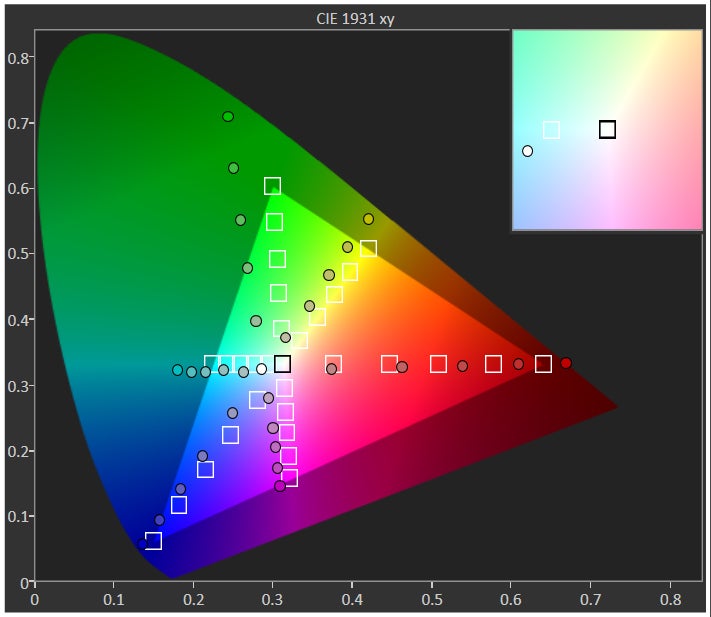
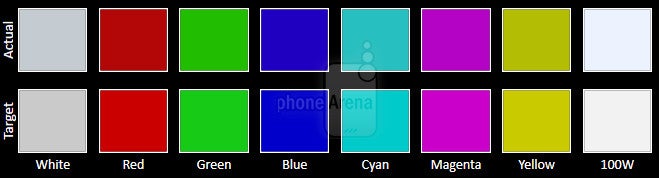
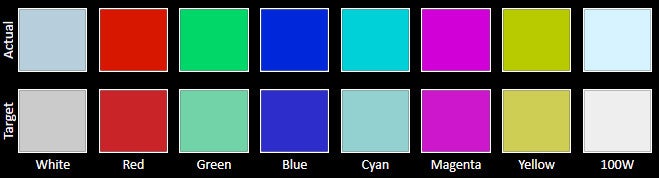
As for color-accuracy, we can't say we feel LG delivered on its promise of a color-accurate image. Color temperature, for example, sits at the good, but not excellent, 7100 K (6500 K is the reference value), though that's much closer than the Galaxy S5's temperature of 8183K (in the default 'Standard' screen mode), which causes a significantly blue tint. Thankfully, while on the slightly over-saturated side, the G3 colors are mostly acceptable. In comparison, the Galaxy S5's display has a larger color error and produces more saturated, even gaudy, colors.


Interface
Sexy? Not really. But extremely functional, and more attractive than ever – these are the adjectives we'd use when referring to LG's and Samsung's new UIs.
In the past, both LG and Samsung have been rather similar in their approach towards their respective proprietary Android overlays, and, specifically, the number of features they pack into them. Now, both have introduced some substantial changes to these skins, opting for flatter, more lightweight-looking designs.
Other stand-out features of the G3 include Dual window, which allows you to run two apps side-by-side, Smart Notice, which is a Google Now-like personal assistant that tries to to provide helpful tips as you go along with your day (e.g. remind you to return a missed call, bring an umbrella when it's raining, and so on), and Content Lock, which allows you to password-protect sensitive data. Last, but perhaps not least, you also get the so-called Kill Switch – a feature that allows you to remotely disable and completely wipe the contents of the G3 in the event of theft.
LG G3 interface
But even though the G3 is one of the best-positioned devices to challenge Samsung's GS5 when talking depth of functionality, this remains the strict domain of the latter. The Galaxy S5's Android 4.4 KitKat-based TouchWiz software has also received a major visual update, and it is more attractive than ever. Don't let this fool you, though – it's still armed to the teeth with features.
Without a doubt, the two most eye-catching goodies of the S5 are its fingerprint sensor (embedded into the physical Home button) and a novel heart beat monitor (nestled underneath the rear camera). We haven't come across a solid purpose for the latter, but the fingerprint sensor will definitely appeal to folks who like playing it safe. That said, we're obliged to note that its accuracy leaves something to be desired.
UI of the Samsung Galaxy S5
Phonebook
Utilizing a new, lighter theme, the G3's Phonebook is chock-full with features. It has a tabbed interface that is organized and uniform, and we definitely enjoy perks like a T9-fashion quick search dialer, and direct shortcuts to call and message next to each of your contacts.
Samsung's skinned Phonebook app still feels a tad laggy, despite the extremely potent silicon that powers the S5. Indeed, a high response time is something you simply have to get used to, as, typically, it takes about a second for the app to load, and switching between the various essential tabs – call logs, favorites, and contacts – is done with a hint of delay. On a brighter note, as most things Samsung, the Phonebook offers a slew of options and features, including T9-fashion quick dialing and various ways of picking up a call (e.g. voice commands, gestures).
Messaging
You may have thought that old-fashioned, text messaging is a thing of the past now that the likes of Viber, Whatsapp and BBM have taken root, but you may be surprised just how common this mode of communication still is.
Like in the past, LG's new take on this core phone application is very customizable – you can change the background of different chats, and even the design and theme of the chat bubbles. What's more, the all-new LG Smart Keyboard's height can be adjusted to your liking, and adapts to your writing style and offers predictive word suggestions
On-screen keyboards
Organizer
The G3's Calendar app is the main tool for organizing your agenda for the day, and LG's solution definitely doesn't fall short. It's clean-looking, and can be fed information from various sources. The typical views – day, month, year, and agenda – are all there.
Dubbed S Planner, the GS5's organizer combines the essentials with a few perks handsomely, though it can be a bit overpowering by default. That's especially true if you have a ton of Facebook friends, whose birthdays and events will all be automatically fetched by S Planner. Thankfully, you can disable the Facebook Calendar, and every other calendar for that matter. Lastly, S Planner can work in concert with the default AccuWeather app, and show the weather forecast for a given day, simplifying your planning efforts.
Processor and memory
Industry-leading hardware with top-end, in-app performance. Navigating Android, however, is not perfectly smooth with both phones, and stutters do happen.
When you've got Qualcomm's top of the line chip in the 2.5GHz, quad-core Snapdragon 801 (MSM8974-AC) powering your handset you kind of have the luxury of never having to worry about performance.
In terms of memory, you have two options in terms of RAM with the G3 – 16GB of on-board storage with 2GB of RAM or 32GB of built-in storage with 3GB of RAM. This is not the case with the Galaxy S5, which simply has several storage size options. Lest we forget, a microSD card can be found underneath the removable shells of both devices.
Internet and connectivity
Excellent browsing experience and chock-full connectivity caches.
Both the LG G3 and the Samsung Galaxy S5 come with proprietary Browser apps, and they both prove quite functional. Indeed, we're pleasantly surprised by just how well they handle themselves even under stress, and the added layer of customizations and extra functionality over the likes of Chrome will be appreciated by some. That said, we do tend to prefer the company of Google's matured and consistent browser.
As you can imagine, the G3's larger, 5.5-inch screen is a God-sent when it comes to comfortably browsing the web – certainly a tad comfier than with the S5. In terms of responsiveness, however, we're unable to make a distinction between the two – the user experience (scrolling, zooming) is speedy and leaves very little to desire.
Both the LG G3 and the Samsung Galaxy S5 come with proprietary Browser apps, and they both prove quite functional
On the connectivity front, we have two Category 4 (150Mbps download), LTE-enabled handsets with massive arsenals of extras. Those include Bluetooth 4.0, NFC, A-GPS, Wi-Fi 802.11 a, b, g, n, ac, and support for TV-out technologies in the SlimPort/MHL standards (G3 / GS5, respectively). To top the list off, both also offer Screen Mirroring and have a built-in IR blaster for remote control over home electronics.
Camera
Two impressive shooters, each with its own set of tricks. Faults aside, these are definitely part of the 2014 golden standard for smartphone cameras.
Starting off with LG's G3, we have a 13-megapixel, 1/3.06'' Sony IMX135 sensor with a narrower-than-average, f/2.4 aperture. The G3's camera also boasts a powerful, two-tone LED flash, along with a novel, focus-assisting laser beam that allows for super-fast auto focus (under 0.3 seconds). The unit is also optically stabilized, and comes sporting LG's much improved (compared with the G2) OIS+ tech that is even more efficient at nullifying your hands' inherent tremor. The stabilizing gizmo should allow for lower shutter speed – important when shooting in low light scenarios without a flash - without the blur (due to handshake) that usually goes with it.
Camera UI of the LG G3
The camera app of the Samsung Galaxy S5
Samsung's flagship features just as an impressive a configuration, and its 16-megapixel, 1/2.6'' ISOCELL sensor produces very solid results in practice. It honestly is nothing to sneeze at, and, thanks to its phase focus system, it's just as quick to focus and snap (<0.3 seconds). The lens’s f/2.2 aperture is also wider than that of the G3, though do keep in mind that the GS5 does lack optical image stabilization.
Looking at both phone's respective camera UIs, we're happy to see that LG's and Samsung's efforts at a more simplistic look are paying off. Once you have to start digging through the options and feature sets of the two, however, you're likely to appreciate LG's less-overwhelming approach more – smaller bits of information are shown at any one time, though they're scattered all over. In comparison, the full extent of the GS5's camera UI simply hijacks your screen with row after row of options.
Only when put next to each other, however, do we start to notice some discrepancies between the realities the two paint. Perhaps most importantly of all, the G3 often introduces a warm, yellowish tint to photos, which is clearly noticeable when you put its shots next to the shots the S5 churns out. Indeed, while the G3 produces a tad more attractive stills, it is the S5 that delivers color-accurate images that are true-to-life. Calling this a dramatic issue would be unwarranted, though. Nevertheless, this is an area that the GS5 handles better, even though it's not immune to errors, either.
Moving on, noise levels with both devices are excellent, and rarely make an ugly appearance. As for detail, that extra resolution on the GS5 sure is of help when looking at full-sized stills, but the advantage is honestly tiny, so don't expect to make out more fine information about objects with it.
Indoors, the G3 again produces warm shots, that, in decently-lit conditions, sometimes come out unnaturally pinkish, all the while the S5 keeps its cool and provides more realistic results. Once the lights go down (or completely), and the two have to rely on their flash, the S5 again proves just slightly ahead – its shots are still unrealistically cold, but they're just a smidgen more attractive than the overly pink snaps from the G3. On the other hand, the S5 introduces quite some noise in comparison, both in well and poorly-lit indoor scenarios, though the G3 achieves that at the expense of sharpness.
In the case of HDR snaps, both devices produce very attractive results, devoid of ghosting and other visual artifacts that plague poorly-executed HDR solutions. In terms of panaoramas' quality, both the G3 and S5 can shoot insanely-large panoramas, though the LG G3 is in a league of its own, producing huge panoramas, like the 69-megapixel one below. In comparison, the identical pano from the S5, which held the crown until now, is 'only' 33-megapixels large. The software of both phones stitches scenes together properly, and the end results offer amazing amounts of detail.
Sample images
And lastly, video capture. This is another area in which the more realistic footage captured by the camcorder of Samsung's flagship ends up ahead the contrasty image produced by the G3's. Audio reproduction, while far from excellent on the GS5, is also superior to that with LG's new flagship. On the other hand, the G3's OIS gizmo allows for a more shake-free image. This applies to 4K video capture, too.
Sample Videos
Multimedia
A 5.5-inch QHD screen and a powerful loudspeaker mean that the G3 is a very desirable multimedia hog. More so than the GS5 anyway.
A 5.5-inch, QHD IPS panel – that sounds quite impressive when talking image and general video reproduction – but the G3's advantage in a real world scenario is not quite as clear-cut. Sure, a 5.5-incher ensures a comfortable viewing area, but don't expect all these extra pixels (80% more, to be exact) the G3 has over the S5 to count for much. For one, content created specifically for that resolution is still exceedingly rare, not to mention that you'll generally watch videos and the likes from a distance far enough to nullify any advantages in sharpness that the extra resolution brings to the table. With that in mind, don't take this as a con for the G3 – it's anything but – simply keep in mind that this isn't going to be a major game-changer, at least for the time being.
If it weren't clear enough already, the S5's 5.1-inch AMOLED display looks a tad modest in comparison. Nevertheless, it's still spacious enough to allow for comfortable viewing, and its 1080p resolution is, strictly speaking, more than enough in just about every scenario you may find yourself in.
In terms of the specific multimedia app stacks each brings to the table, it's fair to say that neither will disappoint even the more discerning among you. This is to say that essentials, such as the Gallery, Music and Video players, and the like, are all very well executed on either phone, and include extra functionality (like lyrics).
The multimedia experience on the LG G3
The multimedia experience on the Samsung Galaxy S5
As for audio reproduction, both devices rely on a rear-placed loudspeaker to do the heavy lifting. Both implementations are loud (though the G3 is definitely louder), and offer acceptable sound quality – but nothing beyond that.
Call quality
The G3 has an advantage over the S5, which performs 'alright', but not great.
The G3, for its part, has a sufficiently-loud, noise-canceling microphone setup, that transmits voices with a satisfying level of clarity to the other side. The earpiece is also powerful enough to provide comfort during calls, and sound is, again, relayed without significant deterioration in quality.
Looking at the S5, its microphone is moderately-loud, but higher frequencies are boosted substantially, and sound a tad unnatural. As for the earpiece, loudness is just enough, and voices tend to be transmitted with a very slight, muffled quality to them
Battery life
At a glance, the LG G3 appears to have the upper hand over the Samsung Galaxy S5, at least in terms of battery capacity – its 3000 mAh user-replacable juicer is more spacious than the S5's 2800 mAh one.
Considering the G3's extremely pixel-dense, QHD display, however, we were not too surprised to see it trail the S5 in terms of total battery endurance, not least because Samsung's latest proved to be quite the soldier itself. Put in numbers, the Samsung Galaxy S5 managed the great 7 hours and 38 minutes, while the LG G3 only survived for 6 hours and 14 minutes. That's a sizable premium, and a win for the S5.
Conclusion
So there you have it – two amazing flagships that will never fail at exchanging painful blows. If you haven't realized yet, this seeming quibble is exactly the type of mess you'll be in if you ever have to make a decision between the two. That is, unless you get your preferences straight.
In terms of overall design, we feel we can successfully argue that the LG G3 is the more attractive device of the two. The utilitarian GS5, however, will appeal to those looking for practicality over looks, and this has a lot to do with the fact that Samsung's flagship is dust- and water-resistant.
The G3 also has a seemingly superior, 5.5'' display, but the reality is that despite the extra resolution, you'll be hard-pressed to perceive a difference in clarity. What's more, content crafted for such a high resolution is not just rare – it's darn near non-existent. And all those pictures don't come for free – the hit in performance is exemplified by both synthetic and real-world benchmarks. That said, it's not like the S5 doesn't stutter, either. Unfortunately, our initial concerns about what this panel might do to battery life have materialized and that means longevity is a chink in the G3's armor.
And in terms of imaging? The shoe is now on the other foot, as the GS5's camera churns out slightly better stills and video overall.
So how do you choose? As we mentioned in the very beginning of this comparison, it ultimately comes down to your individual preferences, as each device has enough relative strengths to even out its relative weaknesses. We have no objective winner here – just different paths taken, both of which lead to the same great outcome.




Popular stories





Latest News






Things that are NOT allowed:
To help keep our community safe and free from spam, we apply temporary limits to newly created accounts: