Every product we review or recommend is thoroughly tested by our in-house experts in real-world conditions, following our
review methodology
and
ethics statement
to ensure honest, independent, and data-driven results.
This is a global GSM phone. It can beused with T-Mobile USA andAT&T, but without 3G.
Introduction:
Salsa is your friend. You put it on nachos; you do it on the dance floor. The word conjures up images of socializing, music and fun times. We're guessing that's why Salsa is the name of HTC's latest social media, and more specifically, Facebook phone. With more explicit Facebook integration than most, the HTC Salsa, along with its sibling, the HTC ChaCha, carries a physical Facebook button to tie whatever's going on in your hand to the world of Facebook. Sitting between the HTC Wildfire S and the HTC Desire S, is the Facebook button enough to make us want some Salsa on our social networking or would we be better off ignoring this friend request and going for a more established model?
Design:
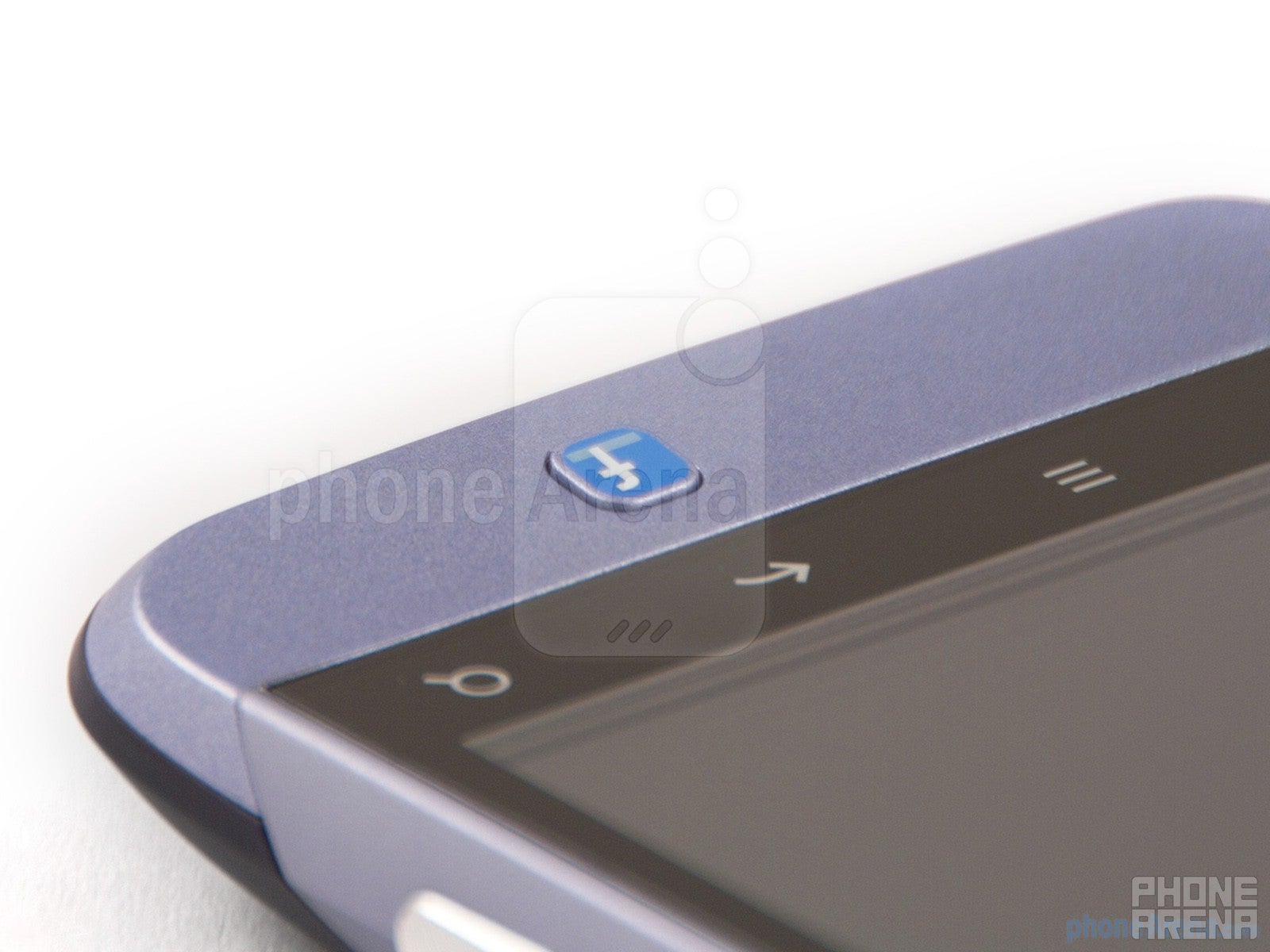
The first thing that strikes us about the design of the HTC Salsa is its build quality. This isn't a half baked chunky plastic job, it's every bit as well built as the HTC Desire S with an HTC Hero-esque styling. Until, that is, you arrive at the jarring blue button on the lower part of the fascia that makes it very clear what this phone's all about. But we'll come onto that later, now, lets talk about the screen.
The HTC Salsa is well built
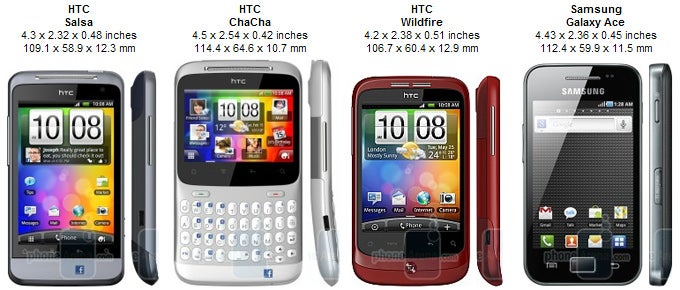
You can compare the HTC Salsa with many other phones using our Size Visualization Tool.
With HVGA resolution (320x480) and 3.4 inches of screen, the HTC Salsa delivers good overall contrast and brightness levels though isn’t very sharp. Viewing angles hold up pretty well and the capacitive display is certainly responsive enough to make the overall experience good, but it’s in the league below WVGA displays out there.
The HTC Salsa has 3.4 inches of screen
As far as the physical design goes, as mentioned, the HTC Salsa resembles a slightly squat HTC Hero with a chin that houses the all-important Facebook button. Directly below the display are 4 capacitive buttons while above is the front facing camera, light sensor and in-call speaker. There's a volume rocker and micro USB port to the left, while to the right is one of the best camera buttons we've seen on a phone, offering a large, easy to press, two stage shutter release. The power button and audio jack lie up top, while on the back is a 5MP autofocus camera, single LED flash and loudspeaker. The handset feels ergonomically curvaceous, though may be a bit thick and heavy for some. This all makes for a hardy mid-range bit of kit with a conspicuous Facebook button. That said, with the lackluster screen, we're hoping for some pretty special functionality to justify the HTC Salsa’s upper mid-range price-point.
Recommended For You
The sides of the HTC Salsa
Interface and Functionality:
Other than the new improved Sense 3.0 lock screen, the HTC Salsa's interface is virtually identical to that of the HTC Desire S and Wildfire S, with HTC Sense 2.1 on top of Android 2.3. There is also additional Facebook integration in the form of the Facebook chat app, and naturally the main feature, the Facebook button.
The HTC Salsa's interface
So how does the Facebook button work? Well it's really quite simple, press it from the home screen to update your status, long press it to update your location and press it when interacting with an image to upload the image to your profile where you can proceed to tag friends and caption your photo. You can also use the button in specific apps to send a music track to Facebook or in the camera module, to send the snap or video straight to your profile. See? Simple.
The burning question is whether or not this level of integration is too superficial to differentiate the HTC Salsa from non-Facebook phones. Our findings? In the week we had the handset, we did indeed upload more photos to Facebook thanks to the button's integration with the gallery and camera module, thoroughly enjoying how easy tagging friends is. That said, we didn't update our status any more often, despite it being just a click away. Unfortunately the button only interacts with a handful of native apps, so for us using Spotify and Doubletwist, the music integration was wasted. Heavy Twitter users reliant on cross platform apps such as HTC's Friend Stream or Tweet Deck could also find the Facebook specific integration limiting.
On top of the physical blue button, there’s an additional piece of software preinstalled - Facebook chat. This comes in the form of an application and a widget, both of which work reliably and predictably listing available friends, with the application alone letting you manage conversations. This app definitely gets a thumbs up, being one of the stronger points of the Facebook integration and far better than the stock Facebook app experience.
Facebook integration
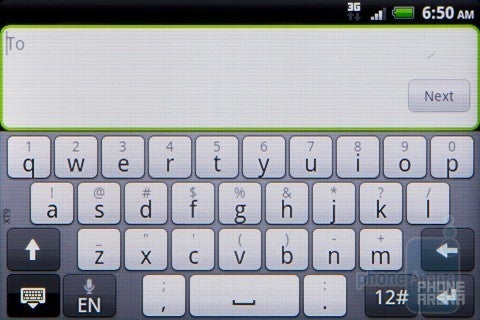
With the screen being larger than the one of the HTC Wildfire S, the keyboard is much more usable. It seems the 0.2" between them is the cut-off point between too small and comfortable.
On-screen keyboard
The HTC Salsa does therefore have some highlights inside, though we would have really liked to have seen deeper integration with the "share" function, making the Facebook button to extend functionality beyond HTC apps.
Camera and Multimedia:
As we highlighted in the design section, the shutter release on the HTC Salsa is one of the best we've used. An odd highlight considering the camera isn't the main focus of the phone, but we're not complaining. In fact, we find it quite fitting as while the camera isn't going to rival the top-enders, it's a very competent mid-range offering. With good levels of detail and saturation, some pictures can look really great and punchy. It doesn't have the best exposure handling, often blowing out skies and under exposing blacks in low-lit conditions, but when it got it right, it really got it right. The auto focus results in some pretty sweet close up shots (check out those strawberries) and the single LED flash managed to do an okay job of lighting up darker situations. In the future, we look forward to HTC applying some of the scene modes we saw in the HTC Sensation to more handsets as these could have saved some of the poorer pictures captured with the HTC Salsa.
Camera interface
Samples shot with the HTC Salsa
Video is captured at a 720x480 resolution and looks accordingly low quality. It's not smooth either, so ends up being a low-point of the phone. Even for Facebook uploads it disappoints which is a shame.
HTC Salsa Sample Video:
Music can be played back through HTC's standard music player which admittedly is starting to look a little tired now despite being perfectly functional. Fortunately, there are a range of alternatives in the market that can help spruce things up, not to mention Google's music app coming later this year, though none of these are compatible with the Facebook button.
The standard HTC music player
With no video codecs on the HTC Salsa beyond the standard MP4, this format is played back comfortably up to the 800x480 res, though no higher. The screen, however, is bright and big enough to make viewing of light movies on the go feasible.
Video playback
Internet and Connectivity:
HTC make sure their Facebook phone is well connected, with quad-band GSM, dual-band 3G, Wi-Fi, Bluetooth 3.0 and GPS. This makes perfect sense, always keeping you as close to Facebook as possible with all the technologies working reliably in our tests.
Web browsing is slightly sub-par thanks to the lower screen resolution offered by the HTC Salsa. Still, the screen is very responsive with multi-touch working well and pages loading up quickly.
Web browsing
Performance:
It turns out this Salsa is smooth, not too chunky and when it comes to performance, leaves a good overall taste in the mouth. A part of this probably has to do with HTC's decision to include an 800MHz processor instead of the 600MHz chipset as found on the HTC Wildfire S. This just means little slowdowns we noticed in applications such as Spotify and intense web pages didn't rear their ugly head with the same impact.
If you're conservative with battery usage, the HTC Salsa can stretch up to two days, which isn't bad for a smartphone these days. Expect that to drop to a full day if you're really going for it.
Reception is good overall as is call quality. Given the slightly larger form factor than the HTC Wildfire S, the HTC Salsa feels a lot more comfortable to talk on, we were able to hear the person on the other end clearly and they reported we sounded clear overall, though a bit of background noise interference was noticeable.
Conclusion:
So if you're looking for a phone in this price range, you will fall into one of two groups, those who should get an HTC Salsa or those who'd be better served with an HTC Desire S or another similarly specced handset. If you consider your phone's primary function to update your status, send pictures to your wall and share music, then the HTC Salsa could certainly help speed up your social workflow. It's also a good size, well put together and ships with a nice camera. The main issue we have which we outlined earlier however is the price-point. Nuzzled between the HTC Wildfire S and the HTC Desire S, it's far nearer the upper end of that spectrum than the little blue button would justify. Perhaps when the price drops we'll be less hesitant to recommend it, but until then, unless you're totally hooked on your Facebook, the HTC Salsa will remain in the shadows of its bigger brother, Facebook button or no Facebook button.
Software version of the reviewed unit: Baseband Version: 47.14.35.3030H_7.47.35.17 Build Number: 1.12.401.1_R CL68450 release-keys
A discussion is a place, where people can voice their opinion, no matter if it
is positive, neutral or negative. However, when posting, one must stay true to the topic, and not just share some
random thoughts, which are not directly related to the matter.
Things that are NOT allowed:
Off-topic talk - you must stick to the subject of discussion
Offensive, hate speech - if you want to say something, say it politely
Spam/Advertisements - these posts are deleted
Multiple accounts - one person can have only one account
Impersonations and offensive nicknames - these accounts get banned
To help keep our community safe and free from spam, we apply temporary limits to newly created accounts:
New accounts created within the last 24 hours may experience restrictions on how frequently they can
post or comment.
These limits are in place as a precaution and will automatically lift.
Moderation is done by humans. We try to be as objective as possible and moderate with zero bias. If you think a
post should be moderated - please, report it.
Have a question about the rules or why you have been moderated/limited/banned? Please,
contact us.








Things that are NOT allowed:
To help keep our community safe and free from spam, we apply temporary limits to newly created accounts: