Platforms like the Google support forum exist for a reason. It's the place where you post about issues and bugs you're encountering with your Google product, like the Pixel smartphone. If a particular problem has been reported a good number of times, Google often ends up fixing it. But there's a frustrating volume issue in Pixel smartphones that hasn't been fixed yet, even though there have been numerous complaints about it on various online forums.
What is the issue exactly about?
The problem is related to an accessibility feature that Google introduced with Android 14. It is called a headphone loud sound alert system, and it basically monitors your audio levels.
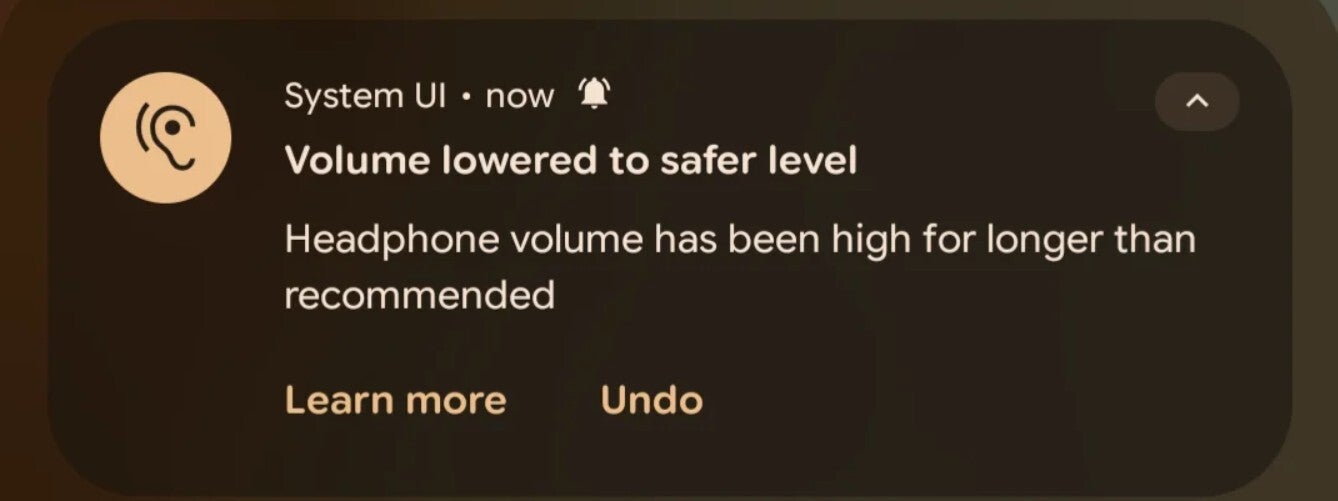
If the system detects that you're listening to audio at a very high volume, a warning pop-up appears on your smartphone, asking you to lower the volume. However, if you ignore the warning, the accessibility feature automatically reduces the sound to a level that it thinks is safe for ears.
While all this might sound smooth as butter on paper, many users find the behavior of automatically lowering the sound a bit annoying. There have been plenty of complaints about it on different community forums like Google Support and Reddit. A user said on Reddit that this feature would mess up their sets in the gym by lowering the music volume out of nowhere while they were performing their exercises.
Recommended For You
Another user posted a while ago that it automatically reduces the music volume while they are listening in their car. Now, a Redditor named Low_Brush_7972 posted about it yesterday on Reddit and said that they "cannot stand this feature."
They mentioned in the post that it's their choice how loudly they want to listen to music. They further noted that it also keeps lowering the voice navigation volume, which ultimately affects their navigation. At the time of writing, this particular Reddit post has almost 600 upvotes, with the majority of users who have commented on it wanting a way to disable it completely.
A light of hope actually appeared a few months ago
It's not that Google has completely ignored the complaints about this problem that have been posted online. The tech giant was reportedly working on a new Hearing Wellness option under the Sounds & Vibration section of the Settings app. It's designed to give you more control over how the loud sound alert system functions.
It reportedly had two toggles: Sound Exposure Notifications and Hearing Health. Disabling both toggles takes away the Pixel's power to automatically lower the volume, the ability that everyone online is asking Google for.
Unfortunately, the menu isn't live yet. I checked on my Pixel 10, which is running the latest Android 16 build, and I can't find the Hearing Wellness option under the Sounds & Vibration section.
Why hasn't the Hearing Wellness option been added yet?
Alert on a Pixel phone that the volume has been reduced. | Image by Redditor Low_Brush_7972
It's been multiple months since the menu was spotted, so it's quite strange that it hasn't been introduced yet. While it is not officially confirmed, this could reportedly be due to regional laws.
As it turns out, many EU countries, such as France, Germany, and others, have safe-listening laws. In these countries, users do not have the right to completely turn off features like the loud sound alert system, which has been designed to safeguard their ears from loud sounds.
But what about countries that aren't part of the EU and don't have safe listening laws? That's the part I can't figure out. I believe Google has yet to finalize what step it should take to address all complaints about this feature while also adhering to regional laws.
Do you think Pixel phones have been having too many issues lately?
52 Votes
Yes, way too many problems lately.
59.62%
I've experienced a display issue after the March update.
0%
My Pixel is lagging a lot after the March update.
5.77%
No, I don't have any issues with my Pixel.
34.62%
Fortunately, there's a working workaround
While the Mountain View giant has yet to roll out an official fix, there's a workaround that seems to work. A Reddit user posted that you can disable the feature using Shizuku and SystemUI Tuner. Although both apps are quite popular, it's worth noting that such tuning apps might mess up your device if you don't know what you're doing.
Furthermore, I, personally, haven't tried this solution. I would strongly advise you to wait for an official fix from Google. However, if the problem is really bothering you and you know how to use these tools, then you can definitely give it a try.
Trade in your old phone for cash at ecoATM!
Recycle your used phone and get instant cash. Find out how at ecoATM!
Aman Kumar is a news writer at PhoneArena covering Google Pixel phones, Android features, AI-powered smartphone tools, and mobile tech news. Before joining PhoneArena, he spent over five years writing about consumer technology for publications like MakeUseOf, How-To Geek, and Guiding Tech. His current daily drivers are the Pixel 10 and Samsung Galaxy S26 Plus, while his red iPhone SE (2nd gen) remains a personal favorite. Aman also appreciates bold smartphone experiments and still considers the Nokia N-Gage one of the industry’s most iconic designs.
A discussion is a place, where people can voice their opinion, no matter if it
is positive, neutral or negative. However, when posting, one must stay true to the topic, and not just share some
random thoughts, which are not directly related to the matter.
Things that are NOT allowed:
Off-topic talk - you must stick to the subject of discussion
Offensive, hate speech - if you want to say something, say it politely
Spam/Advertisements - these posts are deleted
Multiple accounts - one person can have only one account
Impersonations and offensive nicknames - these accounts get banned
To help keep our community safe and free from spam, we apply temporary limits to newly created accounts:
New accounts created within the last 24 hours may experience restrictions on how frequently they can
post or comment.
These limits are in place as a precaution and will automatically lift.
Moderation is done by humans. We try to be as objective as possible and moderate with zero bias. If you think a
post should be moderated - please, report it.
Have a question about the rules or why you have been moderated/limited/banned? Please,
contact us.









Things that are NOT allowed:
To help keep our community safe and free from spam, we apply temporary limits to newly created accounts: