New 'Magnifier' feature for Android P makes it easier to copy and paste

Android users know how much of a struggle it can be to select the words that they want to highlight to copy and paste. Right now, to highlight text, you need to long press on a word to call up the bar that reads "Copy, Search, Select All). The word you long pressed on is highlighted in blue, and a blue dot on each side of the word allows you to extend the highlighted portion of the text. Perhaps better than previous iterations, it still is far from a perfect solution. As a result, Android P will feature Magnifier, a better way to highlight what you want to copy and paste on your Android phone.
With Magnifier, you still get the two dots straddling both sides of the initial word you've highlighted with a long press. But now, you can place the cursor more precisely thanks to a magnified window above the text you are highlighting. The magnifier window works on all surfaces, not just text, so you can employ it when you want to zoom in on a photo.
While we still don't know what the "P" in Android P stands for (it could be popsicle), the new Android build is expected to launch later this summer. Just the other day, Google released the third beta version of the Android P operating system. The next beta will take Android P through the last testing stage before the final version is launched this quarter.
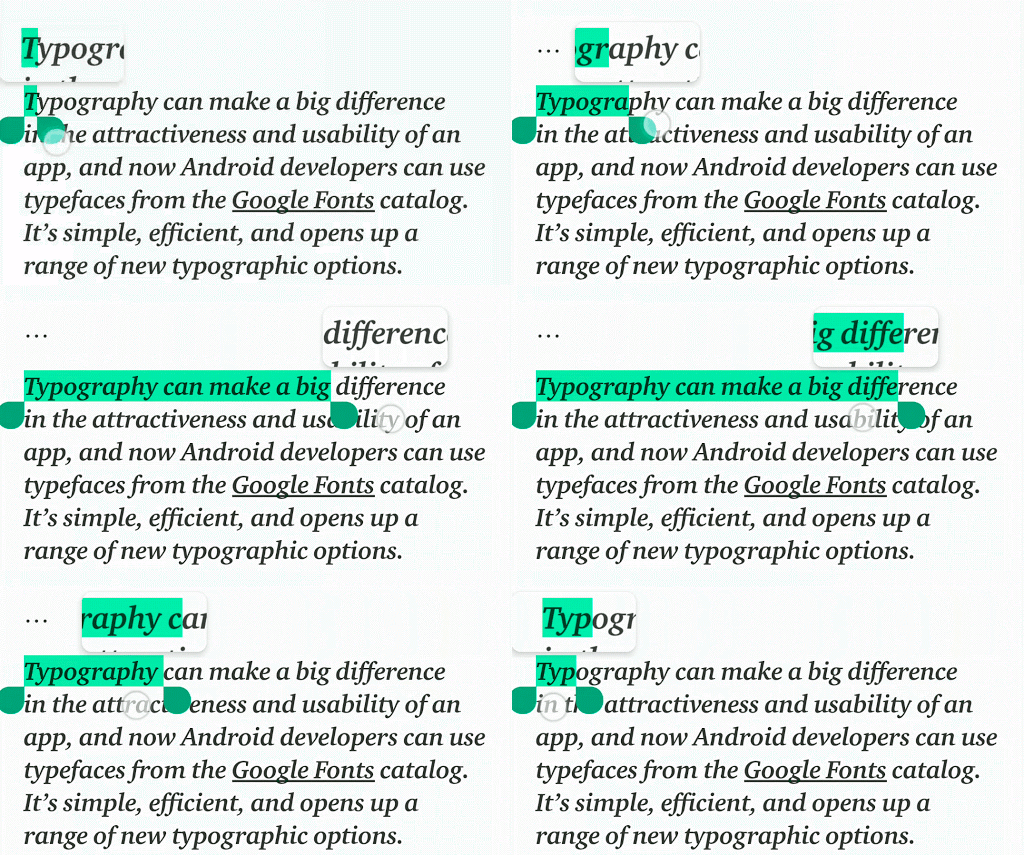
source: Google


Popular stories






Latest News






Things that are NOT allowed:
To help keep our community safe and free from spam, we apply temporary limits to newly created accounts: