In addition to the many new features coming to Google Messages soon in honor of RCS surpassing one billion monthly active users, the app is also preparing to unveil an update to its text field, introducing a dedicated shortcuts bar and a left-aligned layout.
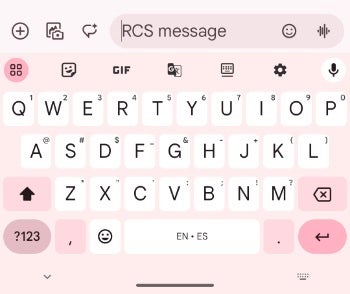
Previously, the RCS/text message field occupied the right two-thirds of the screen, with key functions like "plus," gallery, and Magic Compose disappearing as you typed. Emoji and voice memo shortcuts resided on the opposite end, creating a scattered and sometimes frustrating user experience.
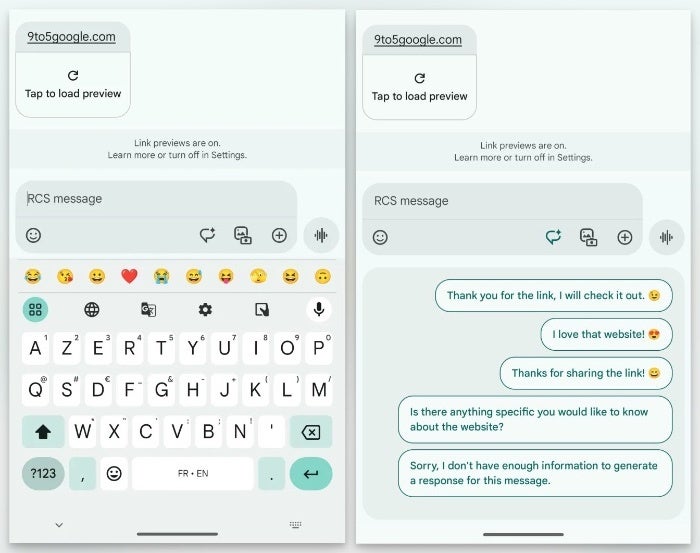
However, as noted by 9to5Google, this changes with the new layout which has the the interface cleverly splitting into two distinct lines as you start typing. The text field now takes a bold left-aligned stance, mirroring the flow of conversation. This shift is accompanied by a dedicated shortcuts bar that keeps "plus," Magic Compose, the gallery (sporting a fresh icon), and the voice recorder readily accessible, regardless of text input.
Google Messages text field before redesign | Credit: Phone Arena
Google Messages text field after redesign | Credit: 9to5Google
The voice recorder feature is also no longer relegated to the sidelines, as it now gets its own button, possibly in preparation for its integration with the Moods feature announced last week. The new split-level interface, with the text field on top and the shortcuts bar below, might come across as jarring at first, but I believe will be beneficial as more features are added and more real estate may be needed for additional shortcuts.
Recommended For You
Some early adopters in the Google Messages beta program are already seeing this text field transformation, though wider availability is yet to come. However, with Google actively rolling out the update alongside other noteworthy features announced earlier this week, it's safe to say Google is putting all their weight behind making Google Messages a highly competitive messaging app and not afraid to roll out these changes more widely.
Get iPhone 18 Pro with Visible, get $480 off!
$719
/mo
$1199
$480 off (40%)
On the Visible+ Pro plan, you get access to 5G Ultra Wideband data on Verizon's fastest network. Along with unlimited roaming across Mexico and Canada, 2 days of Global Pass per month, 3x hotspot speeds, 4K streaming, and Smartwatch service.
Johanna Romero is a Senior News Writer at PhoneArena, covering mobile technology news across Android, iOS, wearables, and the Google ecosystem she knows best. Drawing on 15 years in IT and tech support from 2007 to 2022, she brings a user-friendly eye for the practical features and lesser-known tricks readers care about. Google named her an official #TeamPixel member in 2022, and she also reviews the latest devices on her YouTube channel, JoJo the Techie.
A discussion is a place, where people can voice their opinion, no matter if it
is positive, neutral or negative. However, when posting, one must stay true to the topic, and not just share some
random thoughts, which are not directly related to the matter.
Things that are NOT allowed:
Off-topic talk - you must stick to the subject of discussion
Offensive, hate speech - if you want to say something, say it politely
Spam/Advertisements - these posts are deleted
Multiple accounts - one person can have only one account
Impersonations and offensive nicknames - these accounts get banned
To help keep our community safe and free from spam, we apply temporary limits to newly created accounts:
New accounts created within the last 24 hours may experience restrictions on how frequently they can
post or comment.
These limits are in place as a precaution and will automatically lift.
Moderation is done by humans. We try to be as objective as possible and moderate with zero bias. If you think a
post should be moderated - please, report it.
Have a question about the rules or why you have been moderated/limited/banned? Please,
contact us.




Things that are NOT allowed:
To help keep our community safe and free from spam, we apply temporary limits to newly created accounts: