Google starts rolling out Android Cross-device services
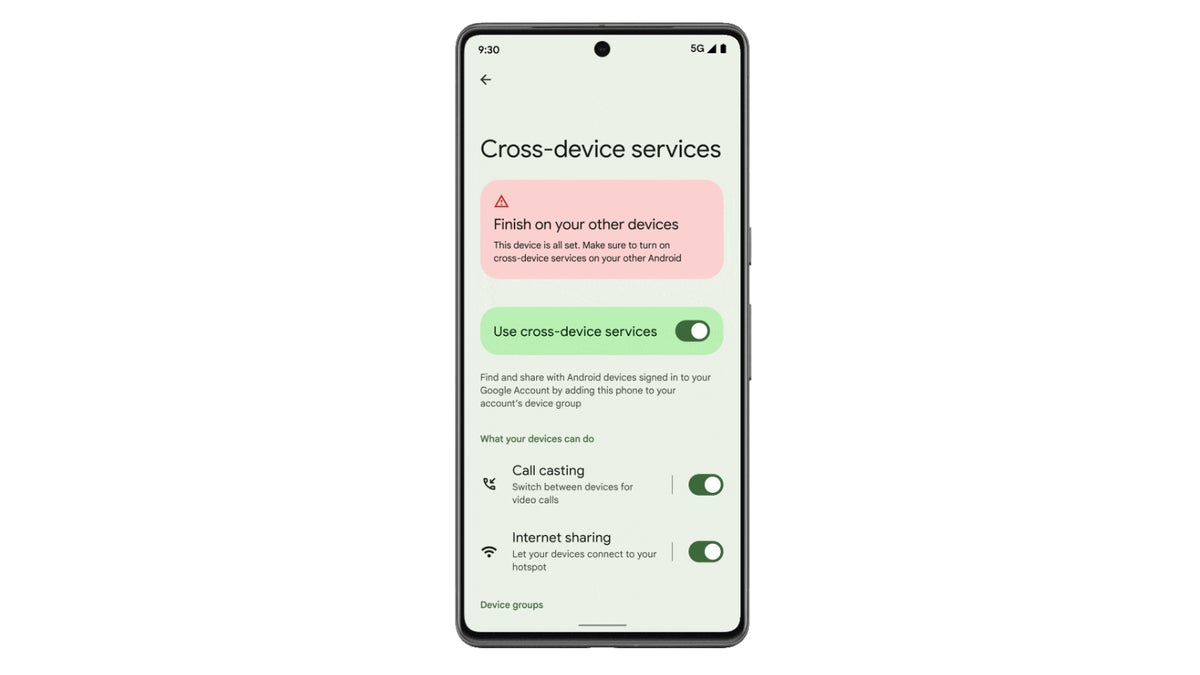
Switch devices in the middle of a call or connect to your hotspot with just a tap | Image credits: Google
Starting this week, Call casting and Instant hotspot are making their way to Android users, according to 9to5google. With Instant hotspot, users can connect their Android tablet or Chromebook to their phone’s hotspot with one tap, skipping any intermediary steps like typing in a password.
As Google points out, Call casting is only available for certain apps. Also, the Mountain View company says that some data about users’ devices may be shared with those apps when switching devices.
As far as Instant hotspot goes, it’s important to mention that this isn’t available on Samsung devices. Google says that those with Samsung devices should take advantage of the auto-hotspot feature instead.
To start using these Cross-device services on your Android device, simply head to Settings / Google / Devices & sharing / Cross-device services. You’ll have to create a device group by enabling Call casting and Internet sharing / Instant hotspot features on the devices you plan to use.


Popular stories




Latest News




![Another batch of Galaxy S26 series users in the US are getting a nice surprise today [UPDATED]](https://m-cdn.phonearena.com/images/article/183643-wide-two_350/Another-batch-of-Galaxy-S26-series-users-in-the-US-are-getting-a-nice-surprise-today-UPDATED.webp)
Things that are NOT allowed:
To help keep our community safe and free from spam, we apply temporary limits to newly created accounts: