
Wi-Fi Assist is improved in iOS 9.3 beta 1, to allow users to track the amount of data used
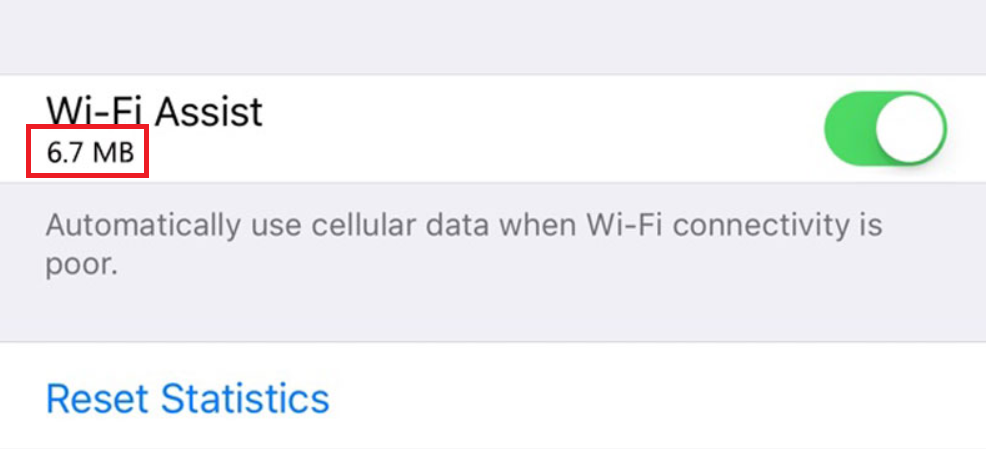
With iOS 9.3, beta 1, the amount of data consumed during the month on Wi-Fi Assist can be viewed on the screen
Earlier this month, we told you about the teenager who received a $2000 bill from his carrier thanks to Apple's Wi-Fi Assist. The feature takes a weak Wi-Fi connection and automatically switches it to a cellular connection belonging to the user's mobile operator. Since Wi-Fi Assist is on by default, someone with an iPhone running iOS 9 could ring up huge overage charges without knowing about it.
Had Apple had this in place earlier, teenager Ashton Finegold could have noticed that he was using an alarming amount of data with Wi-Fi Assist. In the teen's particular case, he thought that he was using a Wi-Fi connection while using his Apple iPhone. But as it turns out, the Wi-Fi signal in his room was extremely weak, which led Wi-Fi Assist to constantly switch to a cellular connection. Even though Ashton thought that he was connected to a Wi-Fi signal, he was actually burning through 144GB of data from his unnamed wireless operator in just one month.


Popular stories





Latest News






Things that are NOT allowed:
To help keep our community safe and free from spam, we apply temporary limits to newly created accounts: