App shortcuts not enough? Make your wallpaper shine through with Super Shortcuts
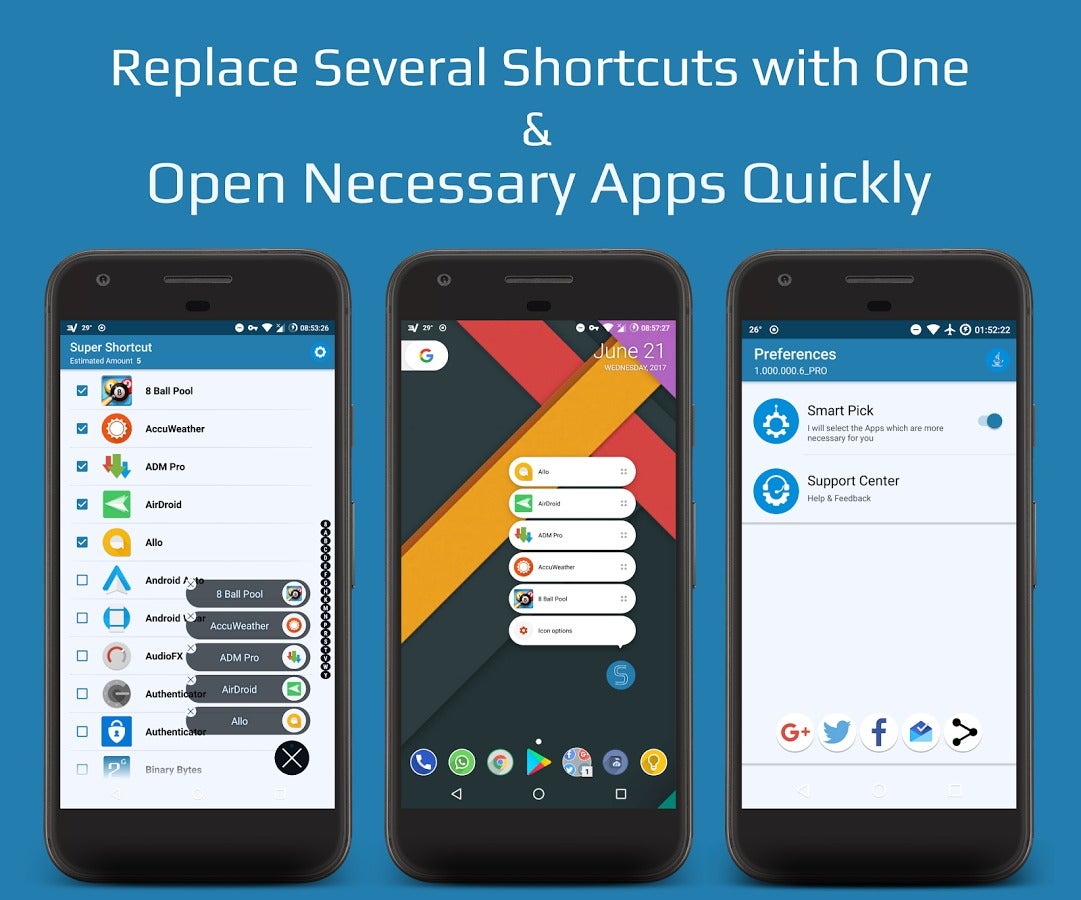
This same neat trick has now been leveraged to create the Super Shortcuts application, which does a better job than folders at de-cluttering your home screen, leaving only the wallpaper to shine from behind.
The premise is the same as with app shortcuts, but instead of individual app functions, you can launch a number of your most used apps directly from the Super Shortcut icon on the home screen. It takes less space than a folder, and is quicker to access as well:
1. Download Super Shotcuts from Google Play, set it up to pop shortcuts to your most used apps or functions, and place it on your home screen;
2. In case the Play Store shows that Super Shortcuts isn't available in your area, download the APK package, and install it directly from the sideloaded file.
source: Geeks Empire (XDA-Devs)


Popular stories






Latest News


Things that are NOT allowed:
To help keep our community safe and free from spam, we apply temporary limits to newly created accounts: