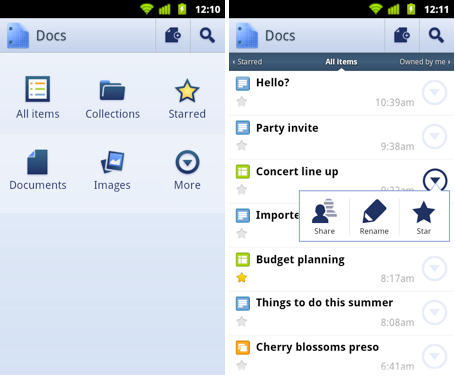
Some Android users might think that their wish on that falling star has finally come true with the release of Google Docs as an Android app. Available from the Android Market as a free download in English for Android phones running 2.1+, Google Docs allows you to access all of your Google documents from all of your Google accounts. You can even open content while in Gmail. Search, star, edit, rename and of course, read your documents right on your mobile device. A widget is available which allows you to open your Google documents straight from your phone's home screen.
Once on your screen, you can edit documents while on the go and share them straight from your Android handset. And with the app and the camera on your phone, photos with text can be turned into an editable Google document using optical character recognition. Create new documents from just snapped pictures and old shots from your gallery can be converted by sharing them with the app. Google's own blog notes that there are some limitations such as the inability of the app to read handwritten text or some fonts. But the Mountain View company did say to "stay tuned-things will get better over time."
Alan, an ardent smartphone enthusiast and a veteran writer at PhoneArena since 2009, has witnessed and chronicled the transformative years of mobile technology. Owning iconic phones from the original iPhone to the iPhone 15 Pro Max, he has seen smartphones evolve into a global phenomenon. Beyond smartphones, Alan has covered the emergence of tablets, smartwatches, and smart speakers.
A discussion is a place, where people can voice their opinion, no matter if it
is positive, neutral or negative. However, when posting, one must stay true to the topic, and not just share some
random thoughts, which are not directly related to the matter.
Things that are NOT allowed:
Off-topic talk - you must stick to the subject of discussion
Offensive, hate speech - if you want to say something, say it politely
Spam/Advertisements - these posts are deleted
Multiple accounts - one person can have only one account
Impersonations and offensive nicknames - these accounts get banned
To help keep our community safe and free from spam, we apply temporary limits to newly created accounts:
New accounts created within the last 24 hours may experience restrictions on how frequently they can
post or comment.
These limits are in place as a precaution and will automatically lift.
Moderation is done by humans. We try to be as objective as possible and moderate with zero bias. If you think a
post should be moderated - please, report it.
Have a question about the rules or why you have been moderated/limited/banned? Please,
contact us.





![Some T-Mobile users need to restart their phones [UPDATED]](https://m-cdn.phonearena.com/images/article/173654-wide-two_350/Some-T-Mobile-users-need-to-restart-their-phones-UPDATED.webp)




 FCC OKs Cingular\'s purchase of AT&T Wireless
Things that are NOT allowed:
To help keep our community safe and free from spam, we apply temporary limits to newly created accounts: