The Samsung Galaxy Watch Ultra and the Galaxy Watch 7have received their first update in the US. The main focus of this update is to fix bugs and improve the overall stability of the watches.
Here are the build numbers of the update for each watch:
Galaxy Watch Ultra: L705USQU1AXG2
Galaxy Watch 7 (40mm): L305USQU1AXG2
Galaxy Watch 7 (44mm): L315USQU1AXG2
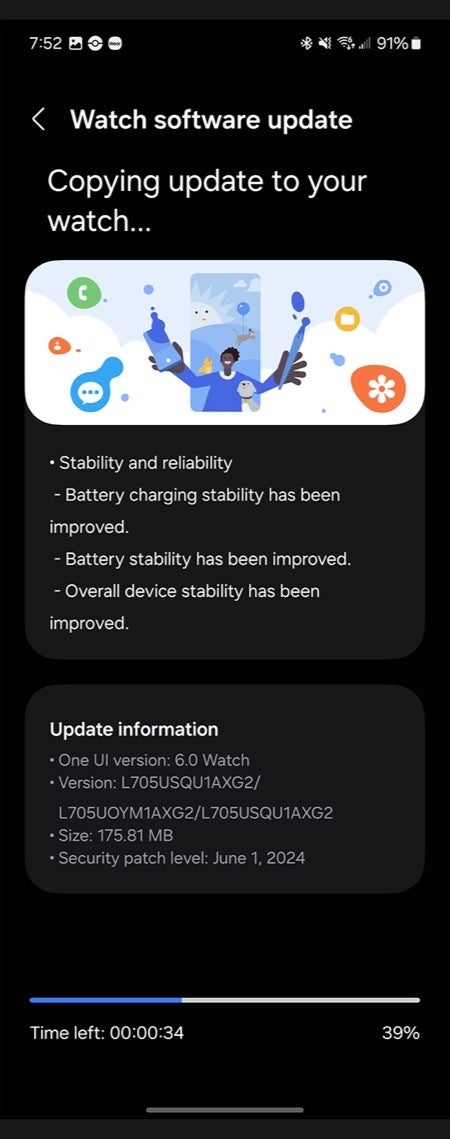
The size of this update was reported to be 175.81MB for the Galaxy Watch Ultra. To install it, open the Galaxy Wearable app on your phone and go to "Watch Settings." From there, scroll down until you find the "Watch software update" section and tap "Download and install." To be safe, before starting the update, ensure your watch has at least a 30% charge, otherwise you won't be able to update it.
One UI 6 rolls out to the Samsung Galaxy Watch Ultra and the Galaxy Watch 7 | Image credit — Droid-Life
Samsung's changelog for the update was fairly simple, emphasizing that it was primarily focused on enhancing "stability and reliability." The company also mentioned improvements to "battery charging stability" as well as overall battery stability. In fact, they repeated the word "stability" four times in their brief four-line changelog.
This update is great news for Galaxy Watch Ultra and Galaxy Watch 7 users in the US, as it addresses initial bugs and enhances the overall performance and stability of the watches. With improved battery stability, users can expect a more reliable and consistent experience. The update's emphasis on stability and reliability suggests that Samsung is committed to providing a smooth and seamless user experience for its smartwatch users.
Trade in your old phone for cash at ecoATM!
Recycle your used phone and get instant cash. Find out how at ecoATM!
Johanna Romero is a Senior News Writer at PhoneArena, covering mobile technology news across Android, iOS, wearables, and the Google ecosystem she knows best. Drawing on 15 years in IT and tech support from 2007 to 2022, she brings a user-friendly eye for the practical features and lesser-known tricks readers care about. Google named her an official #TeamPixel member in 2022, and she also reviews the latest devices on her YouTube channel, JoJo the Techie.
A discussion is a place, where people can voice their opinion, no matter if it
is positive, neutral or negative. However, when posting, one must stay true to the topic, and not just share some
random thoughts, which are not directly related to the matter.
Things that are NOT allowed:
Off-topic talk - you must stick to the subject of discussion
Offensive, hate speech - if you want to say something, say it politely
Spam/Advertisements - these posts are deleted
Multiple accounts - one person can have only one account
Impersonations and offensive nicknames - these accounts get banned
To help keep our community safe and free from spam, we apply temporary limits to newly created accounts:
New accounts created within the last 24 hours may experience restrictions on how frequently they can
post or comment.
These limits are in place as a precaution and will automatically lift.
Moderation is done by humans. We try to be as objective as possible and moderate with zero bias. If you think a
post should be moderated - please, report it.
Have a question about the rules or why you have been moderated/limited/banned? Please,
contact us.









Things that are NOT allowed:
To help keep our community safe and free from spam, we apply temporary limits to newly created accounts: