Apple vs Samsung vs LG vs Pixel and more notification shades: visual comparison
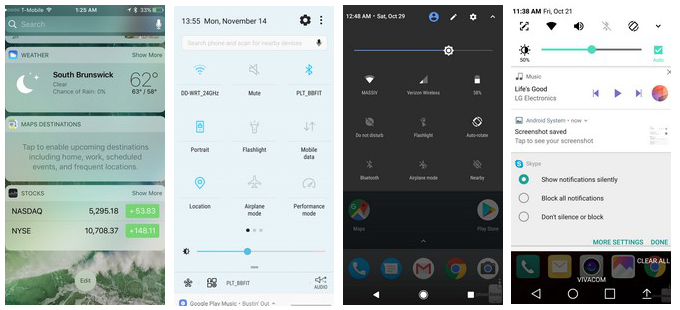
Apple vs Samsung vs stock vs LG notification shades - can you spot the differences?
Those hidden interface panels where phone makers place shortcuts for quick access to connectivity toggles, and host app, call or message notifications, are one of the more diverse interface segments that can make or brake the respective user experience. From background to layout, from iconography to notification access - each and every one of the major phone brands approaches the notification and toggle shades' visuals in a different manner, and provides different ways to access them.
This interface element is usually tucked away from plain sight, and only visible when you pull up or down to preview a message or turn on, say, Bluetooth. The way you access the shade, however, and its layout, could make interaction with your device easier, or an exercise in frustration, that is why we wanted to do a brief listing of who does it how, so you can gauge what you are missing, or where the toggle panel of your phone maker excels compared to the rest. Check them out and tell us whose approach is your fav in the poll below.
Apple vs Samsung vs LG vs Pixel and more notification shade solutions
Whose notification/toggles shade solution you like most?
1859 Votes
Samsung
25.44%
Apple
18.07%
LG
10.27%
Stock (Pixel, HTC, Moto, Sony)
41.53%
EMUI (honor, Huawei)
2.96%
Other
1.72%


Popular stories





Latest News






Things that are NOT allowed:
To help keep our community safe and free from spam, we apply temporary limits to newly created accounts: