App allows Samsung Galaxy Note 9 users to remap the Bixby button
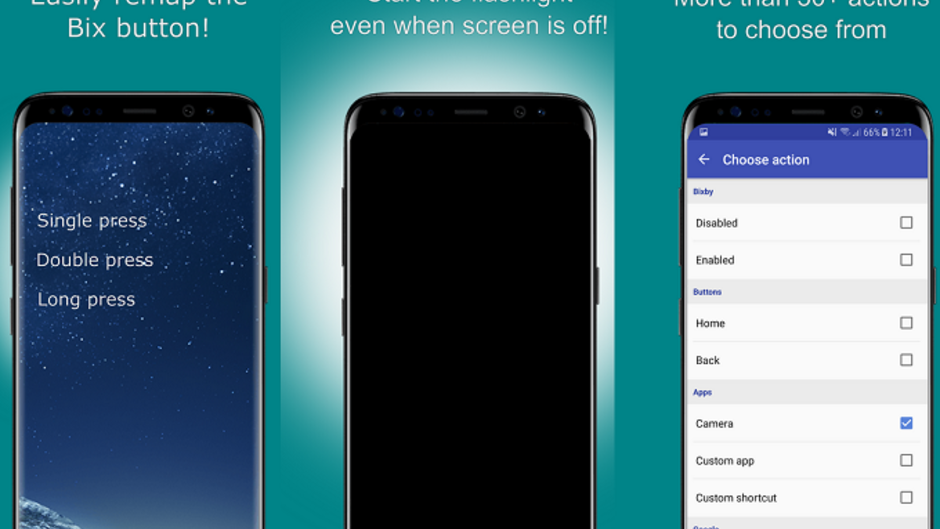
Ok, you love your Samsung Galaxy Note 9, but if there is one thing that is driving you out of your mind, it is the Bixby button. It isn't the idea of the button being there that makes your blood boil, just the point that it can't be remapped like the convenience key on an all-touch BlackBerry. And with the launch of Bixby 2.0 on the Galaxy Note 9, the button cannot be disabled.
However, an app on the Google Play Store, bxActions, has been updated to allow it to remap the Bixby button on the Galaxy Note 9. There are more than 30 actions that can be opened with the remapped Bixby button, including Google Assistant. Unfortunately, the new generation of Bixby means that not all features of the app work on the Galaxy Note 9 as they do on Galaxy models sporting the first generation of Bixby.
Seize control of the Bixby button on your Samsung Galaxy handset. With bxActions, you can set the button to open any app, take a screenshot, and if your phone features the first generation of Bixby (Galaxy S8, Galaxy S8+, Galaxy Note 8, Galaxy S9, Galaxy S9+), you can actually use the app to disable the Bixby button, and set additional shortcuts that are activated with a double press and long press of the Bixby button.
To install bxActions on your handset, click on the sourcelink below.


Popular stories




Latest News



Things that are NOT allowed:
To help keep our community safe and free from spam, we apply temporary limits to newly created accounts: