Google Maps is making it easier to plan trips with a brand-new feature that will make it unnecessary to scroll through tons of screenshots anymore. Now, when you see a place you like in a picture on your phone, you can save it straight to your Google Maps lists. This will save you time and make planning your trips much simpler.
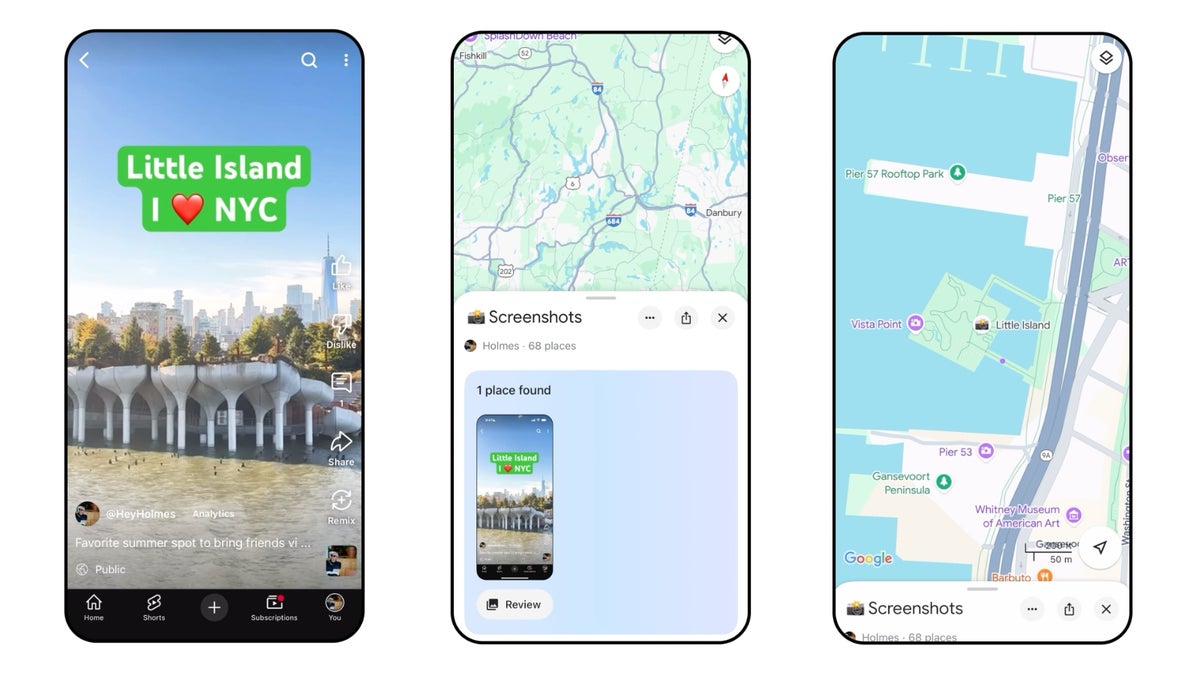
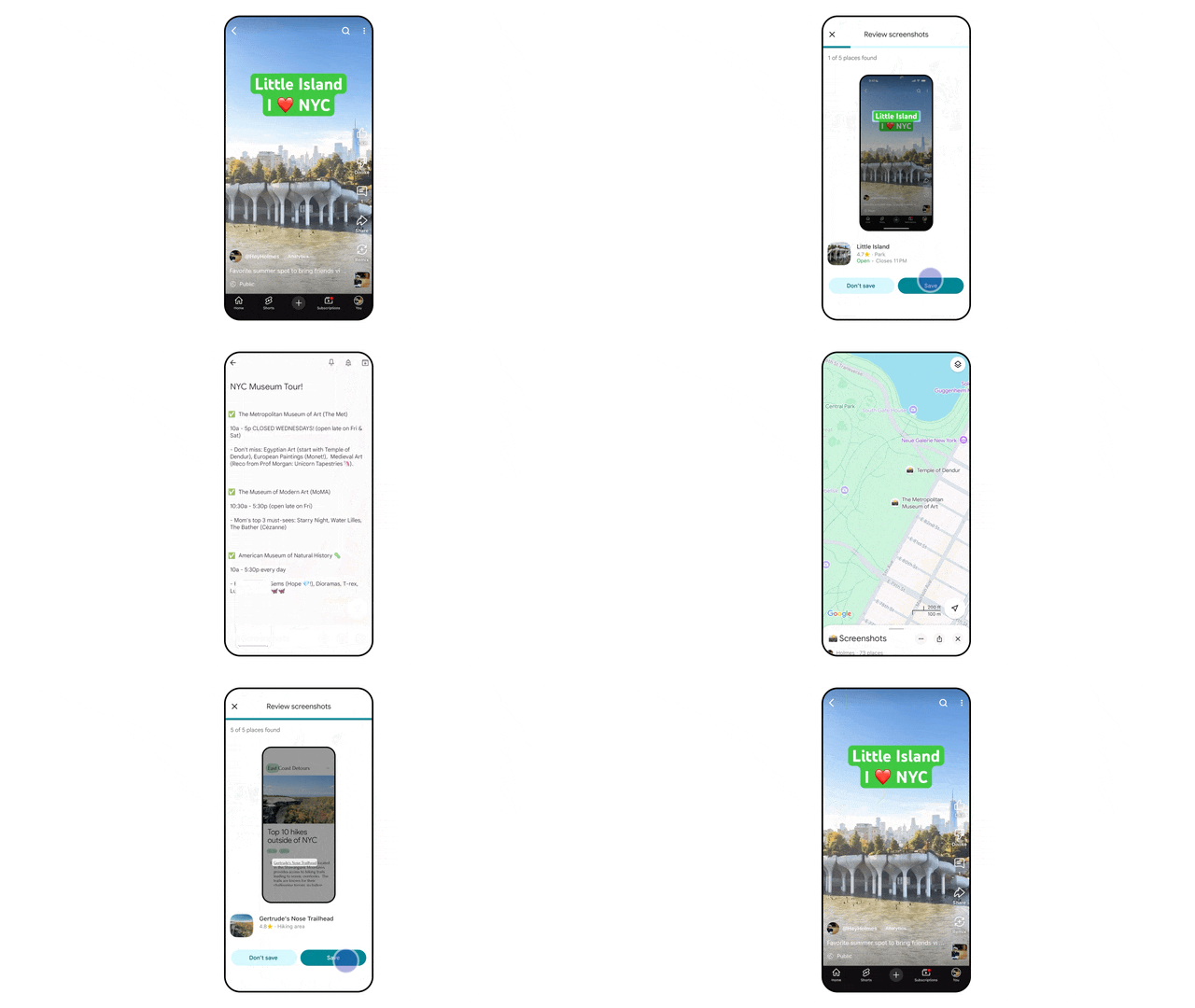
Lots of people plan their trips by jotting down notes, saving posts they see online, and taking many screenshots of places they want to visit. But it can be hard to remember where you saw that nice coffee shop or that amazing view. Google Maps is trying to fix this by automatically finding places in your screenshots. If you turn on the new "screenshot" list, the app, which uses AI, will look at your photos, find the names of places, and let you save them to a special list in Maps. These saved spots will then show up on your map, and you can easily share your list with the people you're traveling with. This feature is starting to appear in the U.S. for English-speaking users on iPhones, and it will be available on Android soon.
Google Maps will be able to use your phone's screenshots . | Image credit — Google
This new feature is one of several ways Google is trying to make travel easier. Recently, Google Search added a feature that uses AI to help you think of trip ideas and even create day-by-day plans. Also, you can now track hotel prices on Google Hotels to help you find good deals. And with Google Lens, you can point your phone's camera at things around you to get information about them, like a smart tour guide. It's clear that Google wants to make planning and exploring new places easier for everyone.
Recommended For You
Being able to easily save places you find in pictures right into your map is a great addition. It solves a common problem for travelers and makes it easier to get started with planning. Even though it might seem like a small update, not having to manually search for and save places from screenshots could really make planning trips much better. It will be interesting to see how people use this feature and how it gets even better on Android.
Trade in your old phone for cash at ecoATM!
Recycle your used phone and get instant cash. Find out how at ecoATM!
Johanna Romero is a Senior News Writer at PhoneArena, covering mobile technology news across Android, iOS, wearables, and the Google ecosystem she knows best. Drawing on 15 years in IT and tech support from 2007 to 2022, she brings a user-friendly eye for the practical features and lesser-known tricks readers care about. Google named her an official #TeamPixel member in 2022, and she also reviews the latest devices on her YouTube channel, JoJo the Techie.
A discussion is a place, where people can voice their opinion, no matter if it
is positive, neutral or negative. However, when posting, one must stay true to the topic, and not just share some
random thoughts, which are not directly related to the matter.
Things that are NOT allowed:
Off-topic talk - you must stick to the subject of discussion
Offensive, hate speech - if you want to say something, say it politely
Spam/Advertisements - these posts are deleted
Multiple accounts - one person can have only one account
Impersonations and offensive nicknames - these accounts get banned
To help keep our community safe and free from spam, we apply temporary limits to newly created accounts:
New accounts created within the last 24 hours may experience restrictions on how frequently they can
post or comment.
These limits are in place as a precaution and will automatically lift.
Moderation is done by humans. We try to be as objective as possible and moderate with zero bias. If you think a
post should be moderated - please, report it.
Have a question about the rules or why you have been moderated/limited/banned? Please,
contact us.










Things that are NOT allowed:
To help keep our community safe and free from spam, we apply temporary limits to newly created accounts: