Update allows some Android users to enable Bluetooth, Wi-Fi from Google Search

Introduced last year at Google I/O, Android Slices allows a "slice" or a part of a third-party app to appear in places like Google Search. Now, a server-side update for Pixel models running on Android 9 Pie is allowing users to enable certain settings by typing the name in the Google Search bar. For example, if you go to Google Search and type in Bluetooth, you'll see among your search history the settings gear icon followed by the word "Bluetooth" and a live toggle switch.
In addition to Bluetooth, this feature is also available for Wi-Fi (typed as wi-fi). Once again, the settings icon can be seen along with a live toggle switch that will allow you to quickly enable or disable Wi-Fi on your phone. The name of the network that your handset is connected to also appears. Prior to the update, the settings icon would appear without the toggle switch. The feature will work with phones running Android builds as old as 4.4 KitKat, but has been seen on Android 9 Pie only for now.
Slices give Android users the ability to quickly enable and disable settings without having to actually go into the settings menu. Other examples that Google has promoted for Slices include the Brightness Level on a phone (complete with slider), although that has yet to show up. With third party apps, users could type in Lyft in the Google Search bar and see live options that would allow them to quickly schedule a ride without opening the Lyft app.
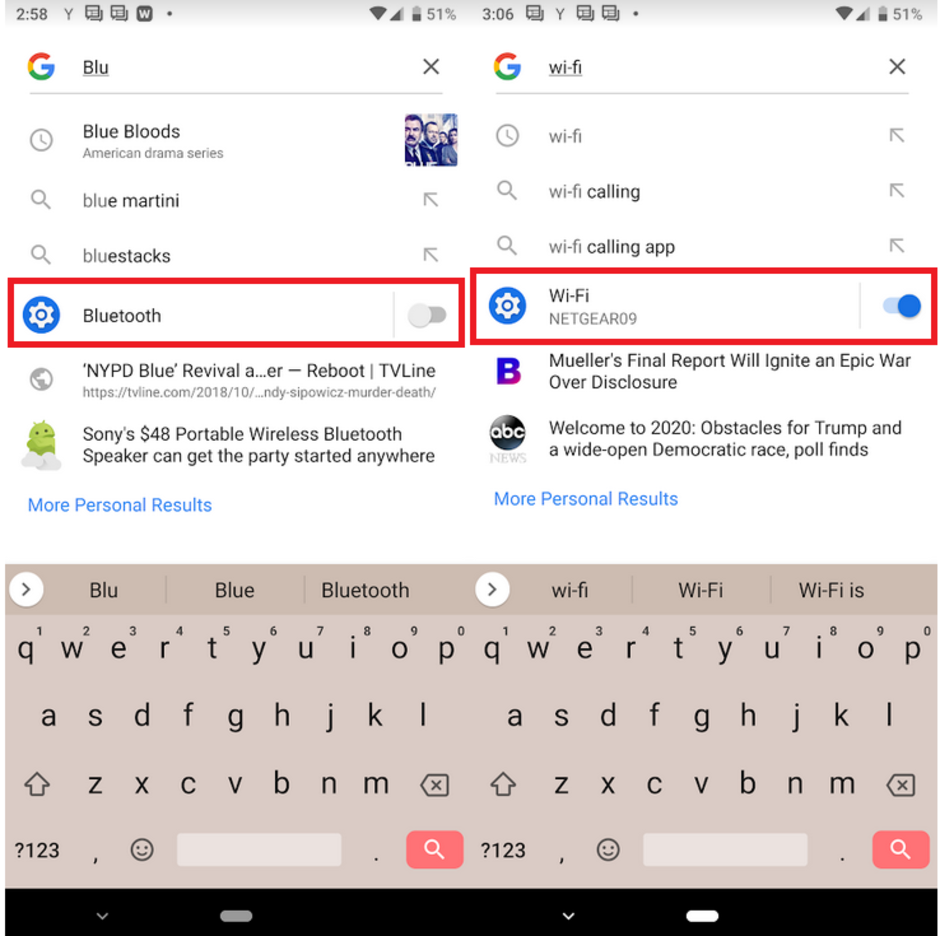
Slices for Bluetooth and Wi-Fi


Popular stories




Latest News


Things that are NOT allowed:
To help keep our community safe and free from spam, we apply temporary limits to newly created accounts: