PhoneArena is looking for new authors! To view all available positions, click here.
  • Home
  • News
  • Google Maps 6.9 update breaks offline maps availability for many countries


Google Maps 6.9 update breaks offline maps availability for many countries

Posted: , by Victor H.

Categories:

Share:

Discuss 11
Google Maps 6.9 update breaks offline maps availability for many countries
Google Maps is probably the most popular mapping application in the world, riding along the Android popularity wave, and up until now it had a neat little feature that allowed you to pre-cache a map on your phone, so you could see it even when you have no coverage. 

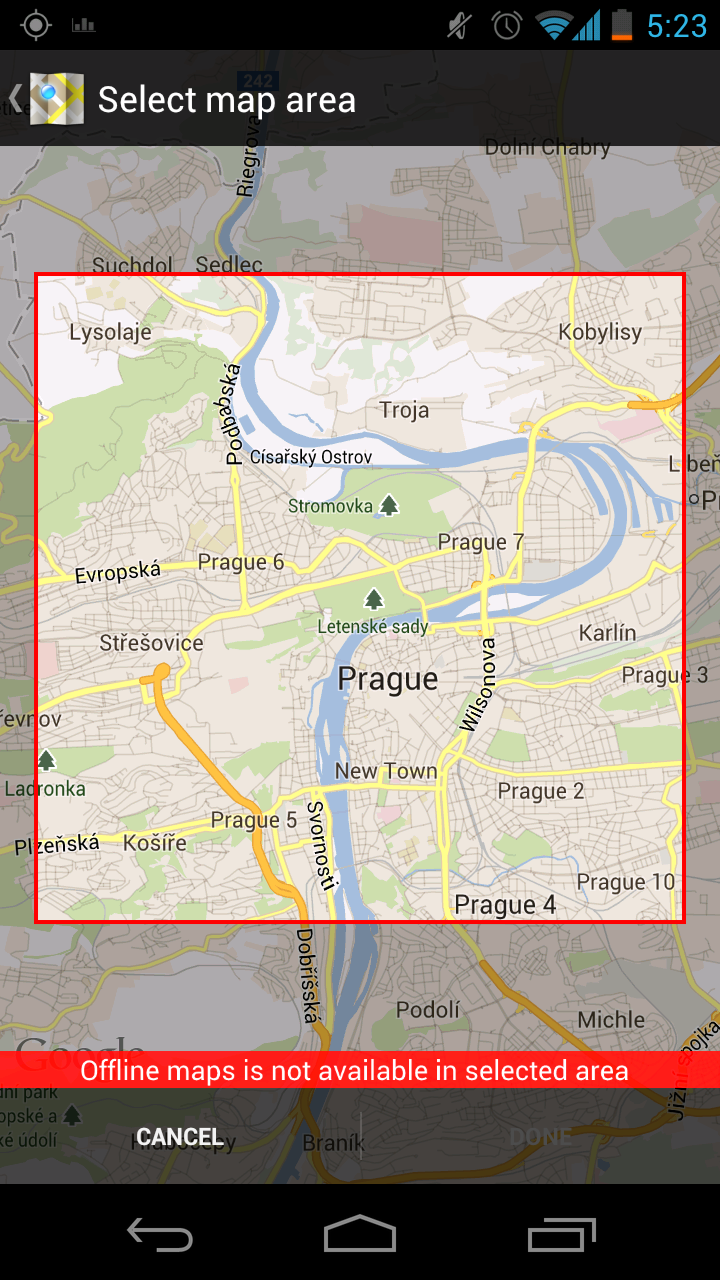
Ironically, the latest 6.9 update to the Google Maps application that brings the feature out of its hiding place in the Settings menu and into a more prominent location, breaks offline maps for a lot of countries where the feature was previously available, and that’s a bummer.
Google Maps 6.9 update breaks offline maps availability for many countries
As far as we could tell in our tests, you can make maps available for offline viewing for most countries and cities in Western countries, but cross an invisible line and go in say Africa or Eastern Europe and the feature suddenly stops working. What’s bad is that what previously worked for countries and cities, now suddenly is no longer available despite the update aiming to bring offline maps to more people.

Correction: Turns out, after some more testing and playing around with offline viewing for Google Maps that the feature is not broken, but rather it works differently. Google Maps will misleadingly come up with "maps not available in selected area" message, but if you zoom in or out, you'd after all be able to save the maps for offline use. It seems that this has something to do with a limitation of map sizes, so you can't save too small or too large of an area. In either case, the offline maps feature does work in the newest update, it just takes some time to arrive at the right zoom level.

So for the time being, if you can no longer save maps for offline viewing on Google Maps, we can only recommend you uninstall the app and revert back to a version 6.8.1 or earlier. From there, you’d still be able to have offline maps by going to the Labs menu in Settings.

Thanks, anonymous!

Share:

Discuss11

11 Comments

  • Options
    Close


Want to comment? Please login or register.

1. itiswhatitis posted on 10 Jul 2012, 09:50 1

Now that's funny!

4. iWorld posted on 10 Jul 2012, 10:18 1 2

funny for funny people.It is What It is.........

6. itiswhatitis posted on 10 Jul 2012, 10:50 1

Yep, i alwasy mange to see the humour side of everything so yeah iWorld its funny

2. remixfa posted on 10 Jul 2012, 10:02 3 2

thats an odd maneuver. I'm sure there was a reason for google to do that though. Maybe the new offline maps downloads a lot of extra info compared to the old ones (like highlights of interest/ect) and the countries that lost it dont have all that loaded into the system yet? Just a wild guess, but im sure there is a reason.

3. sbr999 posted on 10 Jul 2012, 10:07 1

Cross the line and go in Africa or Eastern Europe... lol =)

5. blowfish posted on 10 Jul 2012, 10:36

The latest version won't keep the offline maps in the US for me. It will let me download the map and after a while if I go back into Maps the offline map will be gone. I have a Samsung Captivate. Does anyone else have this issue?

7. Stuntman posted on 10 Jul 2012, 11:47 1

This is the reason I don't bother updating my apps if I know it is already working well for me. Got burned before when an update broke something on the old version.

8. alihafeez posted on 10 Jul 2012, 12:29

Please advise how to revert back to one version prior to the latest. I had faced a similar dilemma on my froyo set and never found a workaround.

10. Stuntman posted on 10 Jul 2012, 16:32

Yeah. You don't get the option of installing a specific version of the app. You either update it to the latest or you remove it. If I could select the specific version, I'd have done that a long time ago for my Facebook app. The current version sucks.

9. sid07desai posted on 10 Jul 2012, 13:24 2

This is why never select 'Automatically download updates' in the play store. If it ain't broke, don't fix it! :|

11. zan4o posted on 11 Jul 2012, 06:45

It's work like charm!
Go to My places\Offline\New offline map
Search for desired city and download it!
Why don't you try harder before publishing a "news"!

Want to comment? Please login or register.

Hot Phones

  • Samsung Galaxy S4Samsung Galaxy S4
  • Apple iPhone 5Apple iPhone 5
  • Samsung GALAXY Note IISamsung GALAXY Note II
  • HTC OneHTC One
  • Sony Xperia ZSony Xperia Z
  • Google Nexus 4Google Nexus 4
  • LG Optimus GLG Optimus G
  • Nokia Lumia 920Nokia Lumia 920