How to sideload Android 4.2.2 on your Google Nexus 4
4comments
If you are not one of the lucky souls that are having their latest Android update fix over the air on the Google Nexus 4, there are, naturally, ways to manually push it to your handset, instead of tapping the software update button hundred times a day.

The easiest thing to do is of course have custom recovery and flash the update as usual, and the newest CWM Touch even warns you will lose root and recovery after the flash, and offers to fix it for you when all is said and done. Alternatively, if you are stock, you can get geeky and bravely sideload via ADB:

1. You will need two things - the latest Android SDK and the 4.2.2 update - downloaded from Google. Make sure you follow the installation instructions and load the SDK software on your computer. You have to make sure ADB is working, so open a command prompt by typing 'cmd' in the Windows search field, and key in 'adb devices'.

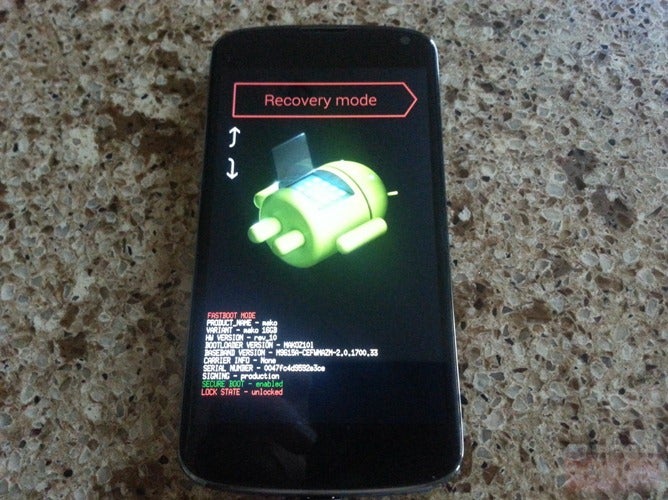
2. Restart the Nexus 4 handset and hold the volume down key while booting to enter the fastboot menu. Once you see Start, press the volume up key to get to the Recovery option and select it by pressing the power key. An Android icon with a red exclamation mark will appear, and then you have to hold the power key, and press volume up a couple of times, which will get you to another menu. Choose 'Apply update from adb' from the new options. 

Recommended For You

3. Now connect the phone to your computer with the USB cable, and call the command prompt by typing 'cmd' in the Windows search field. This will start the terminal window, and you have to navigate to the directory the zip file with the update has been downloaded to, or type the path directly with a command that looks like this: 'adb sideload c:\downloads\de8b8d101614.signed-occam-JDQ39-from-JOP40D.de8b8d10.zip' without the quotation marks.

4. Wait until the progress bar reaches 100%, at which point your Android 4.2.2 update is installed, and you only need to restart the handset, and enjoy the latest version of Google's mobile OS

As a fair warning, the update will introduce some new stuff like sounds and notification toggles, as well as iron put some bugs, but it will also shut down the backdoor LTE Band 4 support, so if you are not keen for a new radio, don't bother with the JDQ39 update. Also, you need to be on the JOP40D build to update successfully.

Grab the Pixel 10 at Mint Mobile for $450 off

$349
$799
$450 off (56%)
Mint Mobile now sells the Google Pixel 10 with a massive $450 discount. The promo is available on select color variants with 128GB of storage. You also get a 12-month unlimited data plan for $180 instead of $360.
Buy at Mint Mobile

Pixel 10 Pro: now $475 off at Mint

$524
$999
$475 off (48%)
Grab the pro-grade, compact Pixel 10 Pro at Mint Mobile with a 12-month unlimited plan, and you can save a huge $475. The data plan comes with a discount, too: 50% off, to be exact.
Buy at Mint Mobile

The Pixel 10 Pro XL is $700 off at Mint right now

$499
$1199
$700 off (58%)
The high-end Gemini AI-enhanced Pixel 10 Pro XL is now available with a mind-blowing discount. You can now save $700 on the phone, plus 50% off unlimited 12-month plans.
Buy at Mint Mobile

The Pixel 10 Pro Fold is now $400 off

$1399
$1799
$400 off (22%)
The foldable Pixel 10 Pro Fold is another standout holiday offer. Right now, you can get the device for $400 off at Mint Mobile. On top of that, you save $180 on 12-month unlimited data plans.
Buy at Mint Mobile
Google News Follow
Follow us on Google News
COMMENTS (4)

Latest Discussions

by 30zpark • 3

Recommended For You

FCC OKs Cingular\'s purchase of AT&T Wireless