Back when Google One launched in 2018, Google made a big deal about offering 24/7 access to Google experts to help with any questions.
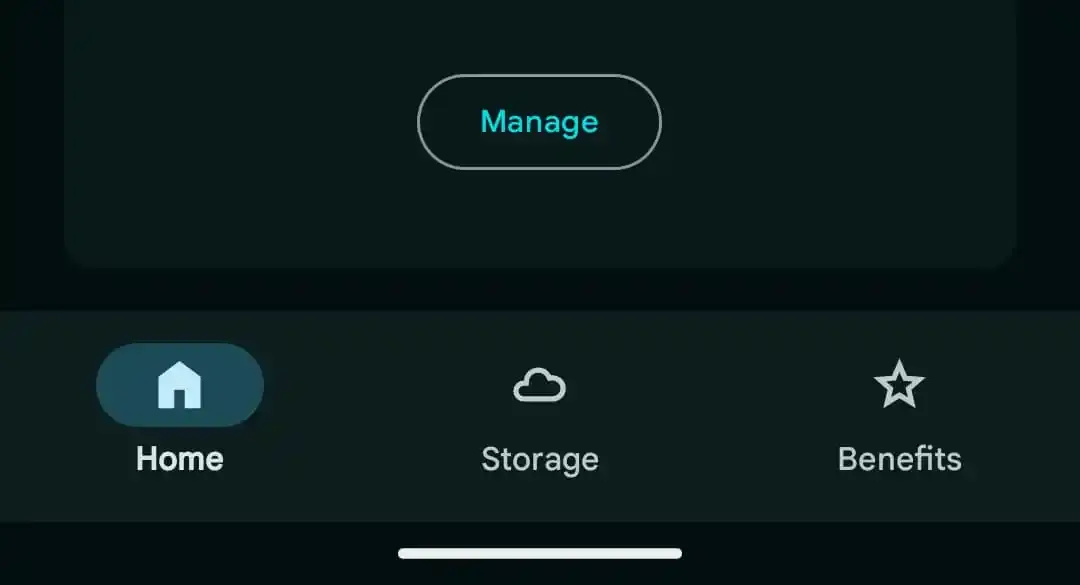
However, if you’re using the Google One app on Android, you might notice that the “Support” tab at the bottom is now gone. Now, there are only Home, Storage, and Benefits tabs. The old Support page, which had a heart icon, used to give you quick links to phone, chat, and email support. You could also check out “Pro Sessions,” look through popular articles, and review your support history there.
The Support tab is missing (Image Source - 9to5Google)
Here's how it used to look:
The old look with the Support tab (Image Source - 9to5Google)
Now, if you need help, you’ll have to dig into the navigation drawer, tap “Help,” then “Contact us,” which is the same as in other Google apps. It’s a bit more hidden, or you can just visit Google One's Help on the web.
Well, this might mean Google is giving less importance to the “Access to Google experts” perk. In fact, “Access to Google experts” is no longer mentioned on one.google.com, and this change should have happened around mid-April.
Recommended For You
That said, you can still get support as a Google One member. There's a support article stating that you can talk to experts via chat, phone, or email if you need help with a Google product.
Mint Mobile's 6-month plans now cost $10/mo
$10
/mo
$35
$25 off (71%)
Mint Mobile is celebrating its 10-year anniversary with a special offer on its six-month subscription plans. For a limited time, you can get your preferred tier (6GB, 17GB, 23GB or unlimited) for just $10/mo. That saves you between 50% and 71% on the carrier's mobile plans, making it way easier to recommend.
Iskra Petrova is a news writer at PhoneArena, where she covers mobile tech news and maintains the site’s device hubs with the latest leaked specs, rumors, and official details for upcoming phones. She joined PhoneArena in 2020 after three years in technical support for Microsoft Exchange, giving her practical experience with software infrastructure and troubleshooting. Iskra holds a Master’s Degree in Literature, which helps her translate complex tech details into clear, reader-friendly coverage. She is a daily Apple ecosystem user, while also closely following Sony Xperia’s camera-focused phones and Samsung’s Galaxy Z Flip series.
A discussion is a place, where people can voice their opinion, no matter if it
is positive, neutral or negative. However, when posting, one must stay true to the topic, and not just share some
random thoughts, which are not directly related to the matter.
Things that are NOT allowed:
Off-topic talk - you must stick to the subject of discussion
Offensive, hate speech - if you want to say something, say it politely
Spam/Advertisements - these posts are deleted
Multiple accounts - one person can have only one account
Impersonations and offensive nicknames - these accounts get banned
To help keep our community safe and free from spam, we apply temporary limits to newly created accounts:
New accounts created within the last 24 hours may experience restrictions on how frequently they can
post or comment.
These limits are in place as a precaution and will automatically lift.
Moderation is done by humans. We try to be as objective as possible and moderate with zero bias. If you think a
post should be moderated - please, report it.
Have a question about the rules or why you have been moderated/limited/banned? Please,
contact us.













Things that are NOT allowed:
To help keep our community safe and free from spam, we apply temporary limits to newly created accounts: