The cool translation feature in Google Lens - the one where you point your phone at a text and it automatically translates on the screen - is now available offline for Android users. 9to5Google spotted the addition to Lens that allows users to download various languages for offline translation.
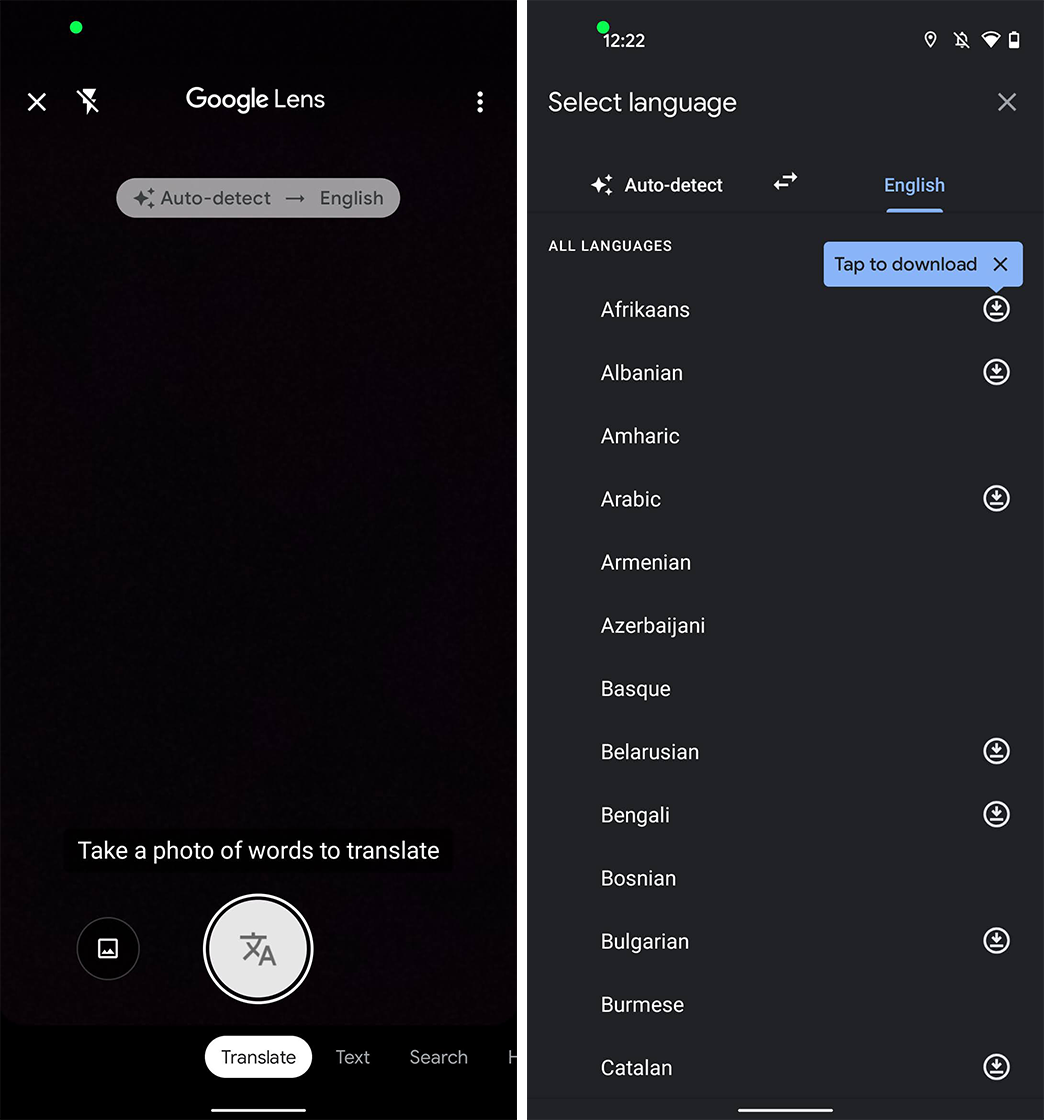
To access this feature, simply open Google Lens and then select the ‘Translate’ option from the bottom carousel. Tap on the Auto-Detect option on the left to navigate to a list of languages that you can download by tapping on the icon next to each one. You’ll then get a pop-up telling you how big the language pack is (45MB for the Spanish language pack) and that’s it.
Offline translation in Lens works just like the normal feature that relies on an internet connection. Just fire up Lens and point the camera towards a text you want to translate. The offline translation capabilities could make a big difference when you travel abroad on a limited data plan, but in the current pandemic reality, nobody travels anywhere. It’s a nice option to have and according to 9to5Google, the feature is already rolling out, so be sure to update your Lens to the latest version.
Tello Halloween Promo: $10GB for $10/mo
Don’t miss this scary-good deal: 10 GB for $10/mo. Save $5/mo for your first 3 months. Offer valid now through November 9, 2026.
Mariyan, a tech enthusiast with a background in Nuclear Physics and Journalism, brings a unique perspective to PhoneArena. His childhood curiosity for gadgets evolved into a professional passion for technology, leading him to the role of Editor-in-Chief at PCWorld Bulgaria before joining PhoneArena. Mariyan's interests range from mainstream Android and iPhone debates to fringe technologies like graphene batteries and nanotechnology. Off-duty, he enjoys playing his electric guitar, practicing Japanese, and revisiting his love for video games and Haruki Murakami's works.
A discussion is a place, where people can voice their opinion, no matter if it
is positive, neutral or negative. However, when posting, one must stay true to the topic, and not just share some
random thoughts, which are not directly related to the matter.
Things that are NOT allowed:
Off-topic talk - you must stick to the subject of discussion
Offensive, hate speech - if you want to say something, say it politely
Spam/Advertisements - these posts are deleted
Multiple accounts - one person can have only one account
Impersonations and offensive nicknames - these accounts get banned
To help keep our community safe and free from spam, we apply temporary limits to newly created accounts:
New accounts created within the last 24 hours may experience restrictions on how frequently they can
post or comment.
These limits are in place as a precaution and will automatically lift.
Moderation is done by humans. We try to be as objective as possible and moderate with zero bias. If you think a
post should be moderated - please, report it.
Have a question about the rules or why you have been moderated/limited/banned? Please,
contact us.















Things that are NOT allowed:
To help keep our community safe and free from spam, we apply temporary limits to newly created accounts: