Google has just updated its Meet app with some extra screen reader options for users with vision disabilities. Several more options for how reactions in Google Meet are experienced through screen readers have been added in this update, and they’re all being rolled out as we speak.
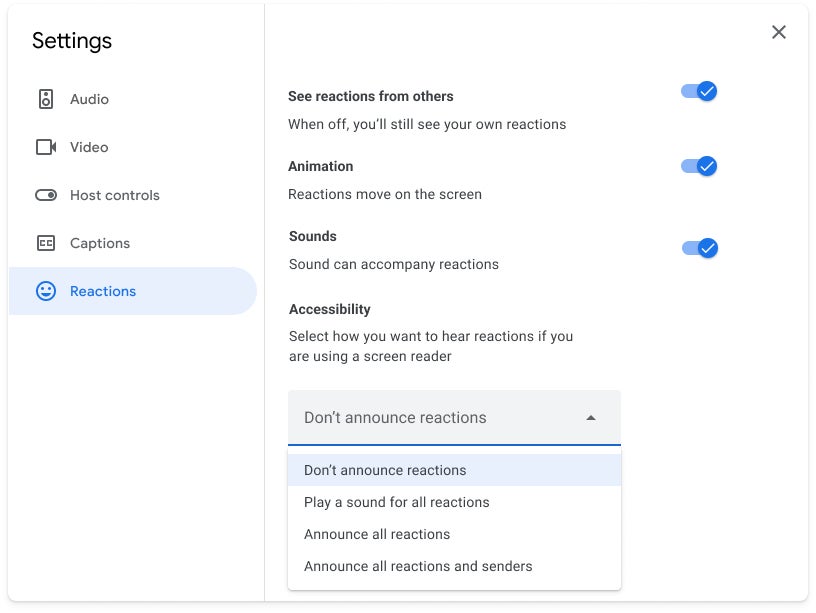
These screen reader options can be accessed and adjusted anytime during the meeting by simply pressing Shift + R or from the Settings menu (three-dot overflow button / Settings / Reactions / Accessibility). Starting this week, the following settings should be available for in-meeting reactions:
Don’t announce reactions: No announcements or sound when a reaction is received.
Play a sound for all reactions: Play a sound when a reaction is received.
Announce all reactions: Announce only the emoji when a reaction is received, for example “Thumbs up”.
Announce all reactions and senders: Announce the emoji and who sent the received reaction, for example “Elisa Beckett and 2 others reacted with thumbs up”.
Tap the three-dot overflow button / Settings / Reactions / Accessibility to adjust your settings | Image credit: Google
Once a user adjusts these new screen reader options, the settings will persist from meeting to meeting, so there’s no need to make the same adjustments again unless they’re somehow changed.
According to Google, the new Meet update is rolling out starting February 3, but it might take longer than two weeks to reach all users. Speaking of which, these new features should be available for Google Workspace customers and users with personal Google accounts.
Get iPhone 18 Pro with Visible, get $480 off!
$719
/mo
$1199
$480 off (40%)
On the Visible+ Pro plan, you get access to 5G Ultra Wideband data on Verizon's fastest network. Along with unlimited roaming across Mexico and Canada, 2 days of Global Pass per month, 3x hotspot speeds, 4K streaming, and Smartwatch service.
Cosmin, a tech journalist with a career spanning over a decade, brought a wealth of experience to PhoneArena. His expertise lies in brands like Samsung and Nokia, and he has a keen interest in innovative technologies. After a brief stint in PR, Cosmin returned to tech journalism in 2016, committed to delivering clear and objective news. When he's not writing or appearing as a guest on TV and radio shows, Cosmin enjoys playing RPGs, watching Netflix, and nurturing his passion for history and travel.
COMMENTS (0)
COMMENTS (0)
All comments need to comply with our
Community Guidelines
PhoneArena Community Rules
A discussion is a place, where people can voice their opinion, no matter if it
is positive, neutral or negative. However, when posting, one must stay true to the topic, and not just share some
random thoughts, which are not directly related to the matter.
Things that are NOT allowed:
Off-topic talk - you must stick to the subject of discussion
Offensive, hate speech - if you want to say something, say it politely
Spam/Advertisements - these posts are deleted
Multiple accounts - one person can have only one account
Impersonations and offensive nicknames - these accounts get banned
To help keep our community safe and free from spam, we apply temporary limits to newly created accounts:
New accounts created within the last 24 hours may experience restrictions on how frequently they can
post or comment.
These limits are in place as a precaution and will automatically lift.
Moderation is done by humans. We try to be as objective as possible and moderate with zero bias. If you think a
post should be moderated - please, report it.
Have a question about the rules or why you have been moderated/limited/banned? Please,
contact us.









Things that are NOT allowed:
To help keep our community safe and free from spam, we apply temporary limits to newly created accounts: