Many of us rely on Google Calendar for a huge portion, if not all, of our work schedule. Meetings, important calls, even coffee with a coworker or friend—for plenty of us, it's all slotted in right there on our Google Calendar profile, with notifications reminding us at all the right times. But sometimes, it can get a little overwhelming.
And Google is aware of our reliance on its calendar app and working to further enhance users' experience by introducing a new feature called Focus Time.
It's essentially something like an unobtrusive office manager who keeps everyone away to give you a quiet place to work, while also taking care of some of your scheduling for you.
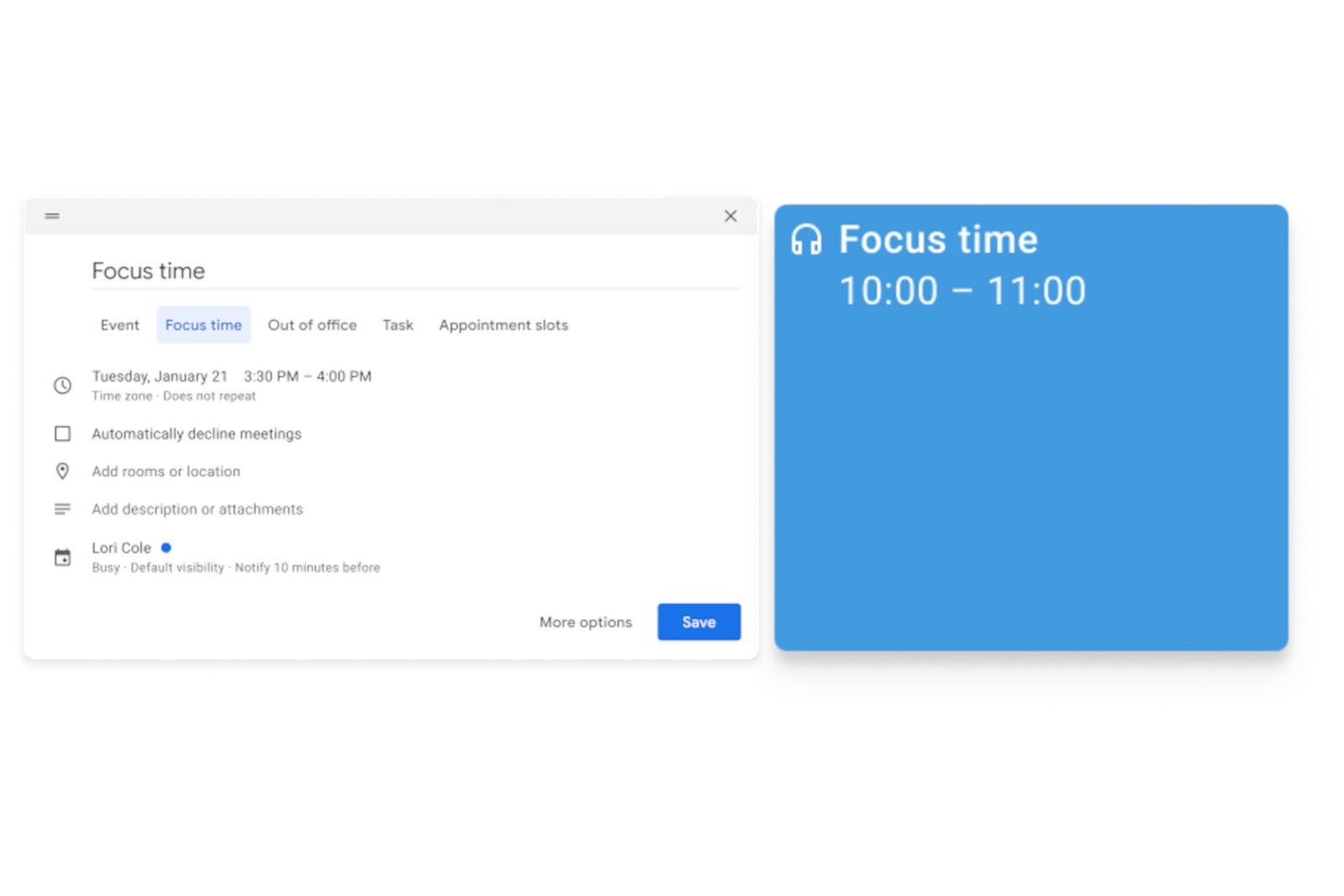
The main function of Focus Time is to allow you to section off important time for personal work that needs to get done, come what may. This keeps it visible on the calendar for you and anybody the calendar may be shared with, and also prevents your being assigned meetings during your scheduled heads-down time.
Focus Time will be logged in Time Insights, where your time spent in meetings is also tracked—it will feature a headphone icon and you can assign a different color to your focus time, to set it apart from other events.
Recommended For You
Other than changing up the appearance of your work calendars, Focus Time can also automatically decline conflicting events while you slog away, without your lifting a finger.
One scenario where we could see this going wrong is, you've got a tentative or rather arbitrary event scheduled in, such as "Coffee with Kate Tuesday 2pm maybe??" And unbeknownst to you, your boss requests an important meeting with you at the same time while you're MIA in Focus Time—and he is automatically denied, because Google hasn't quite reached the intelligence of differentiating varying levels of priority.
But don't worry, the "automatically decline events" feature is optional. The primary function is simply the ability to block out time for personal, uninterrupted work.
Especially with much of the world still working from home, with a million things to juggle and some of us with little ones in the house, we need as much help as we can get towards focusing on the task at hand. Constant distraction, from notifications or otherwise, and the resulting lost time and deeper stress can put is in a very negative headspace.
I've been there myself, and with mental health awareness always on the rise, Google's Focus Time seems like a great tool to help organize ourselves on the path to success and good mental health.
With the changes to our working environments in the past year, having more chats and meetings make it more difficult for people to carve out time for their core individual work. With the new Focus Time feature, we hope to make it easier to create dedicated time for thinking and core work.
The new Google Calendars feature will become available to the following Google account types over the next two weeks:
Google Workspace Business Standard
Business Plus
Enterprise Standard
Enterprise Plus
Education Fundamentals
Teaching & Learning Upgrade
Education Standard
Education Plus
Nonprofits customers
On the other hand, the following accounts will not be getting Focus Time:
Google Workspace Essentials
Business Starter
Enterprise Essentials
Frontline
G Suite Basic and Business customers
Tello Halloween Promo: $10GB for $10/mo
Don’t miss this scary-good deal: 10 GB for $10/mo. Save $5/mo for your first 3 months. Offer valid now through November 9, 2026.
A discussion is a place, where people can voice their opinion, no matter if it
is positive, neutral or negative. However, when posting, one must stay true to the topic, and not just share some
random thoughts, which are not directly related to the matter.
Things that are NOT allowed:
Off-topic talk - you must stick to the subject of discussion
Offensive, hate speech - if you want to say something, say it politely
Spam/Advertisements - these posts are deleted
Multiple accounts - one person can have only one account
Impersonations and offensive nicknames - these accounts get banned
To help keep our community safe and free from spam, we apply temporary limits to newly created accounts:
New accounts created within the last 24 hours may experience restrictions on how frequently they can
post or comment.
These limits are in place as a precaution and will automatically lift.
Moderation is done by humans. We try to be as objective as possible and moderate with zero bias. If you think a
post should be moderated - please, report it.
Have a question about the rules or why you have been moderated/limited/banned? Please,
contact us.














Things that are NOT allowed:
To help keep our community safe and free from spam, we apply temporary limits to newly created accounts: