Turning Wi-Fi and Bluetooth on and off in Quick Settings takes an extra step in Android N preview
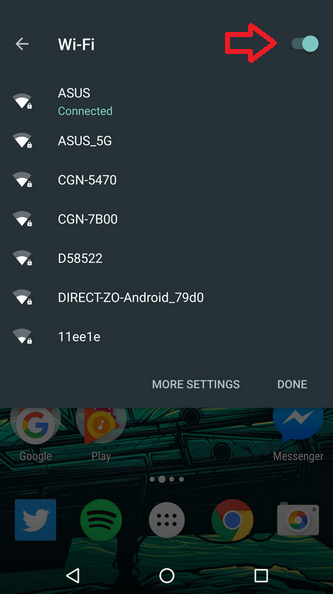
Arrow shows the toggle switch now used in Android N to turn on or off Wi-Fi in Quick Settings
With earlier builds of the OS, Android users could change certain settings very easily by pulling down Quick Settings from the top of the screen. With a single tap of the finger, certain features such as Wi-Fi and Bluetooth could be turned on or off. But that looks to be no longer the case with Android N.
Turning on or off Wi-Fi from Quick Settings in the latest Android N preview now requires two steps instead of one. Instead of tapping the icon to turn it on and tapping it again to turn it off, users now tap the icon once and then click on another toggle switch to the right of the Wi-Fi label. This is also the new way users turn on or off Bluetooth.
Another change removes the ability of the Android user to open the calculator from Quick Settings. If you're not happy with what you see when taking the Fourth Developers preview of Android N out for a spin, you can file a bug report to let Google know that you want some of these changes to be reversed.
source: Phandroid via SlashGear


Popular stories






Latest News






Things that are NOT allowed:
To help keep our community safe and free from spam, we apply temporary limits to newly created accounts: