Apple's iOS 10 will give you a warning when you're connected to an unsecured Wi-Fi network


Apple has been mum about it so far, but it appears that iOS 10 will provide iPhone and iPad users with a warning when their device is connected to an unsecured Wi-Fi network. Don't expect to see a flashing screen with a siren, or a Dennis Nedry type pop-up saying "Ah ah ah. You didn't say the magic word." Instead, the warning will appear when you head to Settings > Wi-Fi.
Under the Wi-Fi network's SSID, you will find the words Security Recommendation. Tap the 'i' button and you will be warned that the Wi-Fi network you are using is unsecured. The actual warning reads, "Open networks provide no security and expose all network traffic."
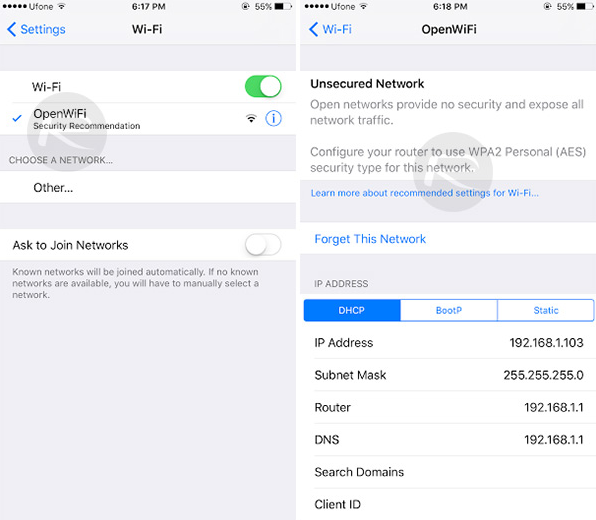
In iOS 10, Apple will warn you when you are connected to an unsecured Wi-Fi network
source: RedmondPie


Popular stories





Latest News


Things that are NOT allowed:
To help keep our community safe and free from spam, we apply temporary limits to newly created accounts: