Palm Pixi Plus Review


Palm Pixi Plus Release Date - Jan 25, 2010
This is a short review of the Palm Pixi Plus for Verizon Wireless. It shares many features with the Palm Pixi for Sprint, which has a more in-depth review that can be viewed here.
Along with their release of the Palm Pre Plus this week, Verizon is also introducing the Palm Pixi Plus, but unlike the Pre Plus which has more memory and RAM over the original Sprint model, the Palm Pixi Plus only adds Wi-Fi connectivity. Because of this, both Pixi models on Sprint and Verizon are basically identical in terms of design and usability.
The display on the Palm Pixi Plus remains at 2.63-inch diagonal with 320x400 resolution and 262K color support. Naturally, images on it don’t look as large or sharp as ones from the Palm Pre Plus, HTC DROID ERIS, or Motorola DROID, but it is still sufficient for a smartphone of this size. As you can guess, the QWERTY keyboard is also compact, with the buttons being smaller and closer together than the keyboard on the Pre Plus. It is still useable and provides good feedback when pressed, but people with larger hands will most likely have a difficult time with it and may want to look elsewhere. Along the sides are the volume rocker, power/lock button, 3.5mm headset jack, microUSB port, and phone silence switch. The external speaker, 2MP camera and LED Flash are on the back. Internality there is 8GB of memory for you to store files and 256MB of system RAM; the same amount as on Sprint’s Pixi. You can also purchase the optional touchstone charger and battery case.
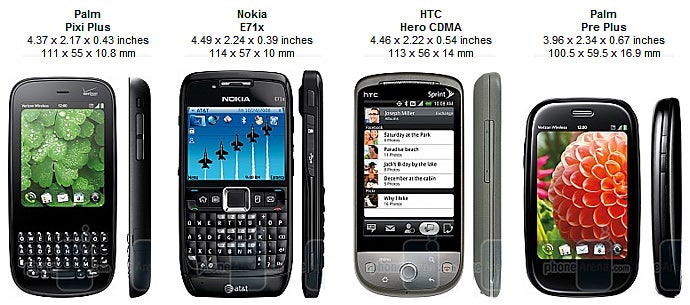
You can compare the Palm Pixi Plus with many other phones using our Size Visualization Tool.
Since the Palm Pixi Plus uses the webOS 1.3.5.1 operating system (which is also found on the Pre Plus), we won’t go into great detail covering it here; as launching apps, such as the web browser, email, messaging, phonebook, calendar, and connectivity are all the same. Needless to say, they work quite well together, as it integrates your personal contacts with ones from Google Talk, AIM, and Facebook. However, we started to notice some lag once we had 10 cards open on the homescreen, while the Pre Plus handled 30 cards without problem. The Pixi Plus includes Google Maps, VZ Navigator, Doc Viewer and PDF Viewer; all of which are also found on the Pre Plus. Furthermore, you can turn the Pixi Plus into your personal 3G Mobile Hotpot, with up to 5 Wi-Fi devices connected to it at once, but it will cost you $40 per month on-top of your voice & data plan.
The Palm Pixi Plus includes a 2MP camera, which is a step-down from the 3MP camera on the Pre Plus, though both share the same simple interface. Images taken outside with the Pixi Plus also look worse, due to poor color representation and inaccurate exposure, which makes them darker and “muddy” looking. Indoor images don’t come out great either, and the flash might as well not even be there.
Call quality was good, almost as clear as on the Pre Plus, but there was some distortion if the earpiece volume was turned all the way up, though it was only minor. Reception also matched that of the Pre Plus with 2-3 bars showing during calls and 5 bars of EV showing while using data.
Palm Pixi Plus Video Review:
Palm Pixi Plus 360 Degrees View:

Popular stories




Latest News

Things that are NOT allowed:
To help keep our community safe and free from spam, we apply temporary limits to newly created accounts: