iOS 6 Walkthrough
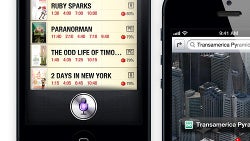
After months of testing, iOS 6 is finally getting released today with over 200 new features, but you shouldn’t be all that impressed by the number - it’s a gradual update to iOS 6 with no revolutionary novelties, but still tons of neat little refinements. And it comes not just to the iPhone 5, but to plenty of other devices starting with the iPhone 3GS and later iPhones, and also the iPad 2 and new iPad.
The update should start arriving over the air in the coming hours and days, and alternatively you can also bump up your device by hooking up your phone to iTunes, and running the update from there. Don’t forget that you shouldn’t interrupt the update.
So what has changed in iOS 6? Let us walk you through from all the new features, starting from the lock screen and going to apps like the brand new Maps from Apple and improved Siri.
The update should start arriving over the air in the coming hours and days, and alternatively you can also bump up your device by hooking up your phone to iTunes, and running the update from there. Don’t forget that you shouldn’t interrupt the update.
iOS 6 walkthrough


Popular stories





Latest News






Things that are NOT allowed:
To help keep our community safe and free from spam, we apply temporary limits to newly created accounts: