PhoneArena is looking for new authors! To view all available positions, click here.
  • Home
  • News
  • Traffic avoidance feature is added to Google Maps Navigation

Traffic avoidance feature is added to Google Maps Navigation

Posted: , by John V.

Categories:

Share:

Discuss 11
Traffic avoidance feature is added to Google Maps Navigation
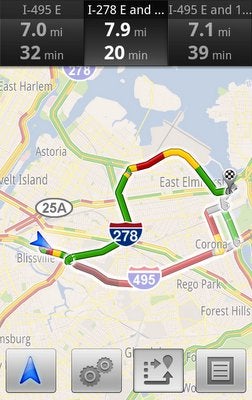
Continually trying to add new features to make its navigation software well rounded, Google has added a new feature to its popular voice guided turn-by-turn GPS software.

Call it a long time coming, but we’re finally seeing traffic avoidance being implemented with Google Maps Navigation to offer users alternative routes for their travel. Android users will have the opportunity to choose from several different options in the event that the application determines that you’ll be colliding into traffic on your current route. Not only will it simply calculate the shortest and fastest options, but it’s working in real-time and makes the calculations based on historical traffic data.

So if you’re in possession of a device that has Google Maps Navigation, you can expect to check out the new feature today with maps for North America and Europe.

source: Google Mobile Blog via Phonescoop

Share:

Discuss11

11 Comments

  • Options
    Close


Want to comment? Please login or register.

1. Sniggly posted on 07 Mar 2011, 15:02 1

Most excellent. Would've been useful a couple of weeks ago when I was moving. But still, I expected they would do this. Next on my navigation wishlist are the ability to set waypoints, followed by the ability to plan a trip, save it, and bring it up later in a list of preset routes.

3. cc (unregistered) posted on 07 Mar 2011, 18:19

Sniggly, if you set up the route on google maps from a PC you can save it to "my maps" and it will be there for later. I haven't found a way to do it from the phone but I have several routes saved under "my maps".

You can also do waypoints from the computer as well. I realize you may already know this because I know you're pretty knowledgeable but figured i'd throw it out there.

4. Sniggly posted on 07 Mar 2011, 18:28

Lol, yep, knew I could do both on the computer. It's just my wishlist for the phone app's functionality. I'm sure we'll see more features migrated to the phones eventually.

2. doubler86 posted on 07 Mar 2011, 16:03

My one and only wish would be for there do be different voices for the navigation. The original is soooo annoying

5. Whateverman posted on 07 Mar 2011, 19:04

If they were to offer different voices, I would want voices from all my favorite TV characters; like Mr. T, Archie Bunker, Rosco P. Coletrane, Smurfette and of course I gotta have Sondra from "227"!

6. Sniggly posted on 07 Mar 2011, 21:47

If they could somehow recreate Don Lafontaine's voice, I would pay a premium for that option.

7. Whateverman posted on 07 Mar 2011, 23:14

Yes!!! Oh, and we can't forget about James Earl Jones, both as Darth Vader and Mufasa!

8. Sniggly posted on 07 Mar 2011, 23:26

Dude, that would be so freakin' golden. How about Morgan Freeman? Could stand to hear him give me directions. :D

9. Whateverman posted on 08 Mar 2011, 00:02

Classic! I think we've got a hit on our hands. I'll work on coding the app if you recruit the voice over talent, LOL!

11. Sniggly posted on 08 Mar 2011, 01:27

Lol, dude, if only I was a Hollywood agent, I'd be ALL. OVER. THAT. SHIZNIT.

10. Owlet posted on 08 Mar 2011, 00:35 1

I want to be able to rename a starred place. I don't think it's possible on the computer either. Unless I'm blind or stupid or something...

Want to comment? Please login or register.

Hot Phones

  • Samsung Galaxy S4Samsung Galaxy S4
  • Apple iPhone 5Apple iPhone 5
  • Samsung GALAXY Note IISamsung GALAXY Note II
  • HTC OneHTC One
  • Sony Xperia ZSony Xperia Z
  • Google Nexus 4Google Nexus 4
  • LG Optimus GLG Optimus G
  • Nokia Lumia 920Nokia Lumia 920