Motorola Moto E Review

Introduction
Motorola’s strategy has been a peculiar one lately to say the least. In the high-end segment, its Moto X Android smartphone proved to the masses that great phones don’t need beefy specs to stand a chance in being successful. Meanwhile, on the other end of the spectrum, its Moto G ushered in a new era for the proud company with its hard-to-beat price. In following up to that success, the Moto E stands to continue the trend by diving deeper into the competitive entry-level segment of the market. Brandishing an even more aggressive $130 off-contract price, can the Moto E permanently make extinct those feature phones?
- Wall charger
- Get Started Guides
Design
Pricing might be regarded as dirt cheap, but it bears a humbling design that comes off slick.
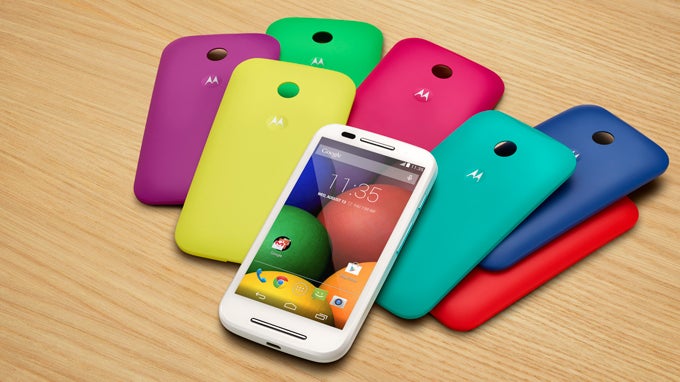
Cosmetically, Moto E employs the same humble design language of the Moto G before it, but there are a few minor differences. Compact, lightweight, and form-fitting, it’s a comfortable thing to hold despite being a little bit chubbier than the Moto G – thanks in part to its decent construction and slightly arched casing. Relying on a plastic build, there’s a pleasant personalization aspect to the design, seeing that the rear casing is interchangeable. Factoring the cost, the design of the Moto E could’ve gone a total different way, but in the end, Motorola manages to deliver something that doesn’t come off obnoxiously cheap.
Around the rear, there’s a 5-megapixel fixed focused camera sans flash, which has the ability to shoot 854 x 480 (FWVGA) video. Fortunately, a microSD card slot is hidden behind the rear casing to supplement its storage capacity. Although it’s not expected to survive submersion, the Moto E features a water-resistant splash guard to safely protect it from minor splashes.

4.91 x 2.55 x 0.48 inches
124.8 x 64.8 x 12.3 mm
5.01 oz (142 g)

4.72 x 2.52 x 0.39 inches
119.9 x 64 x 9.9 mm
4.37 oz (124 g)

4.78 x 2.48 x 0.39 inches
121.5 x 63 x 9.9 mm
4.23 oz (120 g)

4.9 x 2.33 x 0.35 inches
124.4 x 59.2 x 8.97 mm
4.66 oz (132 g)

4.91 x 2.55 x 0.48 inches
124.8 x 64.8 x 12.3 mm
5.01 oz (142 g)

4.72 x 2.52 x 0.39 inches
119.9 x 64 x 9.9 mm
4.37 oz (124 g)

4.78 x 2.48 x 0.39 inches
121.5 x 63 x 9.9 mm
4.23 oz (120 g)

4.9 x 2.33 x 0.35 inches
124.4 x 59.2 x 8.97 mm
4.66 oz (132 g)
Compare these and other phones using our Size Comparison tool.
Display
Far from being the sharpest on the block, the display gets the job done without a whole lot of complaints.
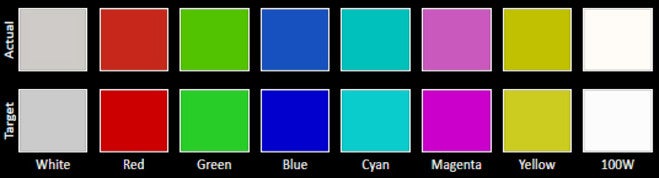
Honestly, we weren’t expecting anything extravagant with the display, especially knowing its price point. Sporting a 4.3-inch 540 x 960 (qHD) IPS display, which gives it a pixel density count of 256 ppi, it’s effective enough for most things, but don’t expect crisp results everywhere. Sure, it’s still good for surfing the web, so there’s not much concern regarding its detail.
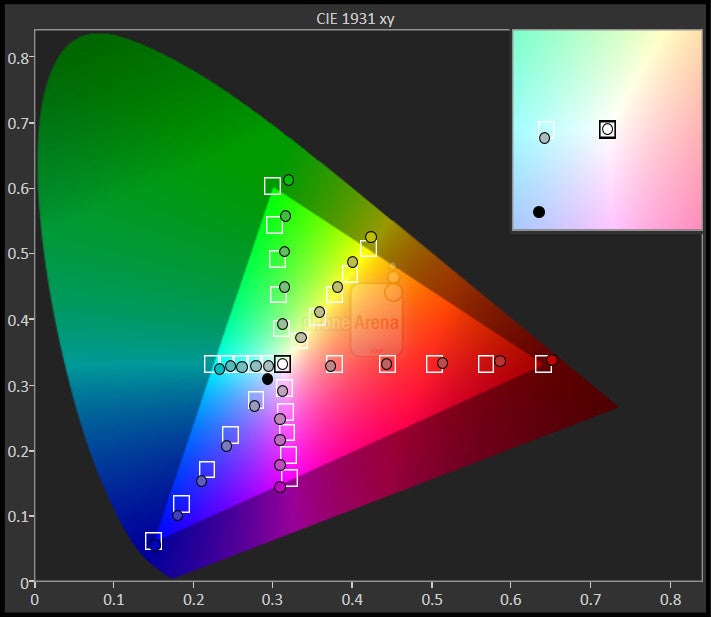
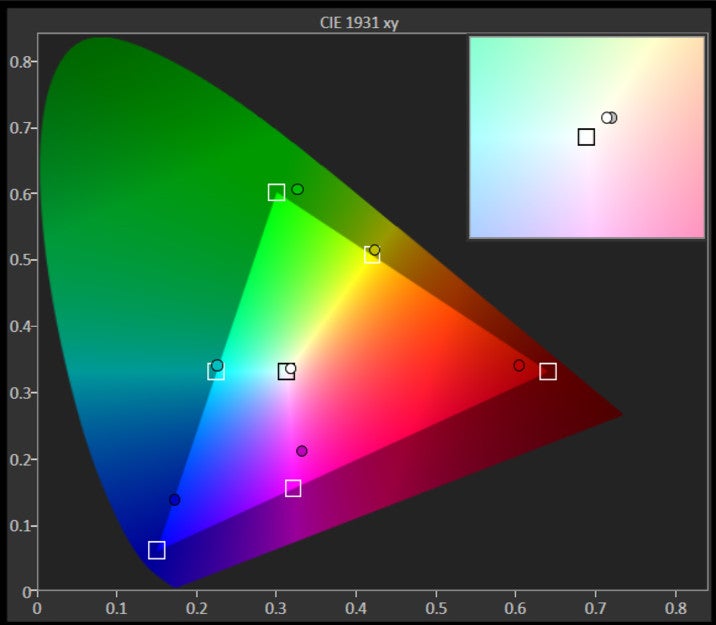
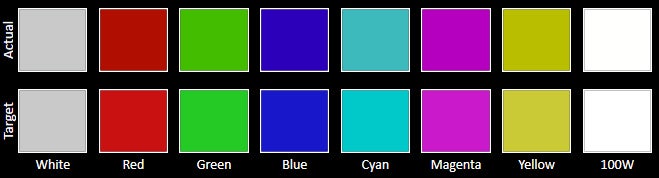
However, its weaker brightness output of 389 nits combined with its poor viewing angles, doesn’t make it a strong usable candidate under sunny conditions. From the front, colors radiate with a punchy and robust tone, but the slightest of tilt causes them to wash out. Hardly expected to enthrall us, the display here might not earn high marks in all key areas, but at the end of the day, complaining about its deficiencies is pointless due to its low cost.


Interface and Functionality
Having a stock Android experience makes it easy for first-time smartphone owners to make the plunge without being overcomplicated.
Out of the box, the Moto E is running almost stock Android 4.4.2 KitKat experience, so both hardened Android users and first time users should be pleased. Unlike some of those other customized Android experiences that sometimes overcomplicate things with their extensive set of features, the Moto E sticks to providing a simple, intuitive, and straightforward experience that doesn’t burden us with redundant things.
Of course, being a stock thing means it provides us with all of the essentials we’d find on any Android device – like the platform’s rich set of organizer apps and the usefulness of Google Now.
Two new features not present on previous Motorola Android phones stand out here. First, there’s Motorola Migrate, which is a utility tool that helps to transfer data form an old phone to the Moto E. Obviously, it’s nothing spectacular in the greater scheme of things, but for first time Android users, it’s a feature that’s appreciated. Secondly, the Motorola Alert app helps to alert certain people to our whereabouts. For example, the “follow me” function sends out periodical texts to specified emergency contacts alerting them about our location.
Processor and Memory
As expected, the small things are finely executed, but it sheds a lot of its performance with demanding stuff.
Predictable to say the least, the Moto E isn’t one to flex itself in the muscle department. In fact, it doesn’t have to because of its intended target. Armed with a dual-core Qualcomm Snapdragon 200 SoC with 1GB of RAM and the Adreno 302 GPU, it handles basic operations with enough responsiveness, but collapses under the pressure of more intensive stuff. Frankly, it’s not meant to be a powerhouse – nor a gamer’s choice.
Internet and Connectivity
Lacking 4G LTE connectivity, the only thing we’re left to endure is slightly longer load times of complex pages. Once they’re completed loaded, though, the experience itself is tolerable thanks to the responsiveness of its navigational controls. Still, page rendering is sometimes choppy in playing catch up to our speed.
Camera
Arguably the most underwhelming part of the phone, the camera is sub-par.
Outfitted with a 5-megapixel camera, one that’s fixed focused, it doesn’t scream anything remarkable with its quality. Details are undeniably soft here, which shouldn’t be a shocking revelation, seeing that the results look more like painted pieces of artwork than anything else. Of course, the quality is made worse under low lighting, where noise and even more grain make it hard to like. Indeed, the Moto E isn’t one for taking photos you’ll want to remember, but rather, it’s there just for the convenience of sharing the moment on Facebook.
Motorola Moto E sample images
Likewise, there’s nothing tangible seeing with its video recording quality. It’s just sub-par, in almost every regard. Yet again, details are just hard to come by with this thing, especially when it captures 854 x 480 videos, which is 2 times less than 720p. Beyond the light details, heavy artifacting elements also cause its quality to diminish even more – to the point that they’re just not pretty.


Multimedia
Surprisingly emitting a deafening tone with its speaker, it’s okay for most multimedia purposes.
Call Quality
Voices have some distortion on both ends of the line, making it a challenge at times.
Moving onto call quality, there are still certain challenges with the experience. The volume output of the earpiece and speakerphone are fine, but voices tend to have a static tone to them. Meanwhile, on the other end of the line, our callers complain about the choppy voices they’re presented with.
Battery
Impressively, its 1980 mAh battery delivers excellent battery life that rivals some of the best.
Amazingly, the Moto E’s 1980 mAh battery earns some high marks with its battery life! In fact, it produces a time of 8 hours, 8 minutes with our battery benchmark test, which easily tops many high-end phones in the category. As for our everyday usage, it delivers roughly 2 days of normal usage, which is pretty excellent in our books.
Conclusion
It’s not perfect, but it doesn’t have to be – mainly because the Moto E is most impressive for its rich value. Value, it’s something that’s prized to the folks who don’t want to shell out a ton of money to experience the advantages of a smartphone. Donning a price of $129.99 off-contract, an unlocked model at that, the Moto E has an inviting presence in a space dominated by big, beefy, and heavy spec’d smartphones that take precedence in the space. Not only does it suffice for being a daily driver to almost anyone, but it’s also a fantastic backup smartphone too! Quite simply, it shows that a lot of love can still be experienced in something so cost-conscious – and without coming off a cheap or tacky!
Software version of the review unit:
Android Version: 4.4.2
Kernel Version: 3.4.42-g38adbb1
Build Number: KXC20.82-15

Popular stories






Latest News





Things that are NOT allowed:
To help keep our community safe and free from spam, we apply temporary limits to newly created accounts: