Every product we review or recommend is thoroughly tested by our in-house experts in real-world conditions, following our
review methodology
and
ethics statement
to ensure honest, independent, and data-driven results.
This is an unlocked GSM phone which can operate in the US on AT&T and T-Mobile.
Introduction:
The Taiwanese manufacturer of computer components has been on the mobile phone market for a few years now, but its products use the name GSmart. And this review will discuss the model t600, advertised as “the the world’s first universal digital TV PDA phone”. On top of that, it’s equipped with a VGA display and runs on the Windows Mobile 6 OS, so it can be “smart”.
The package includes:
Gigabyte GSmart t600 phone battery
Stereo earphones/ handsfree
Charger with 4 connectors for the different standards
miniUSB cable
Stylus
Antenna
Getting started CD
Design:
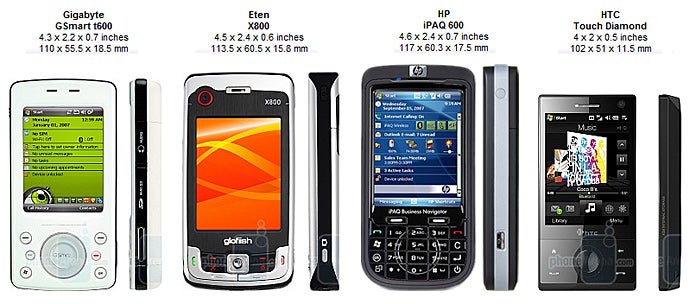
Once you open the box a cute phone appears, whose design looks as if inspired by the classical iPod. Its size is no compact enough to carry it in a pocket for example but if you hold it in your hand it feels good. It weighs 4.9 oz. (140 grams), which is normal for a phone of this type and besides here, it is very well balanced.
You can compare the Gigabyte GSmart t600 with many other phones using our Size Visualization Tool.
The 2.6” TFT display with a resolution of 480x640 supports 262k colors. It is slightly concave which makes it inconvenient for operating with fingers and we recommend using the stylus. The picture is bright with well-saturated colors but once exposed on a direct sunlight almost nothing can be seen.
Below the display we see the 5-way D-pad, two soft buttons, send/and key, Windows and OK shortcuts. All keys are hard to press because they’re not protruding enough and the D-pad lacks drive.
The rest of the keys are located on the black plastic on the sides of the phone. The volume slider and reset button on the left, and on the opposite side you’ll see the camera shortcut and the two slots for the microSD card and the earphone connector, hidden under two caps. The bottom houses the miniUSB and the microphone openings. The telescopic stylus or antenna, the three system LED’s and the power button are located on the top. The power key has no well-express relief but you’ll get used to it very quickly, making pressing it an easy and clearly felt task.
Recommended For You
Almost the entire back is made out of white plastic and only the part where the camera module is housed, accompanied by the flash and the loudspeaker, is made up of black material, the same one as seen on the sides.
Interface:
GSmart t600 runs on Windows Mobile 6.0 Professional without any substantial changes in the interface. Despite been able to receive digital TV broadcasts, its capabilities are almost identical to the ones of the other phones using the same OS.
The manufacturer has not left the interface totally “naked” and there are a few innovations. One of them are the Quick Launch icons on the homescreen. There are 7 of them, giving you fast access to: e-mail, phone recording , background effects, answering machine, sound & notifications, USB connection mode and screen rotation. However, they are too small to be pressed with a finger and their functionality cannot be modified.
The next personalization is the Easy-Touch menu. It is activated by holding the Windows button and lets you stop all applications currently in use, choose one of the four sound profiles, turn off the screen or adjust its brightness with just a few clicks. In theory everything sounds very good but there could have been a more extensive task manager and larger sized options.
Besides, the innovations that we mentioned above, there are some changes made to the battery icon. Now it doesn’t graphically indicate the power status but it shows the first number of the percentage left. We think this is much more convenient, compared to the standard variant, because the number gives you a better idea than 2 or 3 lines.
Phonebook:
The phone is identical to the other WM6 phones. The number of contacts that can be added is not restricted and depends only on the memory available. All contacts are displayed as a list; each field consists of the name and the number of the contact, while a letter placed beside them indicates what the type of the number is (w – work; m – mobile, etc.). Pictures are not displayed even if there is one attached to the contact.
In the upper part, there is a field to perform a name search, and if you want to look for a contact by other criteria (e.g. company), you’ll have to use the “Search” application. Below there are tabs with different letters (divided in groups of three) just below it. This way you can arrange the contacts so that only the ones beginning with a given letter are displayed. These two search features are quite handy and they make finding a particular contact in the phonebook very quick.
Unfortunately, it’s a different story when adding a new one; there are too many fields available and you’ll have to search for the most frequently used. You can write almost everything you want, but strangely, you are able to add only one mobile number. Personal photos and ringtones can be assigned to each contact; there’s no restriction on the dimensions of the pictures but they are visualized in very small size even on an incoming call – we think they are useless.
Dialing Screen
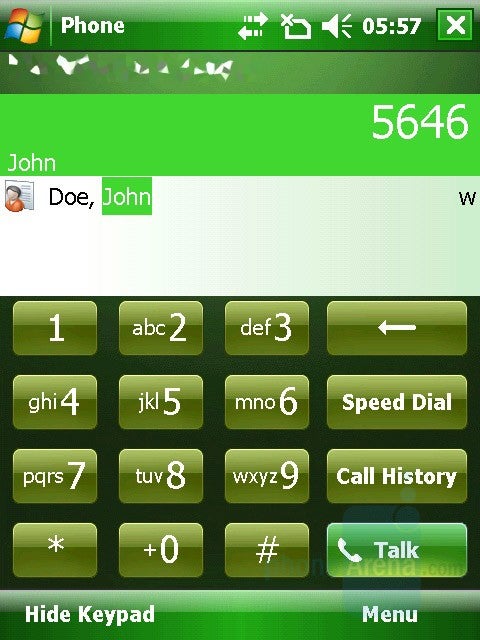
You can dial a number, not listed in your phonebook by simply using the hardware or the virtual keyboard, which appears after you press the Answer button. Pressing the buttons you will start imputing the digits of a possible number, but at the same time you will search the phone book as if imputing a text by a predictive text input system. So, to call John you can press 5-6-4-6 and the matching contacts will be visualized in the list.
Organizer:
Alarms can be accessed through the home screen, by tapping on the clock icon. There are three and each of them has its own settings for repetition, name, and melody. All alarms can be active simultaneously, and overall they are easy to use and do what they are supposed to. We are rather disappointed that their number is limited to three, as it was in the previous version of the OS.
The next tab in this menu is the clock; there is a field called Visiting next to it, which can be used as a World Clock – select another location and the phone starts using its local time. The clock has an option to be displayed on the title bar of all the menus, which is handy.
The Calendar is absolutely standard for a Windows Mobile device and here, you can enter your appointments. You can use options like: reminder (PRIOR NOTICE 1/5/10/15/30/45 minutes, 1/2/3/4/5/6 hour/day/week), recurrence (Once, Every (same-day-of-the-week), Day (same-date) of every month, Every (same date-and-month) for every year, sensitivity (normal, personal, private, confidential). You can also add attendees (required or optional) from your contacts where e-mail addresses have been added and where meeting requests will be sent.
Tasks
Examining the calendar can be done by day/week/month/year/agenda and you can choose starting day for the week and the week duration (5-6-7-day week). The appointments for the day are clearly shown in their time limits, so you can see your free time at a glance.
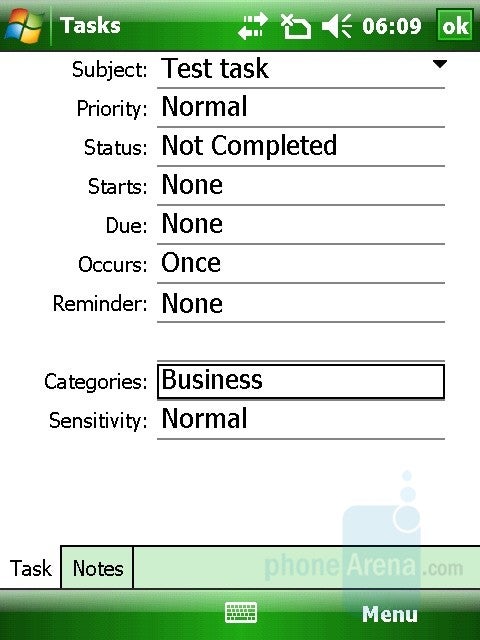
You have Tasks menu, where you can add to-do items. For a given Task you can set subject, priority (normal, low, and high), start/due date, reminder (to be notified if it’s due), category (business, holiday, personal, seasonal) and write a note. The Task can have recurrence (Once, Every (same-day-of-the-week), Day (same-date) of every month, every (same date-date-and-month) for every year and sensitivity (normal, personal, private, confidential). Examining the tasks in a list, you can easily see which of them are finished and which are not. The tasks options can be: sort by (status, priority, subject, start date, due date) or filter (all, recent, no categories, active, completed).
The Calculator is simple but its buttons are relatively big and can easily be pressed with your fingers. Features like scientific calculator and unit converter are still missing.
‘Notes’ are simple notes in which you can input text by the onscreen keyboard or by hand as an image. They can be synchronized with outlook.
Search is an application searching in all files in the phone. You can specify certain types of files (calendar/contacts/excel/messaging/notes/etc), but the best option is All Data, which will rummage everything in your phone.
File Explorer is the mobile alternative of Explorer in Windows environment with computers. We use it to view the phone memory, including the system folders of the device, which feels like working on a PC.
Messaging:
Different message types are placed in a single menu - SMS, MMS and e-mails. There is nothing unexpected here. Entering text is done by one of the following touch display methods:
Block Recognizer
Keyboard
Letter Recognizer
Transcriber
XT9
We think that the on-screen keyboard is the fastest and most convenient way to do it, but if you practice the other methods, they can also be quite handy! Combined with the T9 predictive system, entering text with the phone is pretty quick. However, this has to be one with the stylus, because the buttons are too small to be pressed with fingers.
Just a few steps away, is the option to add your e-mail account (POP3 or IMAP) and to use it on your mobile phone. Very nice extra is that the phone can try to get the email settings automatically from the internet, and so we configured our Gmail Account by entering only the username and password. Windows Mobile 6 already supports HTML formatted e-mails.The client is very similar to the Outlook on a computer, you can filter your inbox to see just some results, reply to a message, or forward it to other person.
The support for attachments allows you to download or send one, in addition to the text body. The phone can be set to synchronize with your company Exchange Server.
Connectivity:
GSmart t600 is quad-band GSM (850/900/1800/1900), which makes it a global phone. A big drawback here is the lack of any 3G support. It can be compensated by the built-in Wi-Fi, but this means that you’ll have to look for access points.
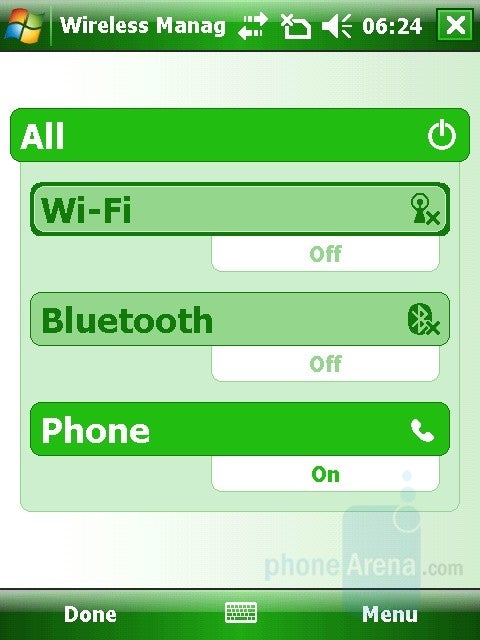
Wi-Fi and Bluetooth come standard. Bluetooth is mainly used for connecting to other nearby devices, as accessories (earpieces, car-kits, multimedia devices) and for data transfer (transfer of files to/from another phone/PC). Cable connection can also be used, via the miniUSB port. Like all other Windows phones, you need to have ActiveSync (Windows XP) or Windows Mobile Device Center (Windows Vista) installed on the computer to connect to it. The program will let you easily synchronize the phone (contacts, emails, and organizer) with Outlook. With WiFi you can connect to a wireless LAN network covering you, use it as an Internet source and view the shared documents (input \\name-of-computer in Internet Explorer and you will see what is shared).
Internet:
Like in most WM6 phones, we have the mobile version of Internet Explorer present here. Unfortunately, the name is the only thing that relates it to the PC version.
Its main drawbacks are that the pages, especially the heavier ones, load slowly and visualize incorrectly. Since options such as pan and zoom in/out are not available, you’ll have to be constantly scrolling in all directions. Even when you get to the part of the page that you are interested in, you’ll have to move left/right, because the text won’t shrink.
Overall, the browser is usable, but uncomfortable and far behind the competition; we avoided using it, unless we really needed to do so. The light upgrade to version 6.1 doesn’t change things much and it’s time Microsoft equipped its business phones with something more competitive. A good example is iPhone’s Safari, the Symbian S60 phones and even some “not smartphones”, by manufacturers such as Sony Ericsson, Samsung.
We installed the internet telephony app Skype, to check if it can be used with a Wi-Fi connection. As in most WM6 phones, in t600 the program was sluggish as well. The voices during a talk are extremely unreal, but they are not interrupted and everything is clearly understood. Only the loudspeaker sound volume is not sufficient in order to have a conversation in a noisier environment.
Camera:
GSmart t600 is equipped with a 2-megapixel camera with autofocus and LED flash, which are located on the back of the phone. It is disappointing that after snapping a picture, you have to wait for about 11 seconds until the camera is ready to go for another one.
The interface offers a big variety of options. Besides indicators, there are some shortcuts on the screen as well but they are very small and not convenient to use with fingers.
We didn’t expect much from the pictures made with t600, but after viewing them in full screen their quality didn’t correspond to the minimal expectations we had regarding this element. Detail is almost fully missing, the colors are far from real, and there is a lot of noise.
Outdoor Samples
Indoor Samples
The camcorder shoots videos in a resolution of 320 x 240 pixels and in a few different formats (3GPP, MPEG4 and WMV). The clips are basically only useful for MMS.
Multimedia:
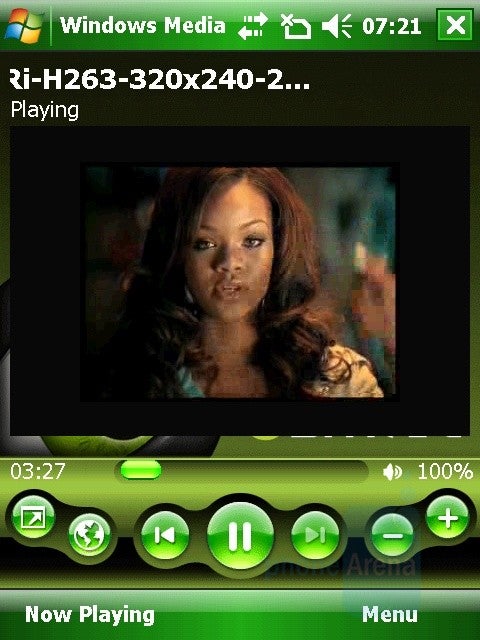
GSmart is equipped with the standard mobile version of Windows Media Player 10. The manufacturer has added his own green theme with the company logo. MP3 format is supported, as well as WMA and WAV. After updating the library with files, all supported types are found, and they can be added to playlists. This function is not well implemented and organizing them is quite hard. Songs can be viewed by artist, album and genre, as these are taken from the ID3 tag of the files.
If you want to watch videos with a relatively good quality we recommend the MP4 and MPEG4 formats, with a resolution of 640x480 pixels and a bitrate no more than 512 kbps. This way, the image is not going to be choppy and it will correspond to the sound. Unfortunately, videos in the H264 codec, which offers a much better quality, are not supported.
Music reproduction is not one of GSmart t600’s key features. Its loudspeaker has a mediocre performance and there are crackling noises when the volume is turned up to the max. Luckily, with earphones the situation improves, but even at maximum level the music was not loud enough. That’s why we recommend mostly using them as a handsfree.
Digital MobileTV and Radio:
With GSmart t600, you can watch digital TV absolutely free, thanks to the DVB-T (Digital Video Broadcasting – Terrestrial) support. This standard has not been fitted especially for mobile devices (as DVB-H) and is the official one used for digital TV broadcasting in Europe. This is a huge advantage, because you have all air channels as if you have a normal TV set. In London alone for example, you will be able to watch/listen to a total of about 50 TV and radio stations.
There’s also a TV player which allows you to tune in to digital radio stations as well. You can choose between preset countries, which will save you time on scanning the air for the available channels (done automatically but still takes a long time). The player’s interface appears on the entire screen and is easy to use. The 5-way D-pad and the soft buttons are used for controls.
Digital TV
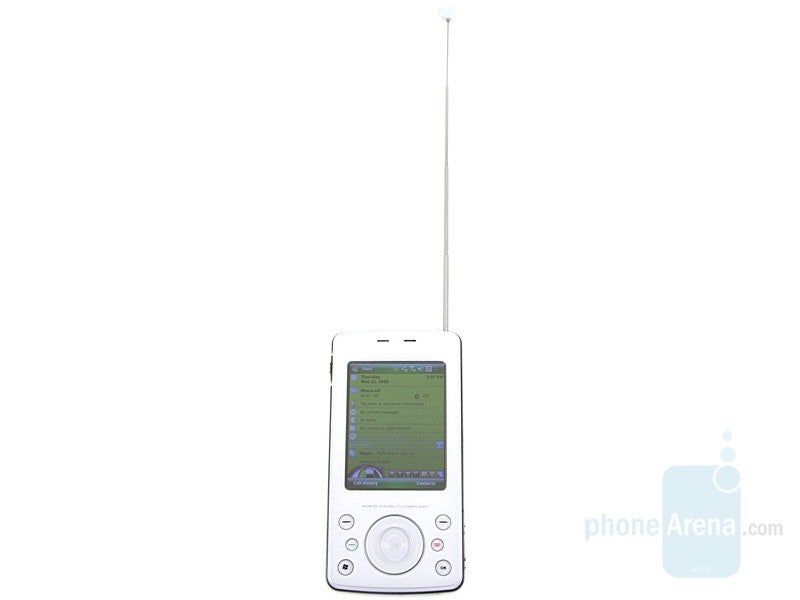
To have a good signal you’ll have to be outdoors or on a higher floor in a building. The antenna goes in the stylus bed but extends much more. The first few times you’ll have to adjust it in position so it’s firmly in place. At first, this could be annoying but you’ll actually get used to it pretty quickly and it won’t be a problem. When watching TV, the picture has a good quality and runs smoothly without being choppy. If you are in a moving vehicle, you’ll only have trouble with the signal if you are going faster than 65 mph.
So far, everything sounds good but the battery only lasted an hour. This is quite disappointing and you’ll be able to watch TV only to check out the news but not a full-length movie for example.
Software:
The phone has 64 MB RAM and 256 ROM of internal memory. Unfortunately, there’s no easily accessible full task manager. The Easy-Touch option has limited capabilities and if you want to stop only a certain application, you’ll have to use the standard WM6 manager, which we relate to rummaging through the menus and don’t think is very convenient.
Every WM6 Professional phone comes with programs that are modified, “pocket” versions known PC applications. Such programs are the mobile versions of (Microsoft) Word, Excel, PowerPoint, Outlook, Internet Explorer, Explorer, Media Player, etc. The Office applications allow you to view and edit documents of the most-used types and the phone opens them without any error. Even a complicated Excel document with a few sheets is not a problem.
In the Tools menu we have a few interesting applications – GSmart BT Application, Spb Backup, Zip Tool and Torch. The first one lets you send multiple files to other Bluetooth devices. This however, is only possible if the receiver has the same program installed. The interface is well-done, pleasant and easy to use.
Spb Backup helps you make a spare copy of your data from the phonebook, organizer, email, the folder My documents and the operating files. You can do all that in just a few clicks.
Zip Tool is an application that lets you compress files. For your convenience it has also been integrated in the File Explorer.
The Torch function is actually a flashlight. Once you activated, the flash light will stay on and can be used as one.
The Answering machine acts as a voice mail and can record messages directly to the phone.
The Phone recorder enables you to record conversations.
There are numerous programs created for this platform, almost as much as the ones intended for PCs with Windows operating system. The most popular are the various utilities for personalizing the PPC, multimedia players, file explorers, Instant Messengers, etc. You can download third party applications to be used instead of the preloaded ones.
Performance:
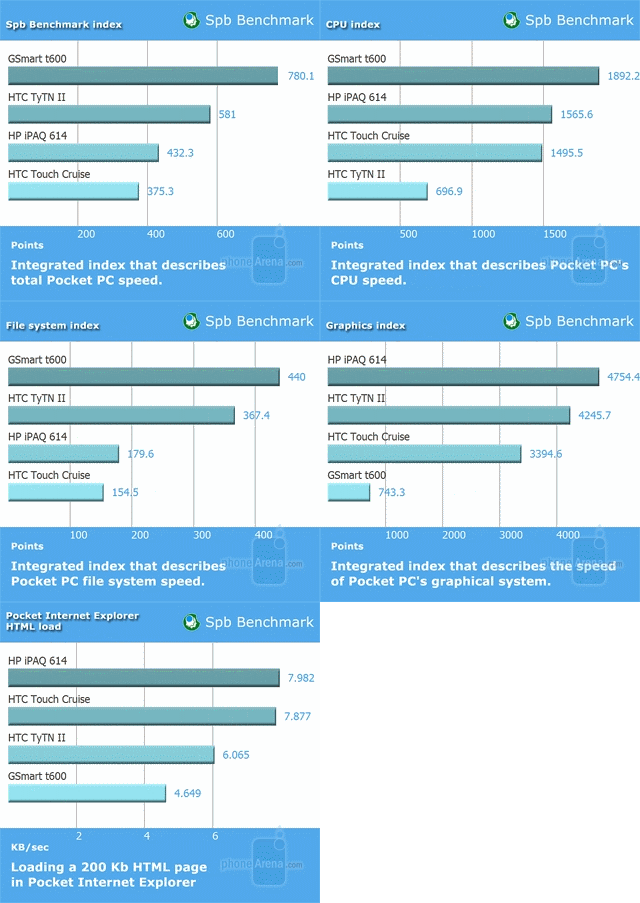
We used SPB Benchmark, to compare GSmart to some fast WM phones. Overall, according to the results, t600 is faster than all the rest and even HP iPAQ 614. Actually this is not so. Its operating speed is not slow but sometimes, during application start and menu navigation, there is a lot of lag.
When having a conversation, you will hear everything very loud, but the sound is very sharp and unreal. At the other end of the line, the situation is worse. The voices are muffled and monotonous, and sometimes, there’s an annoying crackling noise. The loudspeaker is totally unusable.
According to the official data provided by the manufacturer, the battery should provide up to 4 hours of talk and only 150 in standby mode. As we’ve mentioned above, we didn’t like its performance when watching TV.
Conclusion:
Being the first, doesn’t always mean being the best. This is valid for Gigabyte’s GSmart t600 as well. It really is the first in the World Windows Mobile phone allowing you to watch digital TV (DVB-T) free of charge and with good quality. However, we cannot forget about its drawbacks like the weak battery, and the mediocre sound and we can’t decide if its worth it. Currently t600 is the only one of its type on the market and there are no alternatives, but Eten is expected to release its V900 soon. To find out how it will perform is just a matter of time and then we’ll be able to choose.
Pros
Digital TV and Radio
Pleasant appearance
Cons
The battery doesn’t last long when watching TV and in standby mode
A discussion is a place, where people can voice their opinion, no matter if it
is positive, neutral or negative. However, when posting, one must stay true to the topic, and not just share some
random thoughts, which are not directly related to the matter.
Things that are NOT allowed:
Off-topic talk - you must stick to the subject of discussion
Offensive, hate speech - if you want to say something, say it politely
Spam/Advertisements - these posts are deleted
Multiple accounts - one person can have only one account
Impersonations and offensive nicknames - these accounts get banned
To help keep our community safe and free from spam, we apply temporary limits to newly created accounts:
New accounts created within the last 24 hours may experience restrictions on how frequently they can
post or comment.
These limits are in place as a precaution and will automatically lift.
Moderation is done by humans. We try to be as objective as possible and moderate with zero bias. If you think a
post should be moderated - please, report it.
Have a question about the rules or why you have been moderated/limited/banned? Please,
contact us.




Things that are NOT allowed:
To help keep our community safe and free from spam, we apply temporary limits to newly created accounts: