iOS 9: six iPhone tips and hidden tricks for powerusers
Still, that doesn't mean that iOS doesn't have its fair share of heavy users – people that spend a lot of time on the device, communicating with friends and business associates, shopping online, taking notes and getting organized through their phone. The iPhone has its fair share of hidden features, which the average smartphone holder could care less about, but will be used by the heavy user often. Said features are either out of the way, require some inventive thinking, or are the product of a 3rd party app from the App Store. Check out our six not-so-obvious iOS 9 tips below!
image
The iPhones still lack a “close all” button in their Recent Apps menu, but that doesn't mean that you can't actually purge a phone's memory from all active processes. If you wish to do this, hold the power button, as if you are going to turn off your iDevice. Once the Slide to power off screen appears, let go of the power button and hold down the home button. Continue holding until you see the device return to the home screen. You've just cleaned up your RAM and background processes!
Clean up your iPhone's RAM
image
Sometimes the App Store likes acting out. Be it app installation troubles or the menus on the screen going funky. At these moments, you may want to clear up the app's cache, before proceeding with force closes, device restarts, et cetera.
What's that? You can clear the App Store's cache? Yes, you can – if you quickly tap on the navigation bar that's on the bottom of the app (the bar that houses Featured, Top Charts, Explore, Search, Updates) a total of ten times, you will see it go white and re-load all of its assets anew.
Clear App Store cache
image
Most smartphone users have a love/hate relationship with their Facebook app. We all know it's a memory hog, we all know it loves to cache more files than it should and take up between 600 MB and 1 GB on your smartphone. Android users have the official Facebook Lite alternative, which is arguably a bit better, but what about iOS users?
Well, consider removing the Facebook app altogether, and replacing it with a web shortcut on your home screen. Open facebook.com in Safari and log in. See how the mobile version of the website looks a lot like the app? It's pretty functional by itself, too. Now open the Safari sharing options and choose “Add to Home Screen”. You will get a Facebook icon on your home screen, which, when tapped, will open facebook.com. Sure, you will not get new notifications and app badges, but it's a small price to pay for those that are fed up with dealing with the app's random memory hogging. You can still keep the Messenger app around, as it's much less of a rogue. And you can still quick-use the "log in with Facebook" option in other apps – just place your credentials in the iPhone's settings (Settings -> Facebook).
Get rid of the Facebook app
image
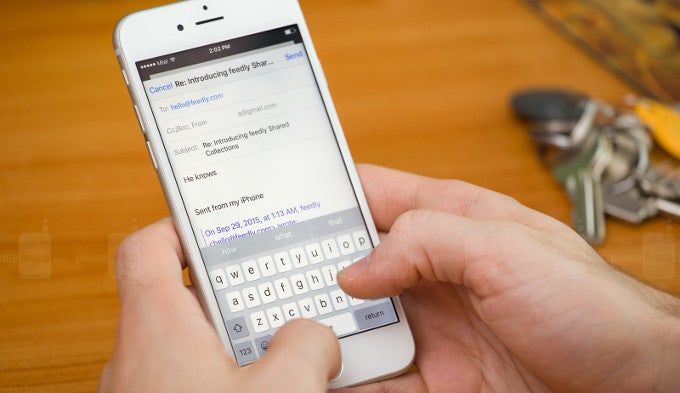
The iOS keyboard looks kind of skimmed-down when compared to some of the 3rd party offerings, with their swipe typing, number rows, shortcuts and whatnot. However, the iPhone does have a few shortcuts in its stock keyboard, despite the fact that they are not marked in any way. They can be accessed when one holds down a specific key. For example, when entering a web address, hold down on “.” and you will get quick access to the most popular web extensions – .com, .org, .edu, .net... Holding it down when you are entering text, you get access to an ellipsis. A lot of the other symbol keys will give you quick access to characters, such as different currency symbols, upside-down question and exclamation marks, bulletpoints, and other characters you probably didn't know exist on your iPhone's keyboard.
Keyboard symbol shortcuts
image
Blue Light Reduction is coming with iOS 9.3. In case you missed the news – it's a mode for nighttime readers, which removes some blues from the screen, making it easier on the eye for bedtime reading. The iPhone's minimum brightness goes down to around 5 nits — certainly not terrible, but can still be annoying in a pitch-black room. Well, there's a way for you to lower the display brightness beyond the minimum of that the slider allows. It's a bit of an iPhone lifehack and takes more steps than can be listed in a single slide here, so go ahead and read our full guide on how to do it here.
Reduce the minimum brightness even more
image
When Apple chose to finally allow for widgets to be made for iOS, it still only let them exist in the notifications drop-down, instead of the home screen. Users often forget about them and there isn't much focus placed on them, we feel. But there are a few pretty cool widgets, which will make your life easier if you spend a lot of time on your iPhone. We've got three here for your consideration – a calculator widget, so you don't have to switch between apps when you need to do some math; a currency converter widget, for those of you that do a lot of online shopping from their iDevice; a calendar app, which actually shows you a full calendar in the Widgets view, instead of the iOS-default agenda; and a comprehensive favorite contacts widget, which should be useful for every iPhone user out there. Alternatively, you can try the free app Wdgts, which contains a lot of different widgets, but it being a jack of all trades is kind of limited in terms of deep functions.
Contacts
Pad
Fantastical 2 (Calendar)
Clear Currency
Wdgts
Contacts
Pad
Fantastical 2 (Calendar)
Clear Currency
Wdgts
Expand usability with 3rd party widgets
iOS 9: six tips and hidden tricks for powerusers
The iPhones still lack a “close all” button in their Recent Apps menu, but that doesn't mean that you can't actually purge a phone's memory from all active processes. If you wish to do this, hold the power button, as if you are going to turn off your iDevice. Once the Slide to power off screen appears, let go of the power button and hold down the home button. Continue holding until you see the device return to the home screen. You've just cleaned up your RAM and background processes!
$137.44
Apple iPhone 6 on Amazon
$160.99
Apple iPhone 6s on Amazon
$200.00
Apple iPhone 6s Plus on eBay
FEATURED VIDEO
36 Comments
1. another1
Posts: 157; Member since: Dec 25, 2015
Getting rid of Facebook is the easiest way to improve your phone's performance, and especially battery life.
Not to mention, it's the number 1 way to improve your life. FB is a true addition for many people.
posted on Feb 04, 2016, 9:51 AM 3
9. sgodsell
Posts: 6594; Member since: Mar 16, 2013
Power user and Apple should never be used in a sentence. How can you have a controlled wall garden and then say you are a power user. What kind of joke is that.
posted on Feb 04, 2016, 12:02 PM 5
21. marorun
Posts: 5029; Member since: Mar 30, 2015
He know everything in thats matter at least.
Power user want FULL control on the device they use and be able to modify it anyway they want.
I am personally a power user ( 5-6 hours screen time a day minimum )
I have 4 email account on my device 3 different calender ( linked to 3 of the emails )
I dont use facebook but i use twitter.
I play load of game on my device and also use it to stream content to my chromcast at home and at work.
I also tend to modify my interface every months using various launcher and such.
Iphone 6S die after 3-4 hours screen time and the 6S plus is way too big. So just thats alone make it a no go for power user.
but when we talk about interface modification... game over apple.
So Wayne learn to understand ppl need before speaking.
posted on Feb 04, 2016, 3:08 PM 0
18. htcisthebest
Posts: 423; Member since: Nov 15, 2011
iSheeps think they are power users.
posted on Feb 04, 2016, 2:02 PM 0
2. 47AlphaTango
Posts: 709; Member since: Sep 27, 2015
I'm a pure ios poweruser. Having a powerbank solves most of my problems. Whether on the go or at home. Also, having a powercase extends the battery life of the ios devices. But sometimes, I just have to turn off the wifi, and disable 3g or 4g, whenever I watch movies, read comics or manga, or play mobile games.
posted on Feb 04, 2016, 9:53 AM 0
24. marorun
Posts: 5029; Member since: Mar 30, 2015
I never turn anything off and leave brightness on auto on all my android device and i dont need powerbank ( beside with my htcs phone i admit )
I can also do anything i want on my phone like make it look like any other OS,
change theme , put my calender as a full screen page on my phone ect.
Power user dont only use the phone a lots they do lots of thing with it.
a very small % of ppl are power user.
posted on Feb 04, 2016, 3:11 PM 0
4. kkmkk
Posts: 699; Member since: May 06, 2013
a true power user use android not ios ( simple fact )
posted on Feb 04, 2016, 10:21 AM 2
6. RebelwithoutaClue
Posts: 5469; Member since: Apr 05, 2013
That is not a fact but an opinion.. nothing more. I don't believe that a true power user is bound to one platform.
posted on Feb 04, 2016, 10:49 AM 14
7. SamsungPhanboy
Posts: 765; Member since: Mar 31, 2015
Owned. +1
posted on Feb 04, 2016, 11:00 AM 4
13. RebelwithoutaClue
Posts: 5469; Member since: Apr 05, 2013
You can always jailbreak your iPhone and even on Android there is no full control. And there is more to being a power user than to customize the s**t out of your phone.
posted on Feb 04, 2016, 12:28 PM 5
16. illusionmist
Posts: 157; Member since: Jan 29, 2013
Dude stop. You’re smothering them with reason.
posted on Feb 04, 2016, 1:36 PM 3
26. marorun
Posts: 5029; Member since: Mar 30, 2015
you can also root an android.
But you dont need to root to have customization and full control on your device but i admit rooting make it completely open.
Jailbroken iphone on the other hand are still somehow limited on some stuff.
posted on Feb 04, 2016, 3:13 PM 0
35. nodes
Posts: 1122; Member since: Mar 06, 2014
if you are a poweruser, you could make iOS whatever you want, like that kid that got hired by Apple, he could flash any iOS version and even multi-boot it.
then there are these people that only follow some guide on the internet.
Step 1 to 8.
and voila!
your device flashed with 3rd party ROM, and call themselves poweruser.
compile your own kernel and rom, then we are talking about poweruser.
posted on Feb 05, 2016, 12:43 AM 1
36. AlikMalix unregistered
Dude, I've been over this before: you have no control of getting an available update unless your favorite manufaturer finally gets their lazy ass on it and then good luck with your carrier. You also have no control over what apps are allowed and not allowed to do (marshmallow will add that but given less then 2% on it - chases are you sing got it). You have no control of bloat that's on your phone, you uave no control what your phone decides to run while in standby. You can't track your family, you can't in a decent game without blaming the high resolution for low frame rate. Besides installing new winter theme - you pretty much got a walled garden of your own there.
File managers, automation, notifications - are all available in all kinds and forms on iOS. You can't even run a decent content blocker without rooting something.
posted on Feb 05, 2016, 3:24 AM 0
14. AlikMalix unregistered
Because in your simple world a power user is someone who likes to change icons and fonts, right? Customizing the look of your home screen is the least of any user needs.
You see iPhones used everywhere in the industry from doctors and medical offices to ship loading docks.
Just because you like to tinkle with your settings because a decent game doesn't run well on your device does not make you a power user. (Just tried running RR3 on a buddy's G4 - it lagged so much - I might as well run it on my old 3GS, I'm the last person that will point at a recent android flagship and say it lags - but I was really surprised by the lack of performance of LG G4 for a game that my 5s runs smooth).
posted on Feb 04, 2016, 12:45 PM 2
27. marorun
Posts: 5029; Member since: Mar 30, 2015
Nope in my world a power user is someone who can do ANYTHING he want on is phone.
Customisation is one thing out of countless others.
In fact Doctors and medical office often use Intrinsic safety made phone wich iphone are NOT those phone eliminate all electrical current output outside the phone and produce no heat so no danger to make explosion if by example your oxygen tank is leaking.
Ship loading docks usualy use rugged phone and sometime iphone but most of my client switched to Sonim phone for such work as its come with 3 year warranty at no cost even if you break your phone and much better battery with the possibility to use a real laser based scanner attachment on the back of the device.
A power user also know how hardware and OS interact in any devices by example :
RR3 you mean real racing 3 right? its run flawlessly on my moto x play with a SD615... Could it be the 2k resolution on the G4 is too much for the SD808? Your iphone 5S is only 750p resolution so to run a game smoothly its take a lots less horse power than on 1080p or 2k. i am also a PC user and a laptop can run a game at 720p everything maxed with no lag but same game might lag on my gamer desktop if i run it in 4k. So yeah your 250 horse power car can go as fast as my 1000 horse power heavy truck but thats because i have much more weight to push ( ence more pixel to push egual to higher load on hardwar)
So dont say a phone is crap because its run everything at higher resolution ( wich is something thats should be possible to change in all mobile game thats way i am pretty sure the G4 would run it at 750p like your iphone whitout lag at all )
I challenge you to say i am wrong on this just try it!
posted on Feb 04, 2016, 3:27 PM 0
23. darkkjedii
Posts: 30515; Member since: Feb 05, 2011
Damn kkmkk! Your ass got owned by everybody lol. You should go to mommy, and breastfeed.
posted on Feb 04, 2016, 3:09 PM 0
28. marorun
Posts: 5029; Member since: Mar 30, 2015
Some ppl can defend themself other cannot.
This iphone 5S running a game more smoothly than a device thats need to push many time more pixel was a joke on Alik as this is simply dumb.
Your 5S would die if we would put android OS on it.
iOS would fly if its would run on the hardware of the G4.
Benchmark only show the end result and i always said android is much more heavy than iOS.
posted on Feb 04, 2016, 3:30 PM 0
29. darkkjedii
Posts: 30515; Member since: Feb 05, 2011
Man shut that ish up, I use both sonnnn. Go bitch somewhere else.
posted on Feb 04, 2016, 3:40 PM 1
Report Post
Send a warning to post author
Send a warning to Selected user.
The user has 0 warnings currently.
Next warning will result in ban!
Ban user and delete all posts
Message to PhoneArena moderator (optional):