The Gateway LT2016U is now the second Netbook to be released through Verizon Wireless, after the HP Mini 1151NR earlier this year. Both have similar features and come with an internal Mobile Broadband data card that operates on Verizon’s EVDO Rev A network while in the US, as well as quad-band GSM/GPRS/EDGE and tri-band UMTS/HSPA while roaming. There is also a CAT 5 Ethernet port and Wi-Fi 802.11b/g for people who have access to a WLAN. Included in the retail package are the Gateway LT2016U Netbook, 6-cell battery, wall charger, and user guides.
Hardware:
The Gateway LT2016U is not as light and compact as the HP Mini 1151NR, as it measures 10.17”W x 7.24”D x 1.03”D and has a weight of 2.95 pounds, where the HP Mini 1151NR is only 6.5”D and weighs 2.5 pounds. This is due to the larger 6-cell battery on the Gateway. When the two Netbooks are side-by-side you can clearly see the difference in size, and when you pick them up you can feel the difference in weight. Because of this, the HP Mini 1151NR remains the more portable device.
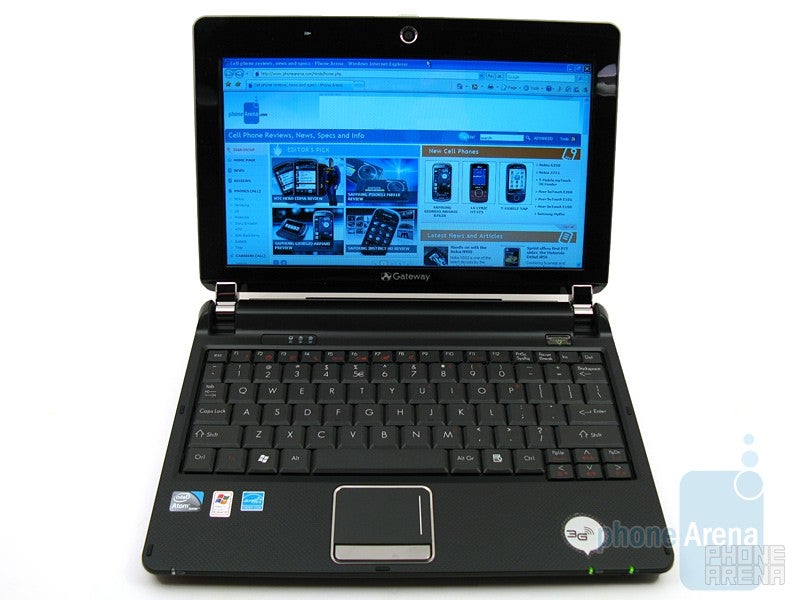
The LED backlitdisplay on the Gateway LT2016U measures 10.1-inches diagonal and has a resolution of 1024x600 pixels. The size and quality is identical to the HP Mini 1151NR, but the Gateway Netbook does not have the protective glass in front of the display, like on the HP Mini. This makes it easier to view outside, since sunlight does not reflect on it as much. Directly above the display are the mic and webcam, which is capable of capturing 640x480 video at 30fps.
Located on the sides are three USB 2.0 ports, wired ethernet jack, 15-pin VGA monitor output, headphone out, microphone in, and media card reader for SD/MMC/RS-MMC/xD/MS/MS-PRO. Naturally it does not come with an internal CD/DVD drive, but an external unit is available that connects via USB.
Both the Gateway LT2016U and HP Mini 1151NR use the same Intel Atom N270 processor, operating at 1.6 GHz, and come with 1GB of internal RAM. Thankfully, the Gateway Netbook has a larger 160GB hard drive, instead of the 80GB that comes with the HP 1151NR. This is a nice improvement, as you have more storage space, but we’ve read that the new HP Mini 311 and Mini 110 will also come with the larger 160GB hard drive once they are released by Verizon. While we find the Gateway LT2016U plenty fast for most web browsing and email use, we wish it came with an option for 2GB of RAM, as that would help with running larger Windows applications.
We find the Gateway LT2016U plenty fast for most web browsing and email use
Even though the keyboard on the Gateway LT2016U takes up the same amount of space as the keyboard on the HP Mini 1151NR, there are some differences. Most noticeably, the Gateway’s keyboard buttons are smaller and closer in size to a standard traditional keyboard, instead of being bigger like on the HP Mini. When testing the two Netbooks, we found that typing was easier on the Gateway and there were fewer mistakes. Also, the touchpad on the Gateway has a more traditional look as the buttons are located on the bottom. We also didn’t have the accuracy problems with the Gateway touchpad that we experienced with the HP, which made it easier to use.
Software and Performance:
One of the main functions of the Gateway Netbooks is to get you on-line, and that is done by using the preinstalled VZAccess Manager program. When it is launched, it lists all the available connections and their signal strength, which includes Verizon Wireless (EV and 1X) and any local Wi-Fi signals. We selected “Verizon Wireless” on the list, as it showed 3 out of 4 bars of EVDO Rev A, and we were on-line within seven seconds. Web browsing using Microsoft Internet Explorer 7 worked well, and complex sites, such as PhoneArena.com, only took 13 seconds to completely load.
We also ran a series of speed tests using two scenarios: 1) The internal Mobile Broadband card using Verizon’s EVDO Rev A network. 2) Wi-Fi connected to our home WLAN using Comcast cable modem 16Mbps service.
The first test wedownloaded a 121MB file from the Nvidia web site. When using the internal Mobile Broadband card, the file downloaded in 16 minutes and 50 seconds, and had an average download rate of 121KB/sec. Then when using our Wi-Fi connection with our home network, the same file downloaded in 2 minutes and 7 seconds, with a rate of 976KB/sec.
.
For the second test we measured the download and upload speed from http://speedtest.net and used the Miami FL server location (as Ft Lauderdale was having issues). The internal Mobile Broadband card achieved 1.46Mbps download and 0.44Mbps upload, while the home Wi-Fi connection speed was 12.15Mbps download and 8.18Mbps upload. We should also point out that the ping test while using the Mobile Broadband was card was 261ms, but was only 26ms when using the home Wi-Fi connection.
Connection
Internal Mobile Broadband EVDO RevA
Home Wi-Fi withComcast
Speed
121MB download fromNvidia
16 min 50sec 121KB/sec
2 min 7sec 976KB/sec
Speedtest.net
1.46Mbpsdown 0.44Mbps up 261msPing
12.15Mbps down 8.18Mbpsup 26ms Ping
As we expected, using a Wi-Fi WLAN connection, which is provided by home/office broadband, will have the fastest download and upload speeds. However, this is not always possible, and that is when the internal Mobile Broadband card and Verizon data service come into play. For average web browsing and email, EVDO Rev A is fast enough, including the occasional file download, watching streaming videos from YouTube and Hulu, or using the webcam. However, if you are going to download a lot of files, such as the 250MB download we had to do using Windows Update, then Wi-Fi would be best, as it’s faster and does not deduct usage from your Verizon data plan.
The Gateway Netbook comes with Windows XP Home Edition with SP3, you can do pretty much anything with it that can be done on a laptop or desktop PC, though we wish it came with Windows 7 preinstalled. Additional programs included on the Gateway Netbook are Adobe Reader, Flash Player, Norton Internet Security (trial), Microsoft Works 9 SE, Microsoft Office 2007 (trial), and Google Desktop. We were able to download and install FireFox, Real Player, and QuickTime Player without any problems.
The included 6-cell battery is rated to provide up to 6 hours of use. During our testing we were able to get up to 5 ½ hours of continuous use while using the Netbook with Verizon’s EVDO internet connection. This is 3 hours longer than we got when using the HP Mini 1151NR.
Conclusion:
The Gateway LT2016U is a very capable Netbook, as it offers pretty much the same features as the HP Mini 1151NR, but with a larger hard drive, more traditional styled keyboard, and longer battery life. If you are a business professional or student and need a Netbook to last all day, then the Gateway LT2016U is for you. However, with the HP Mini 311 being released soon, you might want to hold off just a bit, as it will have Windows 7, 2GB RAM, and Nvidia ION graphics, but will come at a higher cost.
A discussion is a place, where people can voice their opinion, no matter if it
is positive, neutral or negative. However, when posting, one must stay true to the topic, and not just share some
random thoughts, which are not directly related to the matter.
Things that are NOT allowed:
Off-topic talk - you must stick to the subject of discussion
Offensive, hate speech - if you want to say something, say it politely
Spam/Advertisements - these posts are deleted
Multiple accounts - one person can have only one account
Impersonations and offensive nicknames - these accounts get banned
Moderation is done by humans. We try to be as objective as possible and moderate with zero bias. If you think a
post should be moderated - please, report it.
Have a question about the rules or why you have been moderated/limited/banned? Please,
contact us.
 Speed
Speed








 FCC OKs Cingular\'s purchase of AT&T Wireless
Things that are NOT allowed: