Google's new Chrome to Phone sends info from your browser to your Android phone
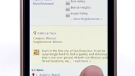
Google's new Chrome to Phone extension adds a very important button to your Google Chrome browser. With this button and an Android phone running 2.2, you can send a link to your handset which will open the phone's browser and find the story you were reading on your home PC or laptop. If you used your desktop at home to find an address or to obtain driving directions, Google Chrome to Phone can send the info to your Android device and automatically open up your Google Maps app with all of the information you need to navigate to your destination. Even that Annoying Orange video that you have been viewing at home can be sent to your phone for viewing on your phone's YouTube client. A phone number you have looked up on your computer at home can be sent to the phone and the dialer will open with the number already entered, ready for you to make the call.
To set up your computer and phone to use this new feature, first install the Chrome to Phone extension on your desktop or laptop from the Chrome Extensions gallery. Then head over to the Android Market with your Android 2.2 powered unit and download the Chrome to Phone app. That's all you need to make going from the home to the road, a seamless experience.
source: Google
To set up your computer and phone to use this new feature, first install the Chrome to Phone extension on your desktop or laptop from the Chrome Extensions gallery. Then head over to the Android Market with your Android 2.2 powered unit and download the Chrome to Phone app. That's all you need to make going from the home to the road, a seamless experience.
source: Google




 FCC OKs Cingular\'s purchase of AT&T Wireless
Things that are NOT allowed: