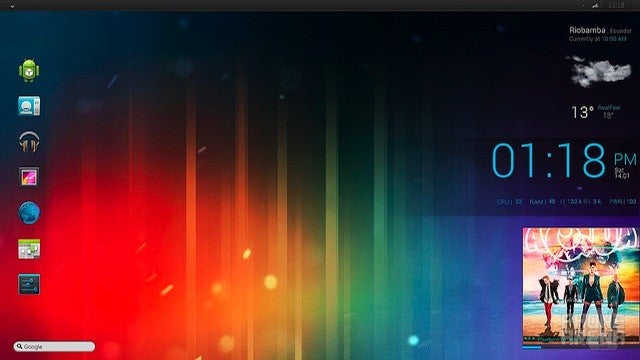
If you are just enamored with the look of Ice Cream Sandwich on your phone and would love to rock that same look on your Windows box, you’re not alone. Flickr user David Molina posted a picture of a custom desktop he put together that is a nice replicate of the Ice Cream Sandwich look in a Windows environment.
The final product is a culmination of quite a few elements, but well worth the effort. The other advantage is that you can use as many or as few of the parts of this setup as you like.
The folks over at LifeHacker did a great job parting everything out with links, so if you're looking to recreate this masterpiece on your PC, head on over to their list to start downloading.
Charlene S. is a former tech news writer at PhoneArena. Her content contribution focused on deep software coverage. She was active between 2011 and 2012, producing a ton of news stories on various topics, as well as going hands-on with the Galaxy Note 2.
Recommended Stories
Loading Comments...
COMMENT
All comments need to comply with our
Community Guidelines
Phonearena comments rules
A discussion is a place, where people can voice their opinion, no matter if it
is positive, neutral or negative. However, when posting, one must stay true to the topic, and not just share some
random thoughts, which are not directly related to the matter.
Things that are NOT allowed:
Off-topic talk - you must stick to the subject of discussion
Offensive, hate speech - if you want to say something, say it politely
Spam/Advertisements - these posts are deleted
Multiple accounts - one person can have only one account
Impersonations and offensive nicknames - these accounts get banned
Moderation is done by humans. We try to be as objective as possible and moderate with zero bias. If you think a
post should be moderated - please, report it.
Have a question about the rules or why you have been moderated/limited/banned? Please,
contact us.








 FCC OKs Cingular\'s purchase of AT&T Wireless
Things that are NOT allowed: