PhoneArena is looking for new authors! To view all available positions, click here.
  • Home
  • News
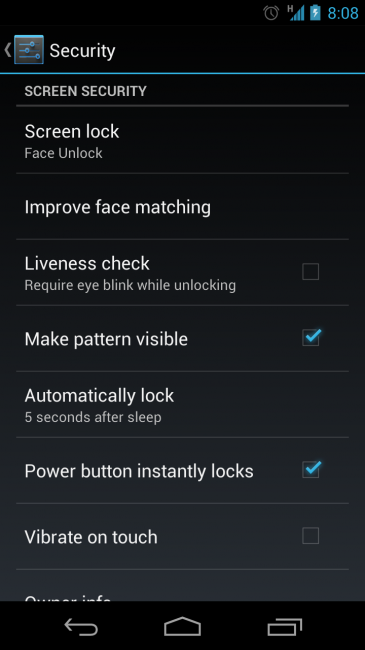
  • Face Unlock becomes smarter in Jelly Bean: asks you to blink for the camera

Face Unlock becomes smarter in Jelly Bean: asks you to blink for the camera

Posted: , by Victor H.

Categories:

Share:

Discuss 29
Face Unlock becomes smarter in Jelly Bean: asks you to blink for the camera
Face Unlock was one of the coolest new features in Android 4.0 Ice Cream Sandwich, but while having your phone recognize your face sounds like a fun (it is) way to access your device, it definitely isn’t among the most secure ones. 

Face Unlock becomes smarter in Jelly Bean: asks you to blink for the camera
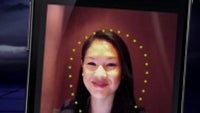
Why? Well, you can easily trick the phone into thinking it’s seeing your face when you’re actually showing it a picture of yourself. With Jelly Bean things have improved as Google has now added a feature it calls “Liveness check” that basically asks you to blink in a certain moment and only then unlocks the phone. Now, that’s something a photograph can’t do and definitely an elegant solution making it harder to crack the mechanism. 

Is it still possible to trick Face Unlock, though? Certainly. All it takes is a bit of tech savvy to craft an animation out of still photos with you with open and closed eyes, and then play it to your phone’s camera from another display. But still, that’s much harder than just showing a picture, isn’t it?

Anyway, we’d only use Face Unlock for the fun and coolness of it, not for real safety, and we’d advise you to do the same.

source: Droid-life
Face Unlock becomes smarter in Jelly Bean: asks you to blink for the camera

Share:

Discuss29

29 Comments

  • Options
    Close


Want to comment? Please login or register.

1. dickwyn posted on 02 Jul 2012, 03:05 10 2

Answering a call is just a blink away

2. script_writer posted on 02 Jul 2012, 03:39 1

what if your blind? and or cant open your eyes? what you wear an eye patch?

3. Wiki_jaan posted on 02 Jul 2012, 03:49 4 1

lol! than buy Nokia 3310

8. ilia1986 posted on 02 Jul 2012, 06:23 4 1

Then you don't have to use this feature. Freedom - you decide what to use, and what not. A radical concept these days of the iOS plague, I know.

11. script_writer posted on 02 Jul 2012, 06:37 1

also what if your a tv/film actor/extra and your appearance changes through out the day

16. plgladio posted on 02 Jul 2012, 07:13

Use the pass word to unlock. Anyways there will be a option to skip it.

20. OptimusOne posted on 02 Jul 2012, 07:28

hmmmm faceunlock is optional

4. longhairbilly posted on 02 Jul 2012, 04:52 2

I was actually impressed with face to unlock. It worked way better then I though it would. That said, I had to stop using it, I work outside and wear sunglasses all day.

Face unlock does not work well with sunglasses and I imagine it will not work at all now being it won't be able to see my eyes blinking.

6. Wiki_jaan posted on 02 Jul 2012, 05:54 2 2

lol! u dont even want to remove glasses for only 10 seconds.

26. fraydoe posted on 02 Jul 2012, 08:00 2 1

they should instead have you rotate the phone around your head or something that requires 3d authentication. because its still pretty easy to bypass whether its animated digitally or whether i just take a pic and some construction paper. nevertheless it's still really cool!

i think i can see the new iphone ....
*NEW , iUnlockByFace!* ONLY on iphone lol

* Some comments have been hidden, because they don't meet the discussions rules.

Want to comment? Please login or register.

Hot Phones

  • Samsung Galaxy S4Samsung Galaxy S4
  • Apple iPhone 5Apple iPhone 5
  • Samsung GALAXY Note IISamsung GALAXY Note II
  • HTC OneHTC One
  • Sony Xperia ZSony Xperia Z
  • Google Nexus 4Google Nexus 4
  • LG Optimus GLG Optimus G
  • Nokia Lumia 920Nokia Lumia 920