When the LG Voyager was introduced for the 2007 Holiday Season, it was the “must have” device from Verizon, as it was the first non-smartphone to incorporate a full touch-sensitive display with internal QWERTY keyboard. Since then, there have been other phones introduced with touchscreen displays, such as the Dare, Versa, and Krave. Then the beginning of this year, rumors started that a “Voyager 2” was coming to Verizon, but the Voyager name was retired, and the device was dubbed the LG enV Touch VX11000. The most notable improvements include two large 3” WVGA displays, better user interface, call quality, and a 3MP autofocus camera.
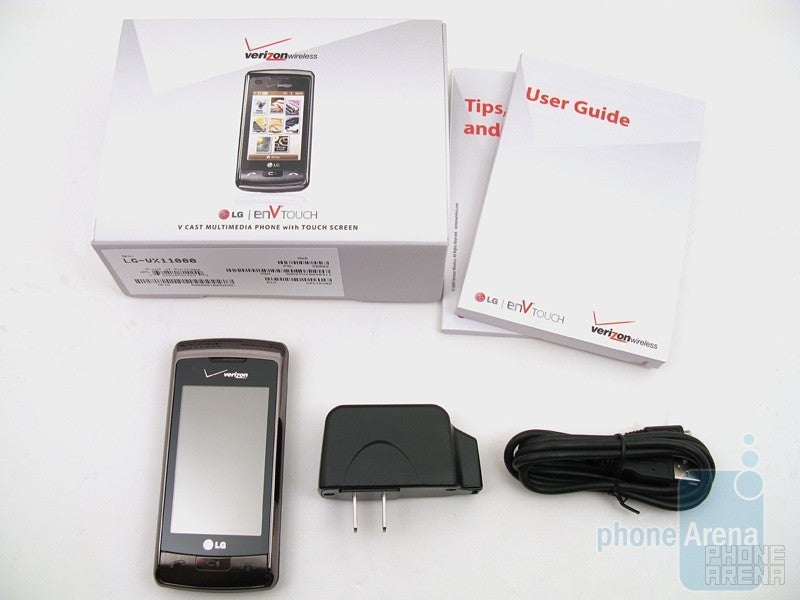
The retail package includes the enV Touch phone, 950mAh battery, combination wall charger/microUSB cable, and user manual.
Design:
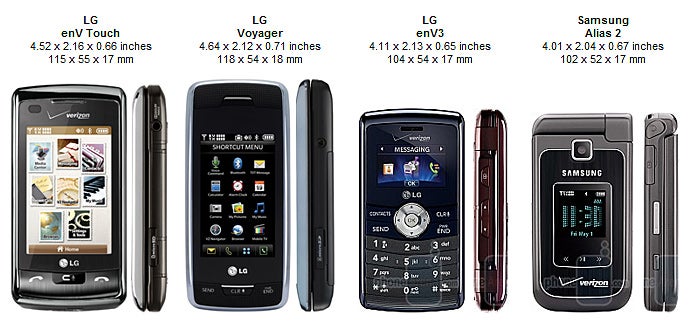
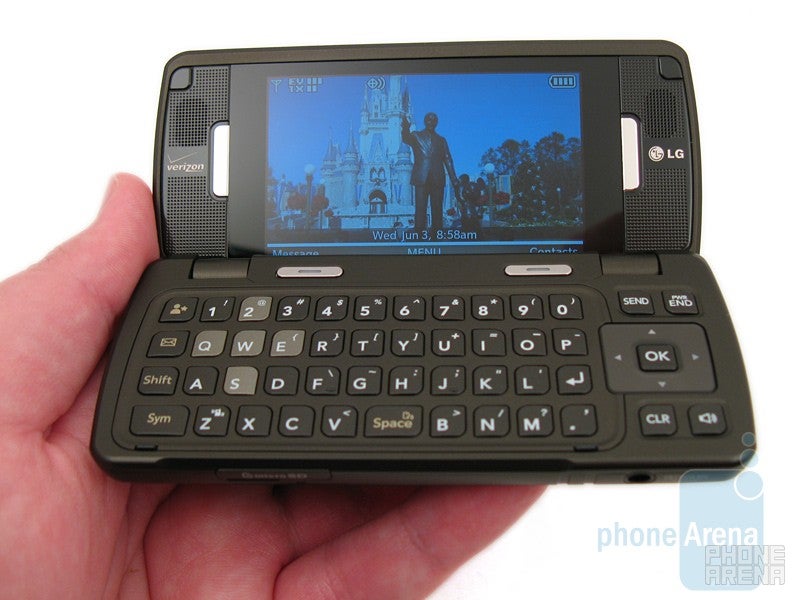
When looking at the enV Touch for the first time, you can easily tell it is an upgrade from the Voyager, since both share many design characteristics. The clamshell form-factor remains intact with the familiar 2-stop hinge. Most of the front real estate is taken up by the display, with pewter chrome accents surrounding it. We like this choice since it’s not as shiny and reflective as the mirror chrome used on the Voyager. The back still uses the soft-touch coating, but has geometric indentions to it, which is also found on the enV3. The device’s overall height and depth is now slightly less, but it is also a little wider (due to the size of the display). Because of this, it less “brick like” than the Voyager, but it is still not as compact as the Alias 2, enV3, or Versa, and is noticeable while in your pant’s pocket. The overall construction feels solid for the most part, but we did notice some plastic creaking sounds when pressing on the chrome edging around the display. The Voyager and enV3 also exhibit this, but to a lesser extent.
You can compare the LG enV Touch VX11000 with many other phones using our Size Visualization Tool.
As previously mentioned, the external 3” resistive touchscreen display is quite impressive, as it features WVGA 800x480 pixel resolution and supports up to 1.6 million colors. The internal display is the exact same size and specifications, except that it is not touch-sensitive. When looking at the displays on the LG enV Touch VX11000 next to the Voyager, you can easily see the difference it’s size and quality of images it produces. The enV Touch also has a light sensor, which automatically adjusts the brightness of the external display based on surround light levels, as well as a proximity sensor that turns off the display when the phone is next to your face and you’re on a call. Our only complaint here is that there is no way to manually adjust the brightness of the displays.
Since the touchscreen is resistive (pressure) sensitive, you can use your finger or a stylus for input, but we found a stylus really isn’t necessary. It provides a haptic (vibration) feedback when pressed, but you can change level of the vibration or even turn it off. The overall responsiveness of the touchscreen is good, but it does require a slightly more pressure than the Versa to get a response; about the same amount as the Dare.
Just like with the other LG touchscreen phones, the only physical buttons located on the front are for Send, Clear/VoiceCommand, and End/Power. They have a metallic look to them, but are in fact plastic. Along the left side is the camera button, volume rocker and lock button, with the 3.5mm headset jack and microSD card slot on the right side, microUSB data port on the bottom, and 3MP camera with flash on the back. We are glad to see the proprietary data port and 2.5mm headset jack used on the Voyager was replaced with the more standardized microUSB and 3.5mm formats.
When opening the phone up, you have the familiar 2-stop hinge that is found on the Voyager and other enV models. Below the internal display is the QWERTY keyboard, which has undergone some changes. The buttons are still about the same size, but have more rounded edges to them. There is now a single space key in the center, instead having two on either side, which to us feels easier to use. The d-pad is larger, and there are buttons for Favorites and New Text Message located on the left side. We found typing messages on the QWERTY keyboard to be slightly quicker than the Voyager, due to the center space key. When compared to the Versa (with keyboard attachment) the backlit buttons on the enV Touch were easier to see and are not a cramped together as on the Samsung Alias 2. Big hands will also like the larger keyboard on the LG enV Touch VX11000 than the enV3.
LG enV Touch VX11000 360DegreesView:
User Interface:
The User Interface has been updated, and incorporates some of the features found on the Dare. You begin by having to unlock the external display, which can be done by sliding up the screen, or by pressing the lock button on the left side of the phone. The Home Screen shows your desired wallpaper and 5 icons across the bottom for Inbox, Dial Pad, Main Menu, Contacts List, and Favorites. Located on the right edge of the screen is a small arrow, which can be placed anywhere from the top to the bottom. Pressing it will open your Shortcuts menu, where you can add 15 items as well as second page for 15 media items (pictures, videos, music, web favorites). You can then drag any of those icons to the top of the screen and it will automatically place it on your desktop. We like being able to do this, as it allows for 1-click access from the Home Screen, but the Versa goes one step further with three separate Home Screens for Shortcuts, Media, and Favorites. We’re not sure why this feature wasn’t added to the LG enV Touch VX11000, but it would be nice to have.
One area that the LG enV Touch VX11000 disappoints is in regards to the themes, as only two are included: Modern Retro and Blue Inspiration. The Modern Retro is selected as default and shows 6 icons that look like postage stamps (media center, messaging, contacts, recent calls, VZ Navigator, my music, browser, and settings & tools). When you select one (such as media center) you are taken into that menu and can slide from side-to-side to go to the next menu. When using the Blue Inspiration theme, it shows three sections for communications, multimedia, and settings & tools, which are divided equally on the screen. Each one of these categories has 6 icons, but only 3 are shown at a time, which means you have to horizontally scroll the icons across the screen to see the hidden items. We didn’t care for this theme, as it is more time consuming to find what you’re looking for. We don’t understand why a device with a two beautifully 3” WVGA displays would be subject to such flaccid themes. Even the enV3 comes with a selection of four themes that show some animation when used. Maybe a future firmware update will bring better themes to the enV Touch, but we doubt it. Other limited user customizations include menu fonts, dial font size, and clock format.
Phonebook:
Just like it’s predecessor, the LG enV Touch VX11000 allows up to 1500 contacts to be stored with their name, 5 phone numbers and 2 email addresses, but you can now input a street address a well. Naturally, you can still select a picture and ringtone for each contact, but the size of the CallerID image when that contact calls is rather small (about 1.25” diagonal). There’s no reason why this could not be larger. After a contact is saved, you can assign them to one of 999 speed-dial locations and also add them to your Favorites menu, which allows you to call or message a person just by clicking on their picture. Finding a person in your contacts list is relatively easy, as you can either scroll through the list or input the beginning letters of their name at the bottom of the screen.
Tapping on the Phone icon on the bottom of the Home Screen will bring up the standard numeric dial pad. Due to its larger size and better response, we didn’t encounter the dialing problems that we experienced with the Voyager. Also, when you being to dial a number, it searches the contact list for matching results and will show the matching name at the top of the screen. You can then click on it to dial the number.
Organizer:
The Calendar still offers the same features as before, but has undergone a facelift and is more user friendly. It begins by showing the current month with the date highlighted. You can select a specific day on the calendar by pressing on it, as well as moving from month-to-month by sliding your finger across the screen. There is also a month and year drop-down list to go to any date faster. Once the desired date is selected, you can add an event with the subject name, start and end time, repeat frequency, until date, alert time, ringtone and vibrate. When the phone reaches that saved event, it will display the information on the screen and playback the designated alert tone.
Separate from the calendar are the Alarms, where up to 10 can be added. It is very basic and only allows you to set the alert time, repeat frequency, and ringtone. This is an easy way to setup a daily wake-up alarm, or notification if it takes place within 24 hours.
Just like with the Voyager, Dare and Versa, the speaker-independent Voice Command feature can be launched by pressing the Clear button located under the external display. Once activated, there are 9 commands you can speak to the phone: Call name or number, Send Message to, Go to menu, Check item, Contacts name, Redial, Play, My Account, and Help. The most useful of these is the “Call” command, where you can speak the digits to dial or the name of a person in your contacts list. The only training that is required are for the digits and a few basic words, not the contact names or commands. During our testing, the system didn’t have any problems with our spoken commands, even while in noisy environments. It can also be used in conjunction with a Bluetooth headset, so you can call numbers without accessing the phone.
The LG enV Touch VX11000 comes with 250MB of internal memory, but 90MB of that is used out of the box. While this isn’t as much other “music” phones, such as the 1GB on the Chocolate 3, you can still add microSDHC cards up to 16GB in size for expanded storage of music, pictures, and videos.
Messaging:
Just like most other phones today, the LG enV Touch VX11000 can send and receive text, picture, and video messages. Since one of the main features is the QWERTY keyboard, most users will opt for this method of typing messages. There is still T9 predictive for use with the external touchscreen, but the touch-keys are rather small. When you receive a message you can view it on either screen and can reply to it directly just by typing on the QWERTY keyboard, without have to select “reply”.
Other messaging options include Mobile Email, which allows you to send and receive email through your POP or IMAP account, as well as Mobile IM, to connect to people on your AIM, Windows Live, and Yahoo buddy lists.
Connectivity and Data:
The LG enV Touch VX11000 is a dual band all-digital device that operates on the 800MHz and 1900MHz CDMA Verizon Wireless network. Non-voice data, such as Web and E-mail, are transmitted using Verizon’s 3G EVDO Rev A network.
Bluetooth version 2.1 with EDR is now supported and allows for up to 20 device parings. Supported profiles include: headset, hands free, dial up networking, A2DP advanced audio distribution (stereo), AVRC, phonebook, object push, file transfer, basic printing, human interface, and basic imaging. We were able to use the auto pair feature to easily connect to our Jabra 250v and Motorola HT820 headsets. When using the 250v for calls, we were able to get up to 30 feet of static free performance, and with the HT820 we were able to get up to 35 feet of stereo music without static.
As with most non-smartphones for Verizon, the LG enV Touch VX11000 does not have Wi-Fi and relies on Verizon’s EVDO Rev A network for connecting to the Internet. When launching the HTML Browser, you are taken the familiar VZW Home Page, which has quick launch icons for News, Email, Entertainment, Sports, Weather, Connect, Verizon Services, More, and Favorites. Located at the bottom left corner of the browser is an icon for page width-fit, and in the right corner is an icon that brings up browser functions. Clicking on it shows icons for page back and forward, home, favorites, RSS, search, history and settings, and an address bar at the top with 3 tabs. To enter in a web address, you simply press the address bar and use the on-screen or internal keyboard. It also shows a list of web sites you recently went to that you can select from. Complex web site, such as PhoneArena.com, only took 30 seconds to completely load, where the Voyager would take up to 60 seconds. You can use your finger to pan around web pages with the external display, or use the d-pad when viewing on the internal display. Pressing on a page once will show the zoom control at the bottom, or you can simply double-tap the page to zoom in and out, and even use the volume rocker for zooming. One option is to have the browser in full-screen mode, which eliminates the status bar at the top that shows signal strength and battery level. You can also turn on the automatic thumbnail, which makes browsing large sites easier, as it shows a mini-map overview of the entire page. Just like with the Versa, the LG enV Touch VX11000 has limited Flash support. This allows you to watch embedded YouTube videos in web pages, and also view videos directly on the YouTube site. Full screen mode is supported and loads the video in a separate program where you can zoom in and out, play/pause, and use a sliding progress bar across the top. This is a major improvement over the Voyager, as it has problems playing YouTube videos. Even though the browser has limited Flash support, not everything will work, such as web-based games, which will show an “unsupported flash media” message when trying to load. Despite this limitation, the browser on the enV Touch is still the best we’ve seen on a non-smartphone from Verizon. The only way to step-up is to go with a smartphone, such as the HTC Touch Diamond with Opera browser.
Computer Sync:
Included in the retail package is a wall charger with detachable microUSB cable. Before connecting the LG enV Touch VX11000 to your computer, you can go into the phone’s Settings & Tools menu and select an option for USB Auto Detection. When selecting “Ask on Plug”, each time your PC is connected to the enV Touch, the screen will ask if you want to sync music or data. If you select “Music”, the phone shows up on your PC as an external music device, where you can sync mp3 files from you favorite music program directly to the microSD card installed on the phone. If you choose “Data” then go to Tools and select “USB Mass Storage”, the microSD card is shown as a Removable Storage device on your PC, where you can copy pictures, videos, and music files. This is by far the easiest method for transferring files, as it eliminates the need to remove the memory card and place it into a SD card reader.
Camera:
Another nice improvement on the LG enV Touch VX11000 is the 3MP autofocus camera with Schneider-Kreuznach lens and LED flash. The program takes two seconds to load and is easily accessible by pressing down the dedicated camera button on the left side of the phone. Once activated, you can use either the external or internal display as the viewfinder. The only difference here is the external will have touch-icons and the internal requires the use of the d-pad for changing settings. The 2-stop autofocus cannot be turned off and allows you to select from Auto, Macro, and Manual. With it set to “auto” the camera takes about 1.5 seconds to focus, less than a second to capture the image, and 4 seconds to save. The total turnaround time to take one picture, save it, and take a second picture is about 8 seconds; 2 seconds faster than the Voyager.
Images taken outside are excellent, equal to that of the LG Dare, as they are crisp and have good detail. This is mostly likely due to the fact that both have the same camera. Colors are accurate and not overly saturated, with better white balance than we saw with the Voyager. Unfortunately, images taken inside still face the same common problems that most cameraphones share: grain the in the image and slight blurriness due to camera shake with low shutter speeds. Fortunately there is a flash, which helps when taking low-light images of subjects no more than 10 feet away. Other camera features include a Panorama Mode for wide-angle images, Intelligent Shot that adjust for anti-shake, smart denoise, and dynamic lights, Facial Makeover that removes blemishes and enhances facial features, Smile Mode that will only take an image when a smile is detected, and Name Card Reader to covert business cards to stored contacts. All of these features worked well, except the name card reader, which often times would misspell names and email addresses.
Videos can be recorded up to VGA 640x480 resolution and can be as long as the available memory. They are recorded between 17-20FPS, which is better than the 15FSP on the Dare and 12FPS on the Versa. While they are not “vacation quality”, they are good enough for viewing on the phone, PC, and uploaded to YouTube.
Multimedia:
It should come as no surprise by now that the music player found on the LG enV Touch VX11000 is more advanced and user friendly than the “red” player found on the Voyager, and allows for multitasking. The player on the external display has a similar layout to the Versa, with it showing the album art, progress bar, and buttons for rewind/skip-back, play/pause, and fast-forward/skip-ahead. This is also on the internal display, but the d-pad has to be used for navigating. Since the device has stereo speakers located on either side of the internal display, it is recommended to flip the device open when listening to music, as this provides for the best un-muffled sound. The sound quality from the speakers is good (better than the Voyager) but for some reason music isn’t as loud as when played from the enV3 or Chocolate 3. There are also 6 equalizer settings, but the “flat” setting sounds best. You can also connect wired earbuds to the 3.5mm headset jack or use a stereo Bluetooth headset.
One feature that is missing from the LG enV Touch VX11000 is the VCast Mobile TV service, which uses the MediaFLO network to play live streaming videos. We can only assume this was done to keep the cost of the device down, or because there aren’t many subscribers. It still comes with the standard VCast Video service, which plays pre-recorded clips at lower resolution.
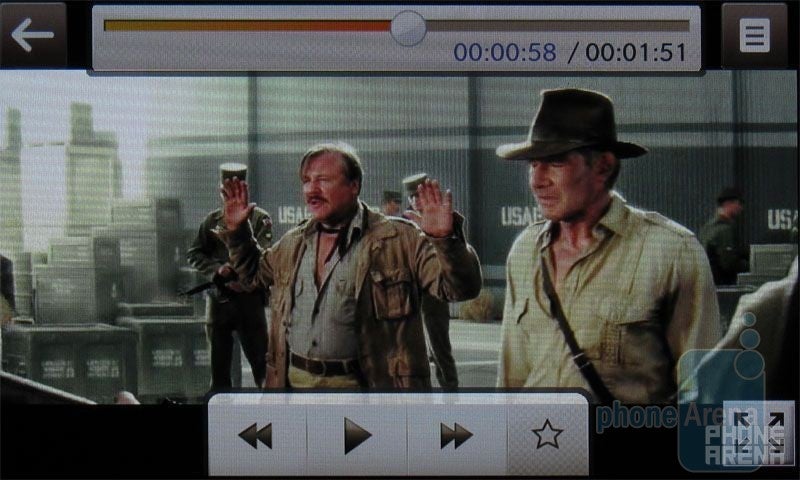
Watching videos on the LG VX11000
We tested our own video files on the device, and were able to playback H.263 and H.264 encoded MP4 videos with resolutions up to 720x306 and bit-rates up to 1500kbps. All of them played back smoothly without dropping any frames. But as expected, DivX and XviD videos are not supported.
Software:
Naturally, the LG enV Touch VX11000 can use VZ Navigator for driving directions, and download ringtones, games, and other applications, but it also comes with a document viewer that can display .doc, .xls, .ppt, and .pdf files. This is a first for a Verizon non-smartphone, and is a nice feature to have. It worked remarkably well, as it would open Word, Excel, PowerPoint, and Acrobat files without problem. The only real function you have is to zoom in on pages and move them around the screen. It does not support copy/paste or editing of files.
Performance:
Having a large touchscreen display and 3MP camera is nice, but if the phone doesn’t have good call quality and reception, then what good is it? Thankfully, the LG enV Touch VX11000 does quite well in both categories. The call quality on the device is equal to the Versa, as it lacks the background hiss that is heard on the Dare and distortion that is produced by the Voyager. Voices are clear and natural sounding on both ends and does not have the “tunnel” effect that was also prevalent on the Voyager. One surprise was how loud the Speakerphone was, which almost sounded like it was going to bust the speakers. Because of this, we had to keep it set to low. The reception is also about the same as what you would find on the Dare and Versa. We were able to place and receive calls around South FL without any of them dropping, and would average between 2-3 bars of signal reception.
The included 950mAh battery is rated by LG to provide up to 4.3 hours of talk time or 17 days of standby time on a full charge. Even though this battery has the same 950mAh capacity as the one used on the Voyager, we were able to get 5 hours of continuous talk time with it, where the Voyager was only 3.5 hours. The Versa was slightly higher at 5.4 hours and the Dare is still king at 6 hours, but both of those come with a larger 1100mAh battery.
Conclusion:
With all of the features packed into the LG enV Touch VX11000, it will no doubt be one of the most popular Verizon devices this year. People who loved (or hated) their Voyager will be hard-pressed to find many complaints about this device, except maybe for the poor selection of themes. Other than that, the enV Touch truly delivers as an update to the Voyager, with two 3” WVGA displays, better appearance, improved user interface and music player, 3MP autofocus camera, document viewer, excellent call quality and reception. The only real competition comes from other LG devices, such as the Dare, Versa and enV3, but the LG enV Touch VX11000 has them beat, if you are looking for an all-in-one device with touchscreen and QWERTY keyboard
LG enV Touch VX11000 Video Review:
Pros
Internal and external 3” WVGA displays
Better touch-response than the Voyager
Improved user interface
Call quality and reception
3MP autofocus camera
Document viewer
3.5mm headset jack
Cons
Themes aren’t that impressive
Still larger and heavier than some people might like
A discussion is a place, where people can voice their opinion, no matter if it
is positive, neutral or negative. However, when posting, one must stay true to the topic, and not just share some
random thoughts, which are not directly related to the matter.
Things that are NOT allowed:
Off-topic talk - you must stick to the subject of discussion
Offensive, hate speech - if you want to say something, say it politely
Spam/Advertisements - these posts are deleted
Multiple accounts - one person can have only one account
Impersonations and offensive nicknames - these accounts get banned
Moderation is done by humans. We try to be as objective as possible and moderate with zero bias. If you think a
post should be moderated - please, report it.
Have a question about the rules or why you have been moderated/limited/banned? Please,
contact us.






 FCC OKs Cingular\'s purchase of AT&T Wireless
Things that are NOT allowed: