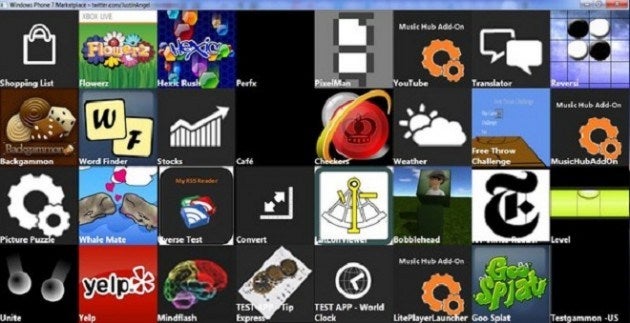
Windows Phone 7 is shaping up to be one visually intensive mobile operating platform that can easily catapult itself among the big rollers in the industry – even though we're still waiting for the platform's official launch. Naturally media will always come into play with any mobile platform since a broad range of consumers rely on their devices to pass by the time. It so happens to be that YouTube is one popular destination for most people, but there has been no indication that Windows Phone 7 would offer a dedicated app of some sort. However, there was a photo included in a tweet from former Microsoft Silverlight program manager Justin Angel that provide some inkling to the possibility that there is going to be some kind of YouTube support with the platform. If you take a closer look at the screenshot, you'll find a YouTube icon at the beginning of column 6, but it's also has “Music Hub Add-On” labeled on there. It would seem like it won't be a separate app, so don't expect to have your hopes raised just yet. Granted though they're still at the early stages, we'd imagine that YouTube will be heavily featured as time goes on, but it would be very compelling for them to get it fully integrated with the platform from the onset.
A discussion is a place, where people can voice their opinion, no matter if it
is positive, neutral or negative. However, when posting, one must stay true to the topic, and not just share some
random thoughts, which are not directly related to the matter.
Things that are NOT allowed:
Off-topic talk - you must stick to the subject of discussion
Offensive, hate speech - if you want to say something, say it politely
Spam/Advertisements - these posts are deleted
Multiple accounts - one person can have only one account
Impersonations and offensive nicknames - these accounts get banned
Moderation is done by humans. We try to be as objective as possible and moderate with zero bias. If you think a
post should be moderated - please, report it.
Have a question about the rules or why you have been moderated/limited/banned? Please,
contact us.






 FCC OKs Cingular\'s purchase of AT&T Wireless
Things that are NOT allowed: