File this under the "cool stuff to impress your date with" label, but Google is giving you the chance to do handwritten searches on your iOS or Android smartphone or tablet, instead of using the on-screen keyboard.
We kid, we can actually imagine quite a few scenarios where this will be useful, and they don't only involve bowling accidents and swollen fingers, although Google does try to imply that the guy with the crutches in the promo video thinks this is a godsend for him.
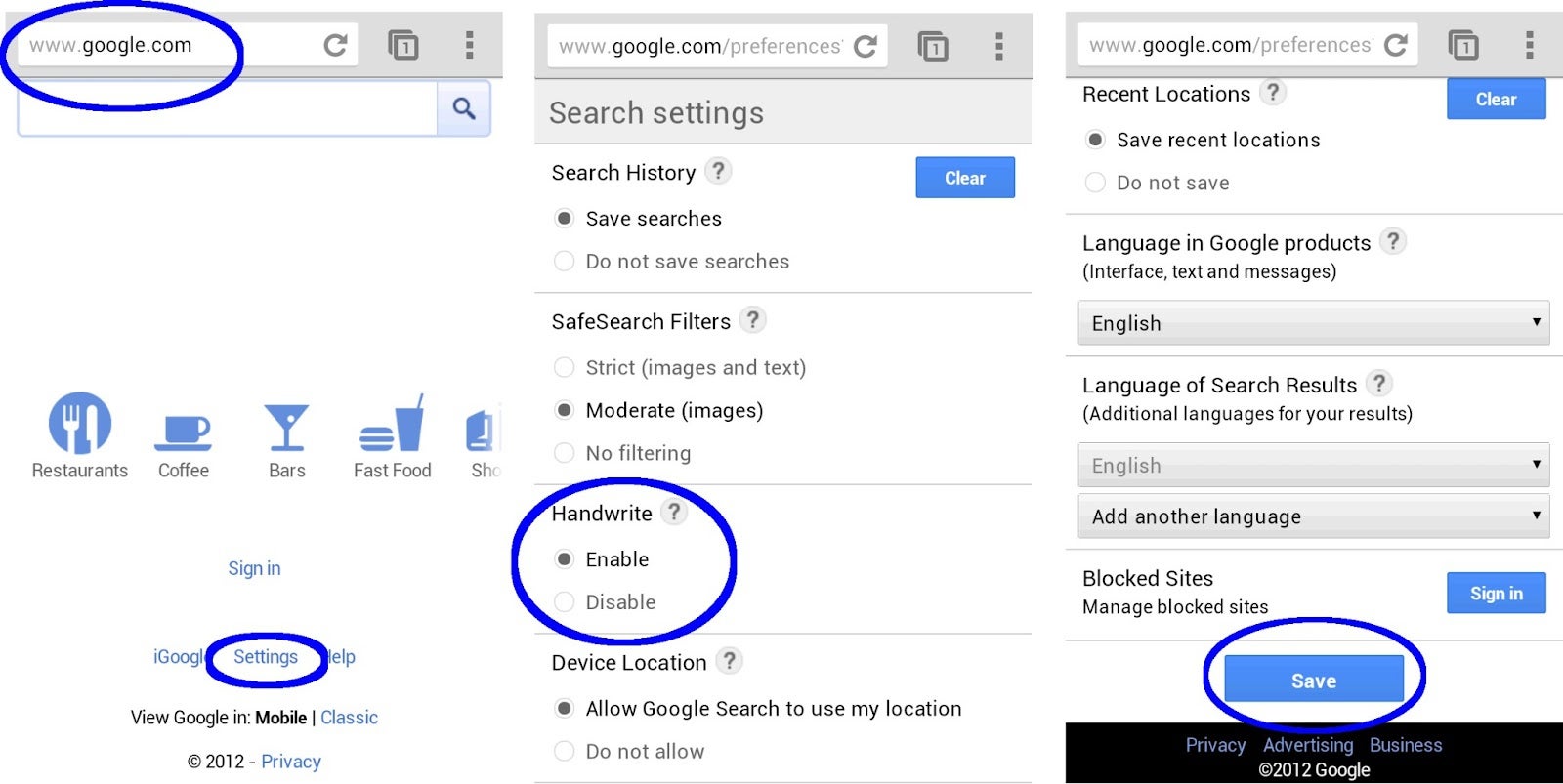
To enable the feature, you have to go to Google.com with your mobile browser, find the "Settings" link at the bottom, then look for the "Handwrite" option, which is third from the top, and checkmark "enable", since by default the option is disabled. Don't forget to scroll all the way down and save, since it doesn't do it automatically when you hit the Back button.
There you have it, you can now scribble the word with your finger directly on the phone or tablet screen, and it will appear in the search box, autocomplete and all. A handy editing bar appears at the bottom when you handwrite, allowing you to insert a space, delete letters, or turn off/on the handwriting functions with the touch of a button. You can do it in 27 different languages, so we can imagine this Handwrite feature being very useful for people in China, Japan or Korea, for example, but Handwrite will only recognize letters in the preferred language you have in your search settings.
Letter recognition is very fast and accurate, pretty close with the best apps we've used, even with our ugly handwriting. It can actually save some time for quick searches, as you only need to scribble two or three letters and autocomplete does the rest, whereas you have to tap on the search box to evoke the on-screen keyboard, and then start writing.
Now you can type, speak, or handwrite your Google searches, which will also come in handy if you have a device with smaller screen and cramped keyboard. Cool, eh?
Recommended Stories
Loading Comments...
COMMENT
All comments need to comply with our
Community Guidelines
Phonearena comments rules
A discussion is a place, where people can voice their opinion, no matter if it
is positive, neutral or negative. However, when posting, one must stay true to the topic, and not just share some
random thoughts, which are not directly related to the matter.
Things that are NOT allowed:
Off-topic talk - you must stick to the subject of discussion
Offensive, hate speech - if you want to say something, say it politely
Spam/Advertisements - these posts are deleted
Multiple accounts - one person can have only one account
Impersonations and offensive nicknames - these accounts get banned
Moderation is done by humans. We try to be as objective as possible and moderate with zero bias. If you think a
post should be moderated - please, report it.
Have a question about the rules or why you have been moderated/limited/banned? Please,
contact us.










 FCC OKs Cingular\'s purchase of AT&T Wireless
Things that are NOT allowed: