Extreme multitasking: the best floating apps for Android
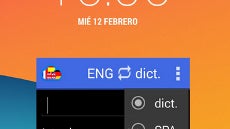
Envious that some Samsung Android device owners with the Nature UX can detach the video playback in a hovering window? Looking with interest to Sony's Small Apps suite, or those devices that have the Pop-up View app mode, letting you pin notes or a calculator on top of everything else?
Well, Android's versatility is here to help. There are solutions out there that allow you to "float" videos, a note list, calculator, even browser and whatnot, above anything else you are doing underneath.
Needless to say, this aids significantly with multitasking on your handset or tablet, as it lets you see and do more things at once. While not exactly a multi-window mode, "floating" apps can certainly come in handy at various situations, so check out the list in the slideshow below.

Popular stories



Latest News


 FCC OKs Cingular\'s purchase of AT&T Wireless
Things that are NOT allowed: