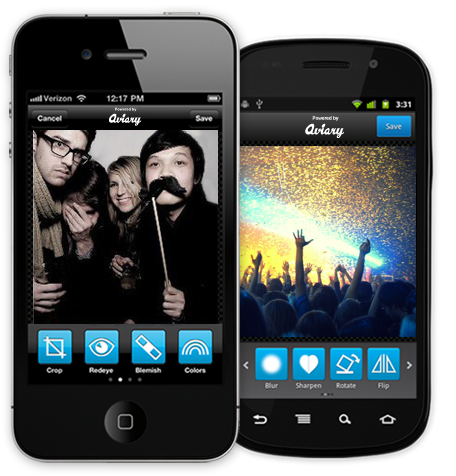
Aviary is a great cloud-based photo editing tool, but the cloud isn't enough. Aviary wants everyone to be able to edit photos all the time, regardless of if you're on a PC or mobile device. With that in mind, Aviary has released a number of SDKs to allow any mobile app on iOS or Android to add a set of photo editing tools.
The SDKs add basic photo editing tools, including: Auto-Enhance, Crop, Flip, Rotate, Sharpen and Blur, Redeye Removal, Teeth Whitening and Blemish Removal, Adjust Colors and Saturation, and Adjust Brightness and Contrast. Beyond that, there are also tools for Drawing, Text, Stickers, Meme generator and Photo effects. Even better, the SDKs are freely available to anyone, and apparently incredibly easy to implement. Apparently, an iOS dev for the Fashism mobile app needed only 15 minutes to add the tools to that app.
Aviary even has 31 launch partners, including picplz, Fotobabble, Pixable, Snapr, and more. The SDKs are available now, and work with both Android and iOS, including full compatibility with iOS 5.
A discussion is a place, where people can voice their opinion, no matter if it
is positive, neutral or negative. However, when posting, one must stay true to the topic, and not just share some
random thoughts, which are not directly related to the matter.
Things that are NOT allowed:
Off-topic talk - you must stick to the subject of discussion
Offensive, hate speech - if you want to say something, say it politely
Spam/Advertisements - these posts are deleted
Multiple accounts - one person can have only one account
Impersonations and offensive nicknames - these accounts get banned
Moderation is done by humans. We try to be as objective as possible and moderate with zero bias. If you think a
post should be moderated - please, report it.
Have a question about the rules or why you have been moderated/limited/banned? Please,
contact us.










 FCC OKs Cingular\'s purchase of AT&T Wireless
Things that are NOT allowed: